How to Register on Binance and Deposit Funds in 2026: Sign-Up, KYC and Funding Routes
- Who can follow this guide: Binance’s own List of Prohibited Countries (updated 5 January 2026) bars residents of the United States, Canada, the Netherlands, Cuba, North Korea, Iran, Crimea and the so-called Donetsk and Luhansk People’s Republics. The EEA is limited too: ESMA told unauthorised providers to stop onboarding new EU clients after 1 July 2026.
- Sign-up takes a few minutes: email, phone number, Apple or Google account; a 6-digit code that is valid for 30 minutes; a password of at least 8 characters with an uppercase letter and a number (Binance help page).
- KYC: choose your residence, the document’s issuing country and the document type, then pass a liveness check. Documents are usually reviewed within 48 hours (Binance help page).
- Three ways to fund the account: a crypto transfer from another wallet, a VISA or Mastercard card purchase, or P2P with escrow. Binance does not publish one global minimum deposit; the limit for your country and method is shown inside the account.
- Trading fee reference: 0.100% maker and taker on spot for regular users, 0.075% when you pay fees with BNB (fee schedule). A 1,000 USDT trade costs 1.00 USDT, or 0.75 USDT with BNB.
- First deposit: send a small test amount on the network the receiving address shows and turn on two-factor authentication before you move real money.
- What this guide does not claim: no single global minimum deposit and no legal opinion about your country; Binance’s pages and your local rules decide. If Binance is not available to you, see our guides to OKX and Bybit, or compare cards in our Binance Card review.
What is Binance and what does an account give you
Binance is a crypto exchange. An account lets you hold crypto, trade spot pairs at the fees below, deposit crypto from another wallet, buy with a VISA or Mastercard card or through P2P, and withdraw to an address you control. This guide covers who can register, the sign-up and KYC steps, how to deposit and withdraw, and the checks that keep a deposit from being lost.
Who can register on Binance in 2026
Check this before you spend time on KYC. The table shows what the official sources say today; none of it is legal advice about your country.
| Where you live | What the official source says | What to do |
|---|---|---|
| United States | The Binance list bars US residents. Binance.US is a separate Binance service for U.S. users. | Use Binance.US, not this guide. |
| Canada, the Netherlands | Both are named on the same list. | Look for a provider that serves your country. |
| Cuba, North Korea, Iran, Crimea, the so-called Donetsk and Luhansk People’s Republics | Named on the list. | Not available. |
| EEA countries | ESMA’s statement of 23 June 2026 tells unauthorised providers to stop onboarding new EU clients; Binance is not among the 387 rows of the ESMA CASP register file (read 27 October 2026), and Binance’s 24 June blog says some users may be affected depending on country and account status. | Check the register for a provider that serves you, or read the notice inside an existing account. |
| Everywhere else | Not named on the list. Binance publishes no per-country list of where sign-up is open. | The sign-up form and the document review decide. Local law is your responsibility. |
How to register on Binance: app sign-up in six steps
- Open the Binance app and tap Sign up. On a computer, Binance’s web sign-up page opens the same form.
- Tap Create a Binance Account. Choose email, phone number, or Apple or Google account. Pick the account type carefully: it cannot be changed after registration.
- Accept the Terms of Service and Privacy Policy and tap Next.
- Enter the 6-digit code sent to your email or phone within 30 minutes and tap Submit.
- Create a password with at least 8 characters, including an uppercase letter and a number.
- If you arrived through a referral link, the code is filled in and shows Linked. A linked code cannot be modified later; you can skip the field if you have none.
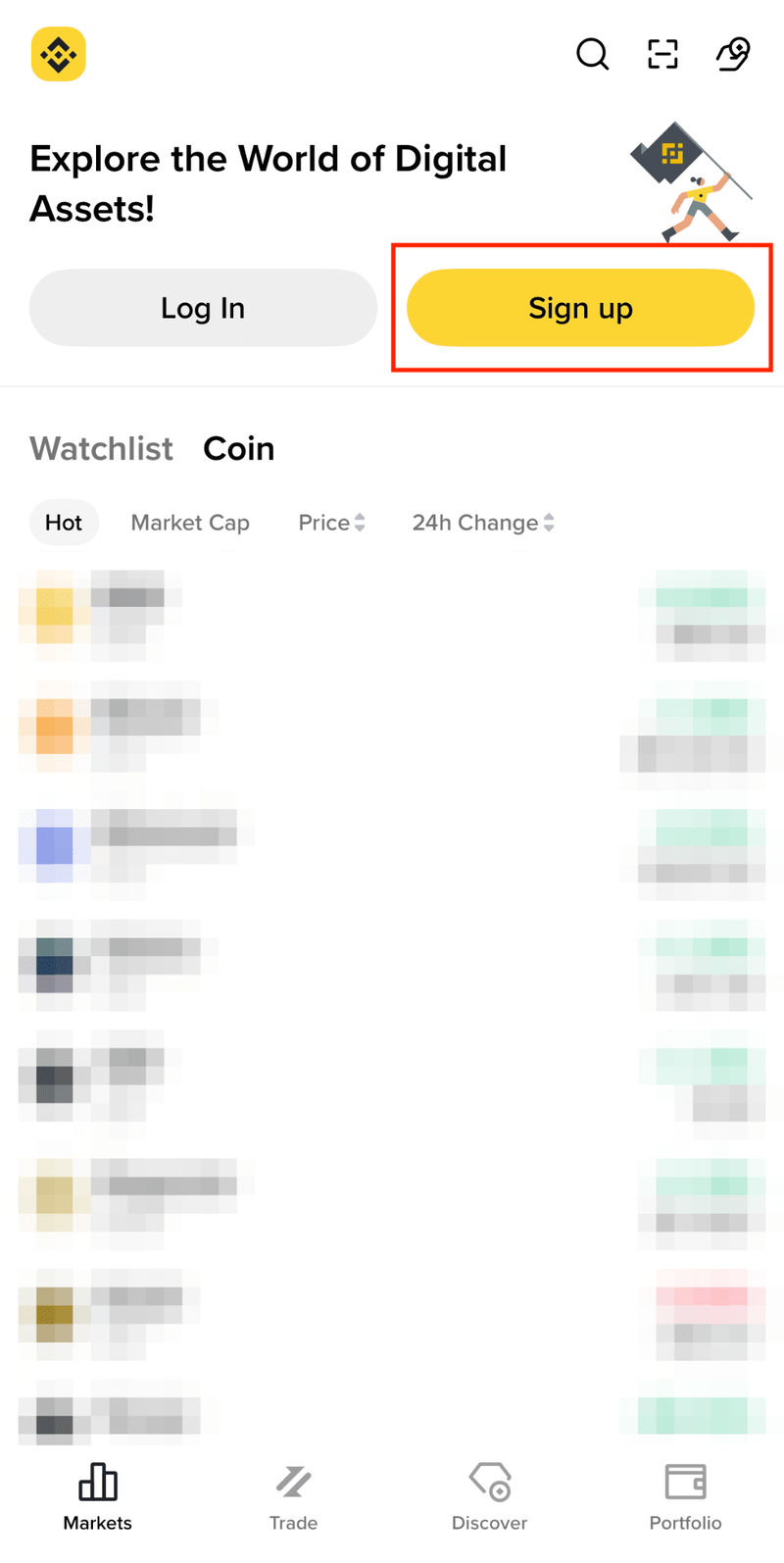
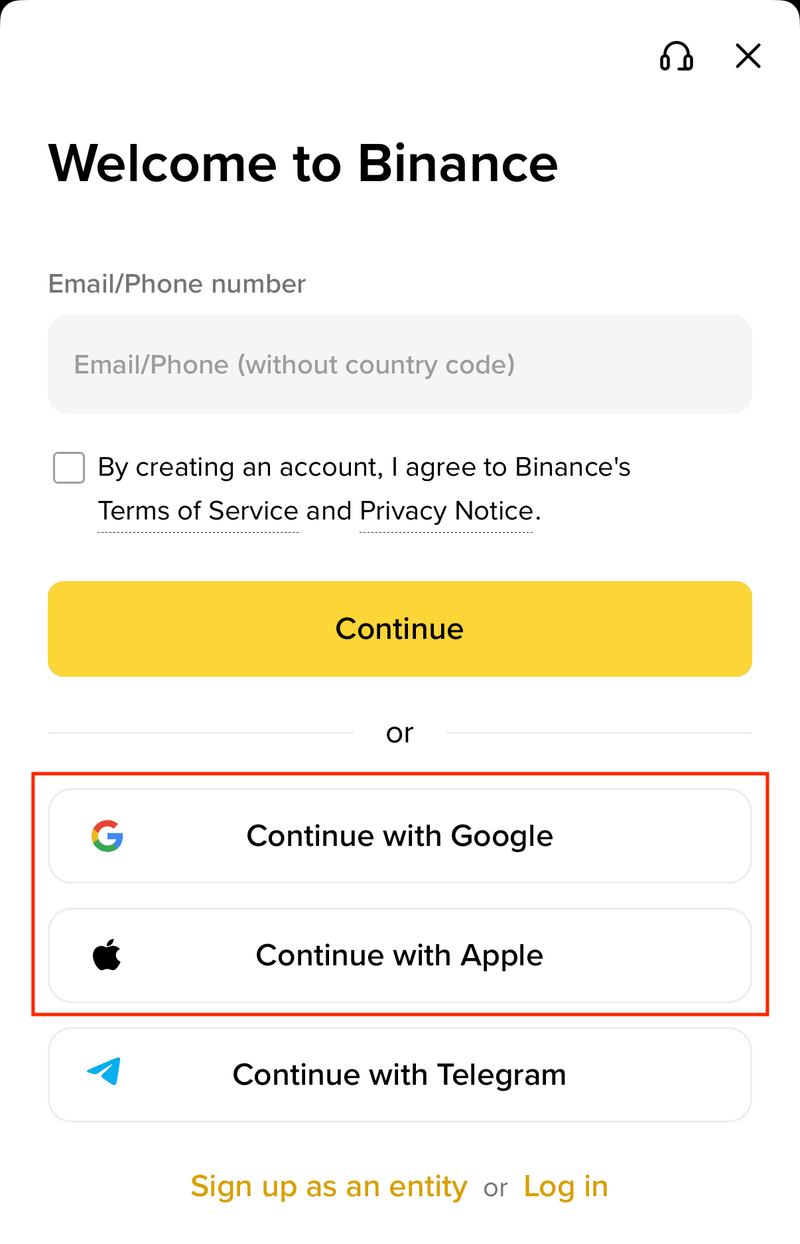
These are official app screenshots from Binance’s help page. The first shows where Sign up sits on the home screen; the second shows the sign-up methods after you tap Create a Binance Account.
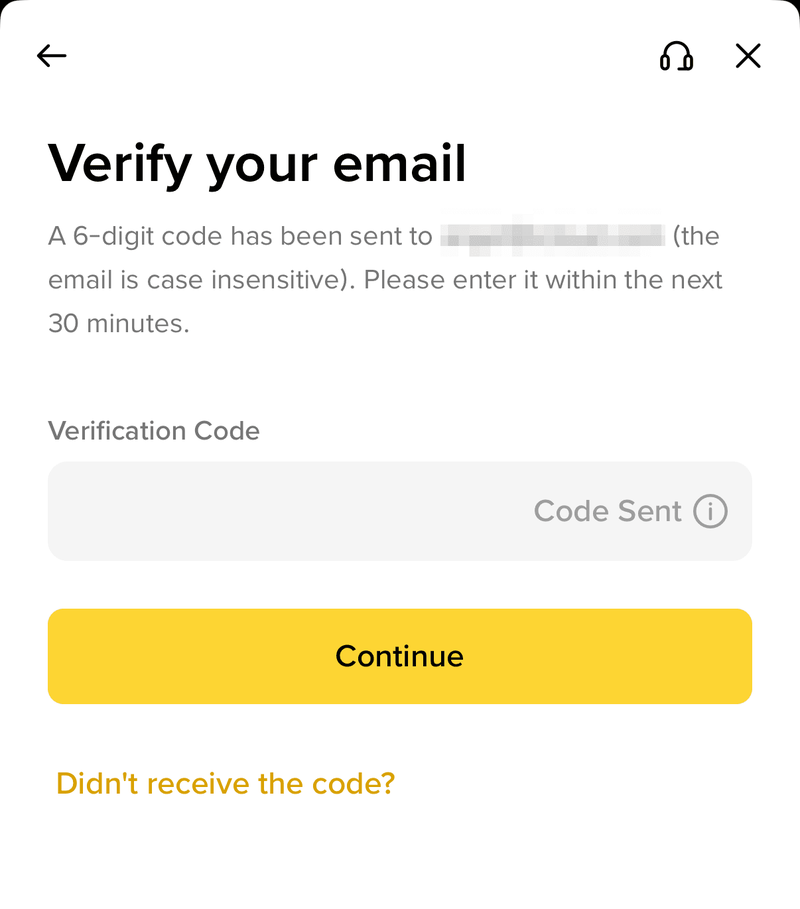
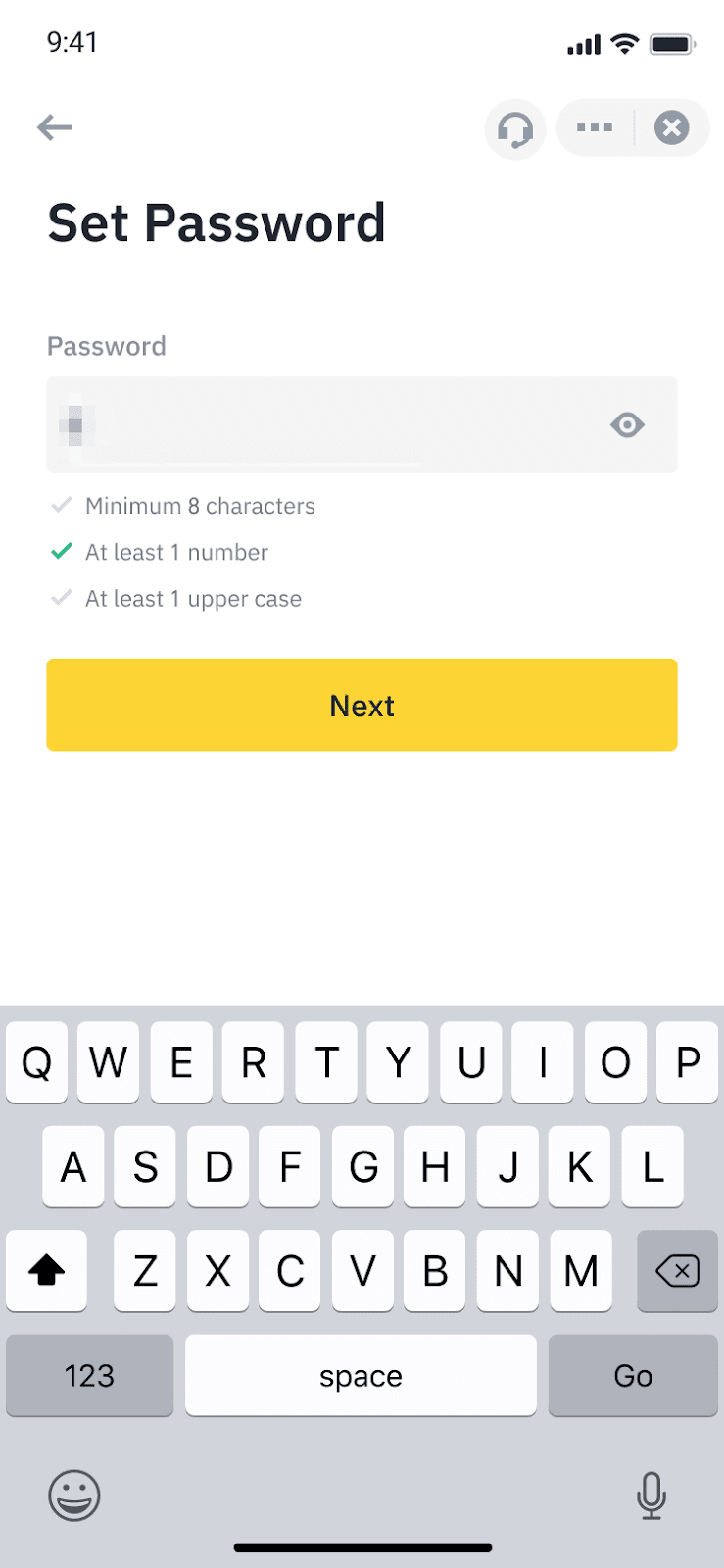
Verify your email shows the 6-digit code field, and Set Password lists the three rules. Binance also advises turning on at least one two-factor authentication method right after sign-up; withdrawals are verified with a passkey or 2FA device.
No verification email or code?
Binance’s checklist for missing emails is short: stay logged in to the email address you registered, check the address on the Security page, look in the spam folder and whitelist Binance’s emails, make sure your mailbox works and is not full, and note that Binance recommends registering with an address from a common domain such as Gmail or Outlook (official checklist). The 6-digit code is valid for 30 minutes; the Didn’t receive the code link on the screen requests a new one.
Binance KYC: documents, liveness check and timing
- Tap Verify Now on the home screen.
- Select your residence, the document issuing country and the document type. The screen lists the document types your country allows, such as a passport, ID card or driver’s license.
- Take or upload photos of the original document. Binance does not accept copies or screenshots, and damaged or expired documents are rejected.
- Complete the liveness check: face centred, bright screen, well-lit area, no glasses, mask or hat.
- Confirm your personal information and wait for the review. Binance says submitted documents are usually reviewed within 48 hours, and sometimes longer.
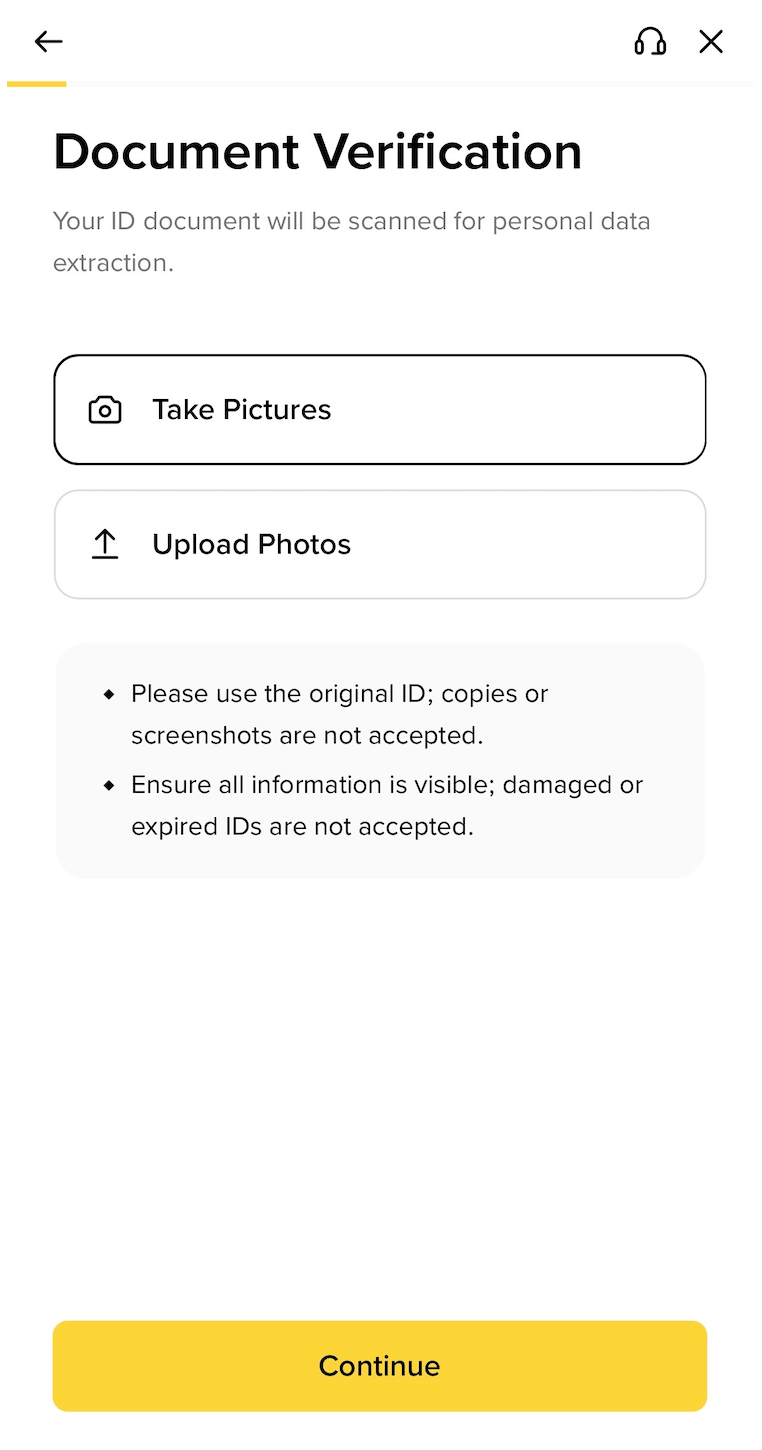
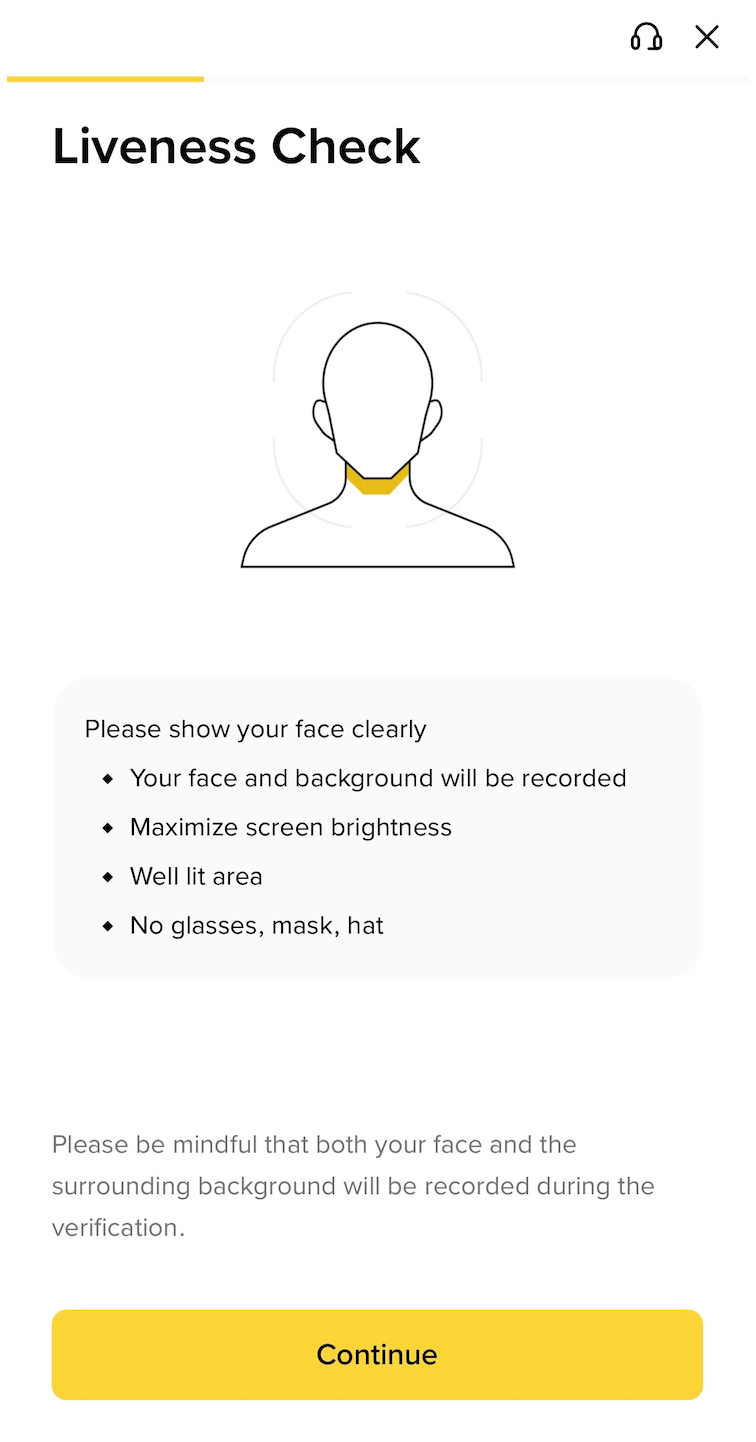
How to deposit on Binance: crypto, card and P2P
In the app, tap Add Funds on the home screen. The menu lists On-Chain Deposit, Buy with a card or bank, and P2P Trading. Which fiat options appear depends on your country and verification level.
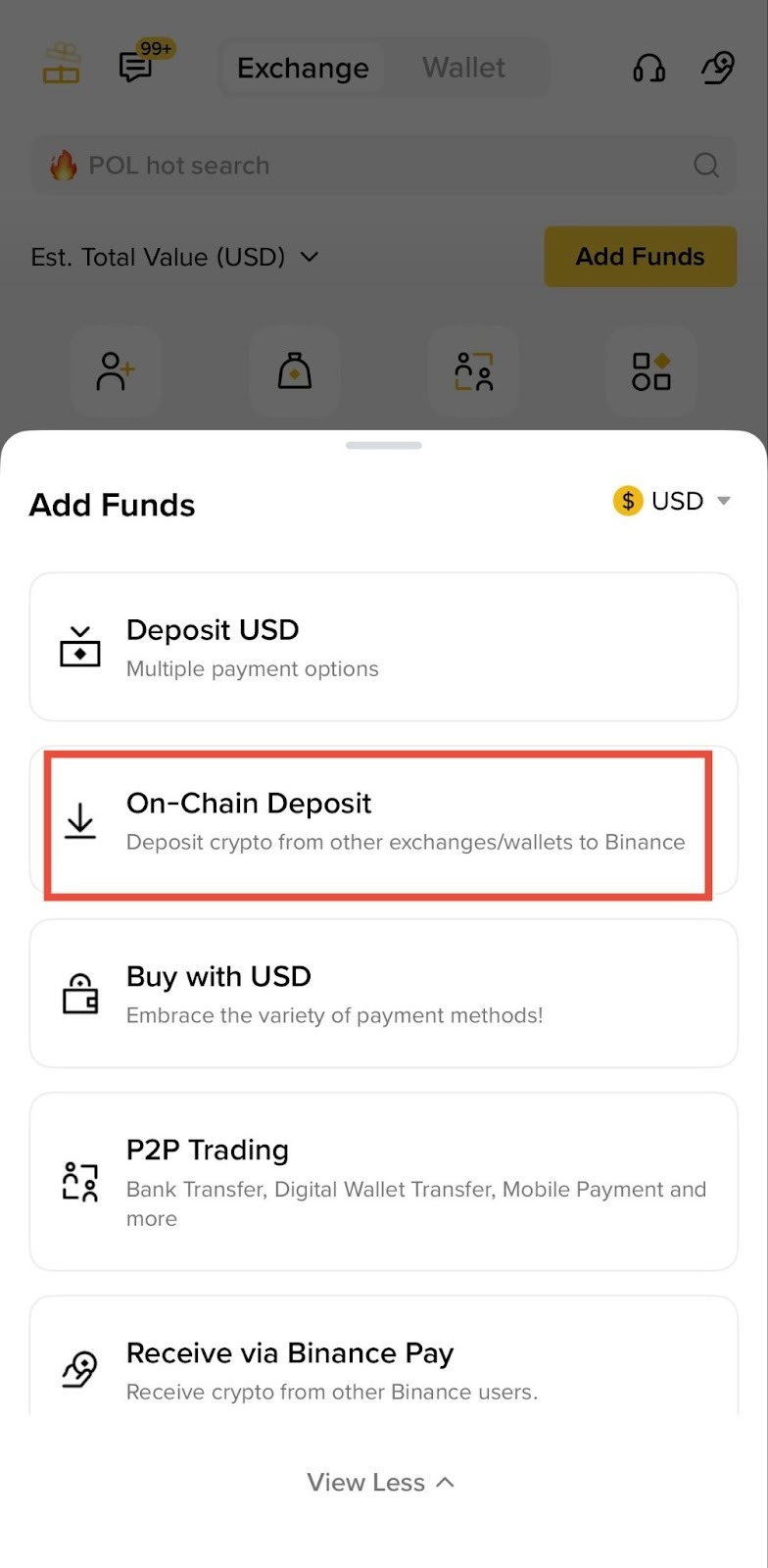
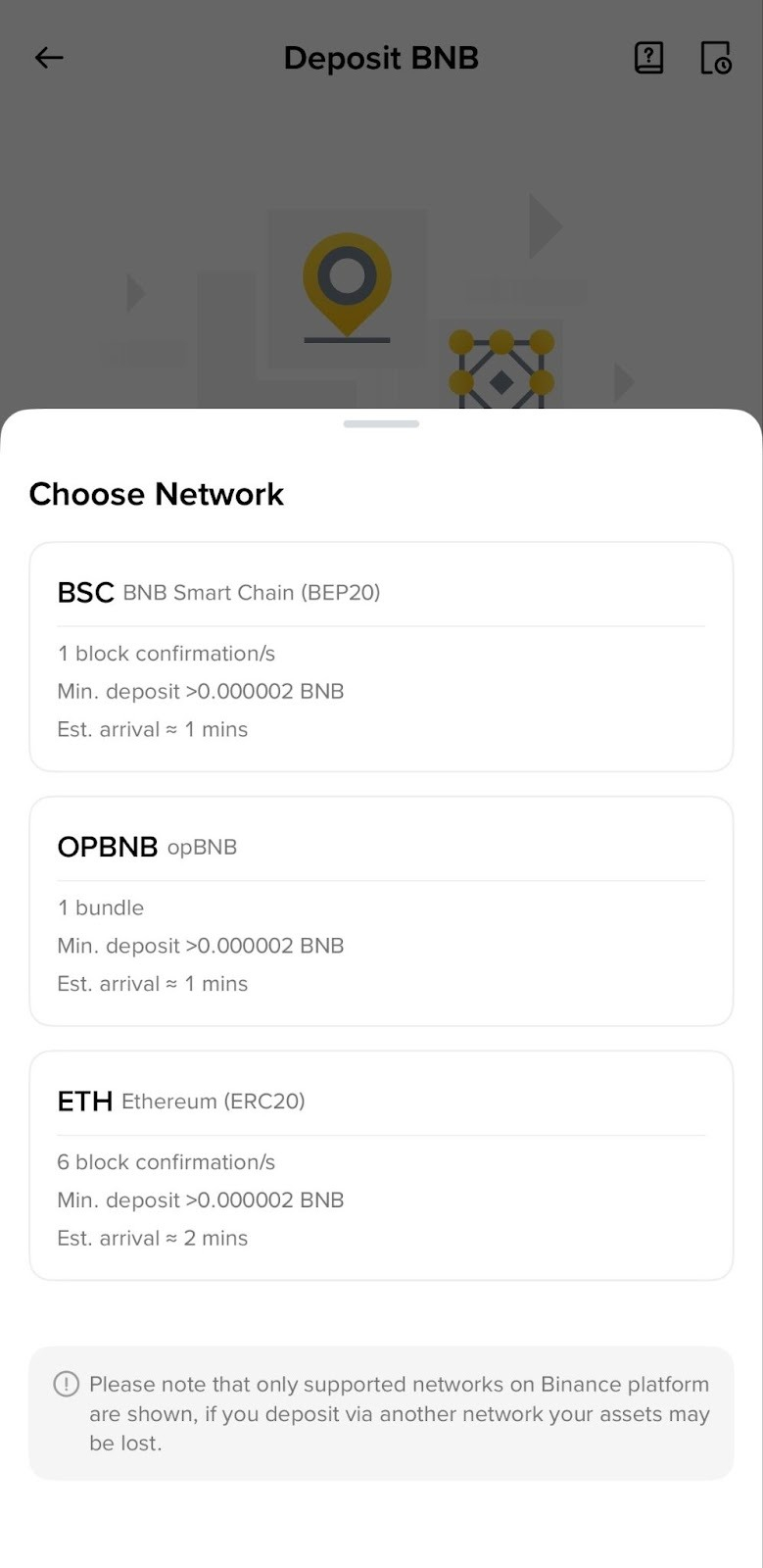
| Route | What you need | What to check first |
|---|---|---|
| Crypto transfer | A wallet or exchange that holds the coin; the deposit address for the right network | Network, memo or tag, minimum shown for that network |
| Card | VISA or Mastercard from a supported issuing country, or Apple Pay / Google Pay | Fee on the confirmation screen, your bank’s cash-advance fee, daily limit |
| P2P | A verified account and a payment method the seller accepts | Escrow status, payment method in the order, seller confirmation |
Crypto transfer from another wallet or exchange
- Choose On-Chain Deposit, pick the coin and then the network.
- Copy the deposit address. Match the network exactly to the one the sending platform uses: a wrong network can lose funds.
- If the coin needs a memo or tag, fill it in on the sending side; networks such as BEP2 and EOS need one.
- Send a small test amount first, wait for the network confirmations (BTC needs 2), then send the rest.
Card purchase
Binance supports VISA and Mastercard credit and debit cards plus Apple Pay and Google Pay, but not every card-issuing country. Check the payment details and fees on the confirmation screen before you tap Confirm; some banks treat crypto purchases as cash advances and add their own fee. Orders expire if you do not finish in time, and a daily limit can be raised with extra verification (official card guide).
P2P
Binance P2P lets you buy from other users in your local currency with the payment method you choose, and Binance holds the crypto in escrow. Pay only through the method listed in the order, release nothing until the seller’s payment is confirmed in your own banking app, and keep the chat inside Binance.
Binance minimum deposit: what the pages say
Binance does not publish one global minimum deposit. For crypto, the minimum is shown per network when you choose it (the Choose Network screenshot above shows a minimum deposit and the expected confirmations for each network). For fiat, the minimum, the limit and the fee depend on your country, method and verification level, and the account shows them before you confirm. Any single dollar figure you read elsewhere is only true for one country or method. I would check the amount on the confirmation screen and make a first deposit small enough to lose a network fee without regret.
Deposit not credited: four checks before you contact support
| Cause | How to check |
|---|---|
| Waiting for confirmations | The deposit is credited once the transaction reaches the network confirmations Binance requires; BTC needs 2 (official checklist). |
| Wrong network | Look up the transaction hash on a block explorer and confirm the network matches the address you copied. |
| Missing memo or tag | A missing memo on networks that need one can stop the deposit from being matched. |
| Minimum or maintenance | Amounts below the minimum and wallets under maintenance are two other common causes. |
How to withdraw from Binance
Status note (6 November 2026): Binance says its hot wallets were compromised at around 20:05 UTC on 29 October 2026, with about USD 6.3 billion of tokens lost, and that it suspended withdrawals while security checks ran. Deposits and other unaffected services stayed open. Binance states that the losses will be covered from the SAFU fund and company funds, not by users. Withdrawals reopened in phases from 1 November and more assets followed on 3 and 5 November; the 4 November update says about 98% of the affected amount has been replenished and withdrawals continue to reopen in phases. Before you plan a withdrawal, check your asset and network on the withdrawal page or the Binance network status page, and read the latest incident update.
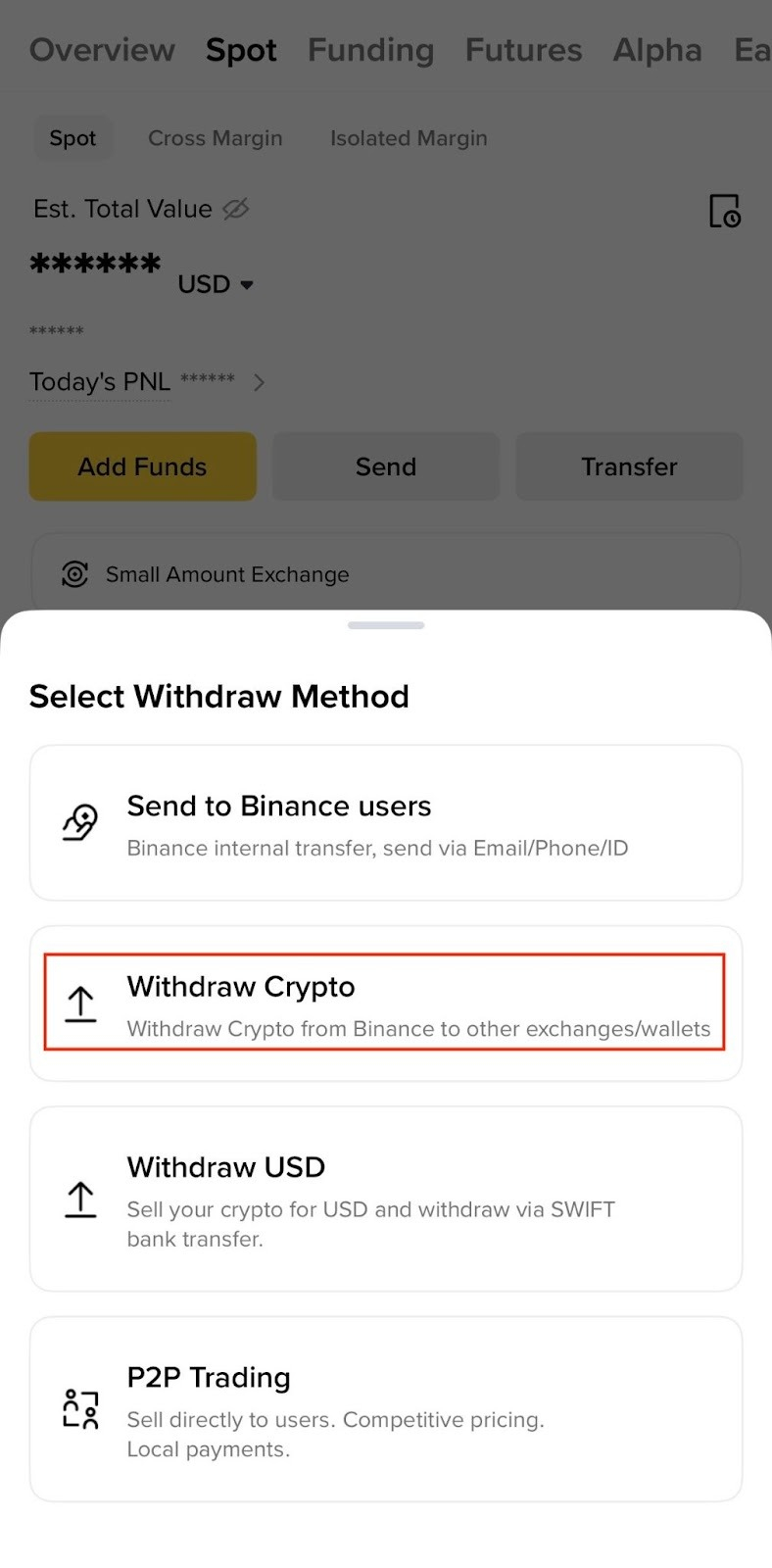
- In the app go to Assets, then Overview, Send and Withdraw Asset (official withdrawal guide).
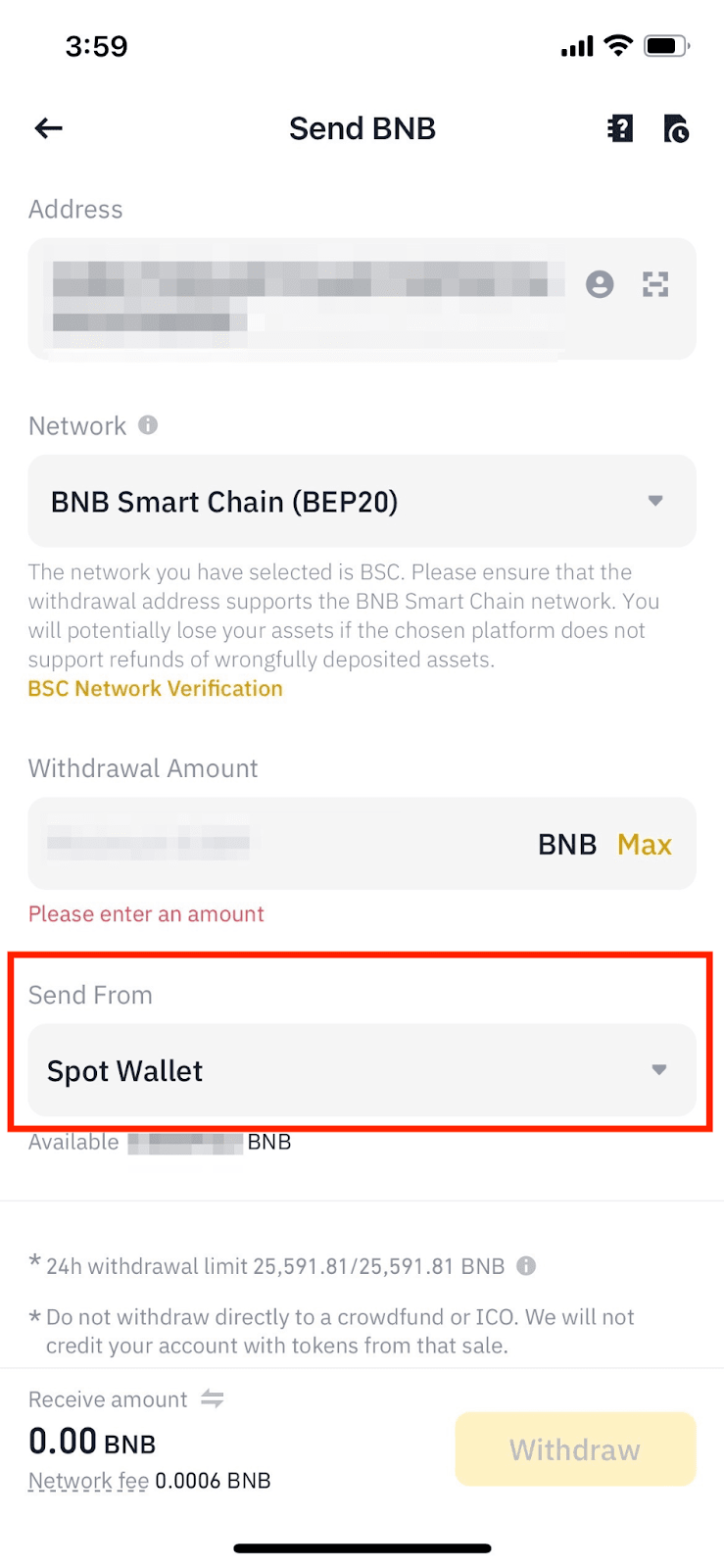
- Choose the account to send from and the asset.
- Paste the destination address and select the network. The network must be the one the receiving platform supports; do not pick the cheapest fee option if it is not compatible with the receiving side.
- Fill in the memo (some platforms call it Tag or Payment ID) if the receiving platform requires one.
- Enter the amount: Receive amount adds the network fee on top, Withdrawal amount deducts it from what you send.
- The first withdrawal to a new address shows a safety pop-up, and Binance suggests sending a small amount first.
- Check the address and network once more, slide to confirm and verify with your passkey or 2FA device.
Binance cannot locate the receiver of funds sent to a wrong address and cannot help further, because the withdrawal starts as soon as you submit it. Contact the address owner or the receiving platform’s support and give them the TxID (official guidance).
Binance fees: spot trading reference
| Level | Maker / taker | With BNB (25% off) | Condition |
|---|---|---|---|
| Regular User | 0.100% / 0.100% | 0.075% / 0.075% | under 1,000,000 USD in 30 days |
| VIP 1 | 0.090% / 0.100% | 0.0675% / 0.075% | from 1,000,000 USD and 5 BNB |
| VIP 2 | 0.080% / 0.100% | 0.060% / 0.075% | from 5,000,000 USD and 25 BNB |
A spot trade of 1,000 USDT costs 1.00 USDT at 0.100% and 0.75 USDT when fees are paid in BNB. Values come from the official fee schedule read on 27 October 2026 and can change.
Who Binance is suitable for, and who it is not
- Best for: readers who live outside the United States, Canada, the Netherlands, sanctioned regions and the EEA, are comfortable moving crypto between wallets on the right network, and want a spot market with a published 0.100% fee that drops to 0.075% when paid in BNB.
- Not suitable for: US residents (use Binance.US), EEA residents while Binance is missing from the ESMA register, and anyone who needs a fiat route that the account does not show for their country.
- Test first: if you are unsure, complete KYC, make one small crypto deposit and one small withdrawal to your own wallet before you decide how much to keep on the exchange.
Binance security checklist before the first deposit
- Turn on an authenticator app: in the Binance app tap the Account icon, open the profile section, go to Security, tap Authenticator App and Enable. Copy the setup key into Google Authenticator before you tap Next, then enter the 6-digit code (official 2FA guide).
- Use the withdrawal whitelist: when you add a withdrawal address, tick Add Address to Whitelist and confirm with 2FA; once the whitelist is on, the account can only withdraw to those addresses.
- Expect messages only through official channels: Binance says it never contacts users by phone and never asks for passwords, 2FA codes or private keys (Binance blog).
- Send only to addresses you control: read any warning email from Binance before you repeat a transfer.
- Do not use the exchange as a long-term wallet: move what you do not need for trading to a wallet you control, and keep your transaction records.
If Binance is not available to you
- Comparing another exchange’s sign-up and deposit steps: read our guides to registering and depositing on OKX, using Bybit and registering on MEXC; each states who can join.
- Looking at deposit methods and limits elsewhere: Bybit deposits and withdrawals lists methods, minimums and networks in the same format.
- Wanting a card instead of an exchange account: compare crypto cards by where you live and our Binance Card review.
Frequently asked questions
Can I use Binance from the United States?
No. Binance’s list of prohibited countries bars US residents from Binance Global. Binance.US is a separate service for U.S. users with its own sign-up.
What is the minimum deposit on Binance?
Binance publishes no single global figure. Crypto minimums are shown per network when you select it, and fiat minimums, limits and fees depend on your country, payment method and verification level inside the account.
How long does Binance KYC take?
Binance says submitted documents are usually reviewed within 48 hours, and it can take longer in some cases.
Which documents does Binance accept?
After you pick your residence and the issuing country, Binance lists the accepted types, such as a passport, ID card or driver’s license, depending on the country. Copies, screenshots, damaged or expired documents are rejected.
Why has my deposit not arrived?
Usually the transaction is still waiting for network confirmations, the network was wrong, a memo was missing, the amount was below the minimum or the wallet is in maintenance. Check the transaction hash on a block explorer first.
Is there a fee for trading on Binance?
Regular users pay 0.100% maker and taker on spot, and 0.075% when they pay fees with BNB. Higher VIP levels pay less.
Can I still register from Europe?
ESMA told unauthorised providers to stop onboarding new EU clients after 1 July 2026 and Binance is not in the ESMA register file. Read the notice in an existing account or check the register for a provider that serves your country.
Is it still safe to deposit on Binance after the October 2026 incident?
No exchange can promise zero risk, and this page does not either. What Binance says in its announcements: deposits were not affected by the hot-wallet compromise of 29 October 2026, losses are covered from the SAFU fund and company funds rather than by users, and about 98% of the affected amount was replenished as of 4 November. Withdrawals are reopening in phases, so keep to the amount you are comfortable holding on an exchange and check the withdrawal page before moving funds out.
Readers outside the United States, Canada, the Netherlands, sanctioned regions and the EEA can start the sign-up from the button below.
Last updated: 6 November 2026. Affiliate disclosure: this page contains referral links to Binance. If you register through them, USDT Card may earn a commission at no extra cost to you; the referral code is 11128920. This is not investment, legal or tax advice, and crypto assets can lose value.