Binance Card Review 2026: Where It’s Offered, Fees and Cashback Tiers
- Where it is offered: Binance’s own cards page says “Currently we support: Brazil.” The Global Program overview says only “selected countries” and publishes no list. No official page names the US, the UK, Pakistan or any other English-speaking market, so the Apply button in your own app is the only real answer.
- What it is: a USD-denominated Mastercard virtual card issued by Immersve Limited (New Zealand) under Mastercard Global Reach. It spends crypto held in your Binance account at the moment of payment. It is not a credit card.
- Fees: annual fee 0 USD and issuance fee 0 USD, a 2% foreign exchange fee on non-USD purchases on top of Mastercard’s own fees, and a 0.9% crypto conversion fee (0.1% for USDC), per the official fee page.
- Cashback since 1 June 2026: 1.5% under 100 USD a month, 2% from 100 to 1,000 USD, 3% from 1,000 USD, capped at 100 USD a month (official table). Older answers that quote a 50 USD cap or a 1.0% bottom tier are out of date.
- Is it worth it? At a non-USD merchant paid in USDC the card costs 2.1%, so the cashback only beats the cost in the 3% tier (net +0.9%). USD-priced merchants avoid the 2% FX fee.
- US readers: Binance.US is a separate exchange and its homepage menu lists no card. If you cannot get the Binance Card, start with our US alternatives guide.
Is the Binance Card available where you live? What the app and official pages say
This Binance Card review starts with availability, because Binance gives different answers depending on which page you read and none of them is a country list. This is what each source says as of 28 October 2026.
| Source | What it says | What it means for you |
|---|---|---|
| Binance Card page | Your account’s country of residence must be a supported country. “Currently we support: Brazil.” | The only country named is Brazil |
| Global Program overview | Available in “selected countries”; eligibility is confirmed at application; physical cards only in some regions | No list, so you cannot confirm your country from the help pages |
| Global Program eligibility FAQ | Supports verified accounts in “selected jurisdictions”; an ineligible user is told automatically at application | The app decides; there is no pre-check page |
| Binance.US homepage | Presents itself as a regulated U.S. exchange; the menu lists Buy, Trade, Convert, Fees, OTC and no card | A separate company and product line, not the card’s US edition |
| Brazil card page (pt-BR) | “For now, only residents of Brazil can apply for the Binance Card” | Brazil has its own programme, covered below |
My reading: if you live in the US, the UK, Pakistan, Australia or any market that is not Brazil, treat the card as unconfirmed until your own Binance app shows an Apply button on the Card page. At least one review page that still ranks for this keyword describes an older Visa card with up to 8% BNB cashback and a list of European countries. That is not the program Binance documents today.
If your app does show Apply, the official flow in the eligibility FAQ is short:
- Open the Card page in the Binance app and tap Apply now (this needs a verified account).
- Fill in your basic details. Expected monthly spend in USD is mandatory; phone and email only appear if you have not already given them.
- Enter your residential address (region, city, country). Eligibility is checked at application.
- Wait for review. If you are approved, the virtual card is issued within 15 minutes; if not, Binance notifies you automatically.
Enter the country where you live: the cards page ties eligibility to your account’s country of residence, and this page does not cover applying under a different country (cards page).
What is the Binance Card and how does it work?
| Item | What Binance says | What it means in use |
|---|---|---|
| Issuer and network | Immersve Limited (New Zealand) under the Mastercard Global Reach Partner Program | Not a bank card from your country; Mastercard acceptance at more than 90 million merchants online and in store |
| Card type | A virtual card is guaranteed; physical cards only in some regions | Plan on a virtual card for online payments and wallets |
| Card currency | USD; other currencies are converted at the Mastercard rate of the processing day | A purchase in your local currency goes through one USD conversion |
| Funding | Crypto in your Funding account, Spot account and Simple Earn Flexible, in your payment-priority order | You need coins in the account first; there is no bank top-up |
| Limits | Set by your KYC level and shown under Transaction Limit in the app | The Global Program pages do not list limits by country |
The payment rules add that the card declines when the combined balance of your selected coins is too small to cover the purchase.
Binance Card fees and cashback tiers
| Fee (Global Program, from 1 June 2026) | Amount |
|---|---|
| Annual fee | 0 USD |
| Card issuance fee | 0 USD |
| Foreign exchange fee (non-USD purchases) | 2% on top of Mastercard’s fees (3% in New Zealand; 0% in Colombia, Peru, some CIS countries and Armenia) |
| Crypto conversion fee | 0.9% (0.1% when you pay with USDC) |
| ATM withdrawal (physical-card countries only) | 2 free a month, then 1.5 USD each |
| Refunds | Paid in USDC; fees are not refunded |
| Monthly spend (USD equivalent) | Cashback | Monthly cap |
|---|---|---|
| Under 100 USD | 1.5% | – |
| 100 to under 1,000 USD | 2.0% | – |
| 1,000 USD or more | 3.0% | 100 USD equivalent |
The tier you reach applies to all of that month’s spending and resets on the 1st. Cashback is calculated on completed purchases, which can take up to 30 days to settle, and is credited by the 10th of the next month in USDC or a BTC equivalent depending on your registration country (cashback rules). Cash-like transactions, payments to financial institutions, government payments such as taxes and gambling do not earn cashback, and Binance decides what qualifies.
The same Binance page still shows the earlier table above the new one, with a 1.0% bottom tier and a 50 USD monthly cap. That is where the old numbers in forum answers and older reviews come from.
Is the Binance Card worth it? Cost against cashback
The table assumes the account is funded in USDC and the merchant prices in a currency other than USD, so the cost is the 2% FX fee plus the 0.1% USDC conversion fee, 2.1% in total. Mastercard’s own exchange-rate spread is not included.
| Monthly spend (USD) | Tier | Cashback | Cost at 2.1% | Net |
|---|---|---|---|---|
| 50 | 1.5% | 0.75 | 1.05 | −0.30 |
| 300 | 2% | 6.00 | 6.30 | −0.30 |
| 999 | 2% | 19.98 | 20.98 | −1.00 |
| 1,000 | 3% | 30.00 | 21.00 | +9.00 |
| 3,333 | 3% | 99.99 | 69.99 | +30.00 |
| 5,000 | 3% (cap 100) | 100.00 | 105.00 | −5.00 |
- Threshold effect: 999 USD nets −1.00 and 1,000 USD nets +9.00. Buying things you do not need to reach a tier is not a saving.
- Cap effect: the 100 USD cap means the net turns negative again above about 4,762 USD of monthly spend (100 ÷ 2.1%).
- USDC first: paying with USDT, BTC or BNB costs 0.9% instead of 0.1%, a 2.9% total at non-USD merchants. At 1,000 USD that nets only +1.00, and the net turns negative above about 3,448 USD.
- USD-priced merchants: the official rule charges the FX fee on non-USD purchases only, so a US-dollar subscription costs just the conversion fee (0.1% in USDC). At 300 USD a month that is 6.00 in cashback against 0.30 in cost. Check the transaction detail to confirm what you were charged.
In my view the card is best for people who already keep stablecoins on Binance and either spend in dollars or spend more than 1,000 USD a month. A local credit or debit card with no FX layer will usually beat it for everyday spending below that.
Payment priority, security settings and common problems
- Payment priority: pick at least 3 and at most 12 coins. For each coin Binance draws first from Funding, then Spot, then Simple Earn Flexible, and only then moves to the next coin.
- Spot as backup: Spot is enabled as a source of funding by default and can be switched off under Source of Funding in Manage Card.
- Freeze and PIN: Manage Card lets you freeze the card (every transaction is declined until you unfreeze it) and set the virtual card PIN.
- Card details: Binance’s security FAQ says never to share the CVV or card details.
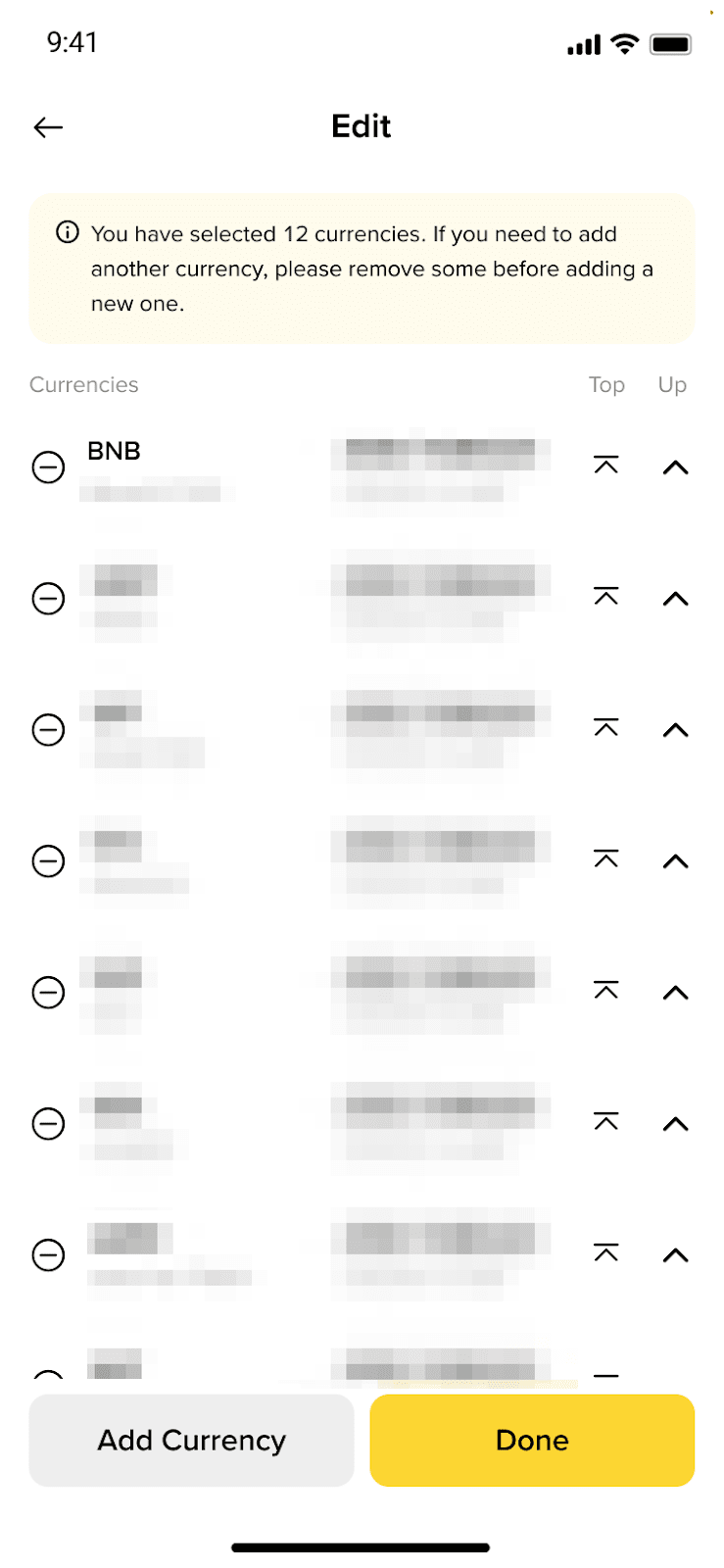
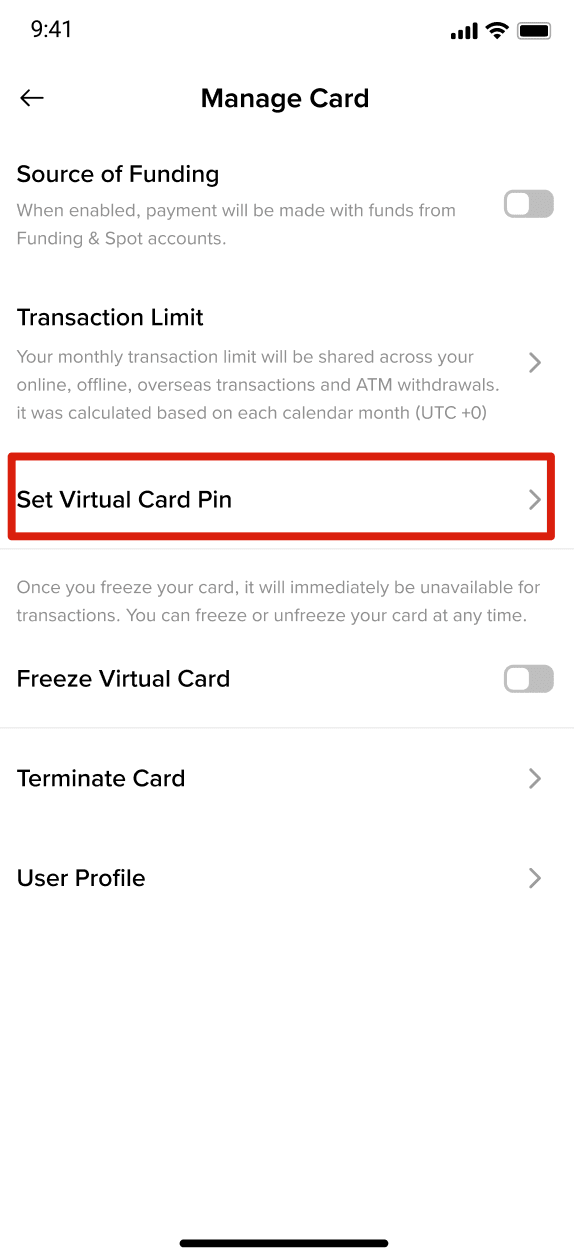
The two images, in order, show the Payment Priority page and the Manage Card page. They come from Binance’s Help Center (English interface) and are not screens from our own account.
| Problem | Likely cause | What to check |
|---|---|---|
| No Apply button in the app | Account not verified, or your country is not currently supported | Finish KYC and update the app; if it is still missing, plan without the card |
| Payment declined | Combined balance of the selected coins too low, card frozen, or the merchant does not accept Mastercard | Balance, Freeze status and Transaction Limit |
| Cashback missing | Settlement can take up to 30 days; the transaction may be ineligible; payout is by the 10th of next month | Cashback page in the app after the 10th |
| Less cashback after a refund | Binance can claw back cashback on refunded spending, and fees are not refunded | Include refunds and fees in your own tally |
The one programme Binance names: Brazil
Because the cards page lists Brazil, it helps to see what the named programme looks like next to the Global Program. The Brazil card overview describes residents of Brazil with verified identity, a virtual card first, and a physical card that needs at least 10 USDT equivalent in the account.
| Item | Brazil programme | Global Program |
|---|---|---|
| Card currency | BRL | USD |
| Cashback tiers | 1.5% under 500 BRL, 2% from 500 to 5,000 BRL, 3% from 5,000 BRL; cap 500 BRL a month | 1.5% under 100 USD, 2% from 100 to 1,000 USD, 3% from 1,000 USD; cap 100 USD a month |
| Conversion and FX fees | 0.9% conversion; FX 1% to 2% plus IOF on non-BRL purchases | 0.9% conversion (USDC 0.1%); FX 2% on non-USD purchases |
| Annual / issuance fee | 0 BRL / 0 BRL | 0 USD / 0 USD |
Sources: Brazil cashback, Brazil fees and limits. The Brazil card is issued by Pomelo Instituição de Pagamento Ltda. under Binance’s announcement of 1 October 2025.
Honest verdict: who the Binance Card suits, and what to read if you cannot get it
- Best for: people who already hold USDC on Binance, spend in US dollars or more than 1,000 USD a month, and whose app shows the Apply button.
- Not suitable for: spending under 1,000 USD a month at non-USD merchants (the net is negative in the table above), anyone who needs a physical card (the Global Program offers one only in some regions), and anyone whose country is not supported.
If the card is not offered where you live, compare other cards by country in our crypto card finder, read the 2026 crypto card comparison, or look at the Bybit Card, KAST and RedotPay reviews. US readers can use the best crypto cards USA list, and the account side of Binance is covered in how to register on Binance and deposit.
FAQ
Is the Binance Card available in the US?
Binance’s cards page names Brazil only and the Global Program publishes no country list. Binance.US is a separate exchange whose homepage menu shows no card, so US readers should treat the card as unconfirmed unless their own app shows an Apply button.
Is the Binance Card a credit card?
No. It is a USD-denominated Mastercard virtual card that spends crypto from your Binance account at the moment of payment. There is no credit line.
How much cashback does the Binance Card pay?
From 1 June 2026, 1.5% under 100 USD a month, 2% from 100 to 1,000 USD and 3% from 1,000 USD, with a monthly cap of 100 USD equivalent. The tier applies to all that month’s spending and cashback is credited by the 10th of the next month.
What fees does the Binance Card charge?
Annual and issuance fees are 0 USD. Non-USD purchases pay a 2% FX fee on top of Mastercard’s fees, and converting crypto costs 0.9% (0.1% for USDC). Physical-card countries get 2 free ATM withdrawals a month, then 1.5 USD each.
Is the Binance Card worth it at a non-USD merchant?
Only in the 3% tier. Paid in USDC the total cost is 2.1%, so 1,000 USD of spending nets +9.00 USD while 300 USD nets −0.30 USD. Paid in USDT or BTC the cost is 2.9%.
Does the Binance Card have a physical version?
The Global Program guarantees a virtual card only; physical cards exist in some regions. In Brazil a physical card needs at least 10 USDT equivalent in the account and has no issuance fee.
This page contains no affiliate links or referral codes. Figures come from Binance’s official help pages, the Binance.US homepage and Mastercard’s newsroom, checked on 28 October 2026, and can change. We have not opened a Binance Card ourselves, and screenshots are Binance’s own help images. This is not financial, legal or tax advice, and crypto can lose value. Last updated: 28 October 2026.