How to Register on MEXC in 2026: Who Can Join, KYC, Deposits and Fees
Key points · checked 25 Oct 2026
- Check your country first: MEXC’s User Agreement (updated 13 October 2026) does not accept registrations from the United States, United Kingdom, Canada, Singapore, Hong Kong, Malaysia, Mainland China, Russia, Belarus, Kazakhstan and several sanctioned places. Residents of those countries cannot use this guide.
- Restricted, not banned: India and the Philippines are not on the prohibited list, but MEXC’s own page lists regulator notices there and no app listing. The Netherlands is being wound down (assets out by 31 October, service ends 16 November 2026).
- KYC is required: since 5 February 2026 an unverified account cannot deposit or withdraw and trading is restricted. Primary KYC raises the withdrawal limit to 80 BTC a day, Advanced to 200 BTC.
- Fees: spot maker 0%, taker up to 0.05%, 0.04% with the 20% MX discount; compare with our Binance guide. Withdrawal fees are shown on the withdrawal page.
- Funding: the usual route is USDT from a regulated exchange on the same network (see our OKX deposit guide). MEXC added USD bank transfer (SWIFT) on 23 October 2026 for eligible users with Advanced KYC.
- No licence claim: this page does not call MEXC licensed or protected in any country; check your own regulator before sending money, and compare regulated routes such as our Kraken sign-up guide.
What is MEXC and who is it for
MEXC is a centralised crypto exchange known for a long list of tokens and zero maker fees on spot. Besides spot it has futures, earn products and a card; this guide covers sign-up, KYC, funding, withdrawal and fees.
| Your situation | Fit | Why |
|---|---|---|
| You place limit orders and want low trading cost | Good fit | The fee page shows 0.0000% spot maker and up to 0.0500% taker |
| You want early access to newly listed tokens | Possible fit | Listing breadth is the selling point; liquidity and risk are on you |
| You only buy BTC or ETH now and then | Not needed | Any regulated exchange does that with one fewer transfer |
| You want to avoid ID checks | Not possible | Unverified accounts cannot deposit or withdraw |
| You live in a prohibited country | Not allowed | The User Agreement does not accept registrations from there |
Who can register: what the official pages say
Many searches for “mexc register” come from countries the agreement excludes, so read this section before any step. The User Agreement (last updated 13 October 2026) says MEXC does not provide services or accept registration in North Korea, Cuba, Sudan, Iran, Mainland China, Singapore, Malaysia, the United States, the United Kingdom, Hong Kong, Kazakhstan, Russia, Belarus, Canada and Russian-controlled parts of Ukraine, plus countries under comprehensive EU or US sanctions or on the FATF call-for-action list. MEXC says the list is non-exclusive and can change.
| Group | Countries | What MEXC says |
|---|---|---|
| Prohibited | US, UK, Canada, Singapore, Hong Kong, Malaysia, Mainland China, Russia and others | No registration or trading for residents |
| Restricted | India, Philippines, Japan, South Korea, Indonesia | Not prohibited, but regulator notices or no app listing |
| Winding down | Netherlands | Move assets by 31 Oct 2026; service ends 16 Nov 2026 |
| Not named | Most other countries | Registration works, which is not the same as local approval |
The grouping comes from MEXC’s own restricted-countries page (21 October 2026). It also says that seeing the MEXC app in a store does not mean you are eligible.
- If you live in the US, UK or Canada: MEXC does not accept you. This guide gives no steps for stating a different country; the agreement says false statements about residence can lead to action, and users in prohibited countries describe being asked for KYC at withdrawal and getting stuck.
- If you live somewhere not named: use your own documents and your real address. MEXC holds no licence we can cite for your country, so no regulator protection should be assumed.
MEXC register steps: how to sign up
Sign-up takes about three minutes; KYC is the slow part. After checking the section above, open the MEXC sign-up page or the official site.
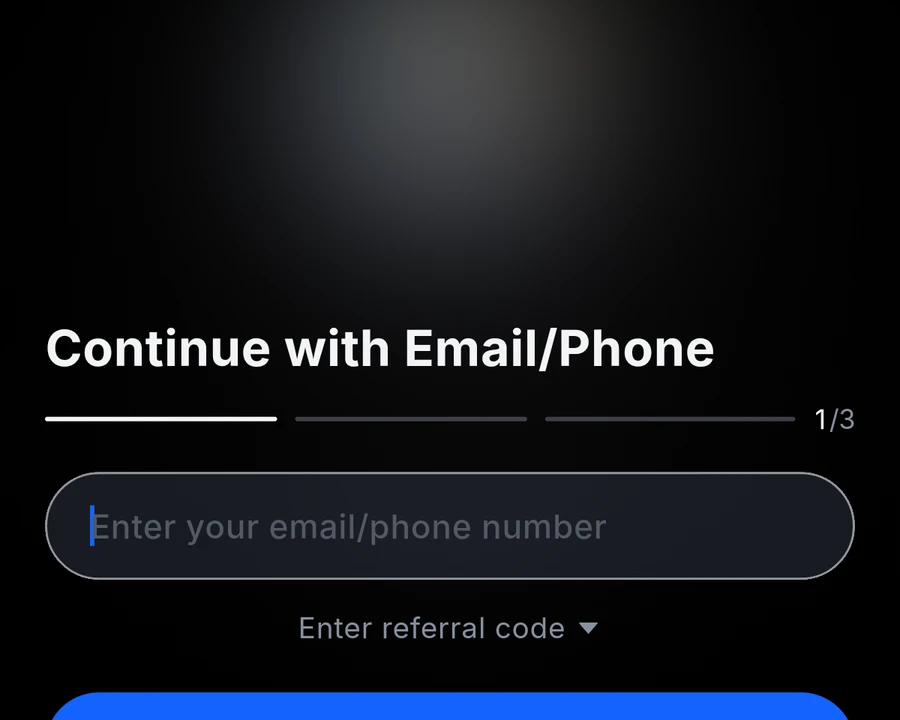
- Tap Sign Up, then choose Continue with Email/Phone. A Google sign-in also exists, but it adds a third-party account to untangle if you ever reset security; a dedicated email is cleaner.
- Enter your email or phone number. Below it is an optional invite field; it usually fills in by itself when you arrive from the link above.
- Set a password and complete verification. The flow shows three steps.
- After login, check the language and the pricing currency in Settings.
MEXC KYC: now mandatory
MEXC’s announcement of 5 February 2026 says unverified users cannot deposit or withdraw and trading and integrated account features are restricted; they can only see market data and announcements. The KYC FAQ (2 June 2026) sets out the two levels:
| Item | Primary KYC | Advanced KYC |
|---|---|---|
| Crypto deposit | Unlimited | Unlimited |
| Crypto withdrawal | 80 BTC per day | 200 BTC per day |
| Fiat | P2P | USD 20,000 per day |
| Spot, futures, events | Yes | Yes |
- Review usually takes about 15 minutes; some applications take 8 to 24 hours.
- You can apply up to 3 times a day for each level, so enter your name and ID type correctly the first time.
Primary KYC steps
- On the web: profile icon, Identification, Primary KYC, Verify via Web (official steps, updated 15 October 2026; the app flow is the same).
- Choose the country that issued your ID and the ID type.
- Photograph or upload the front and back with all four corners visible and no glare.
- Check the details and submit.
Use your own document and your real residence. If KYC keeps failing, use the official support and appeal routes, not anyone offering to do it for you.
Security settings to switch on first
- Google Authenticator: withdrawals ask for an email code and an authenticator code; back up the key before changing phones.
- Anti-phishing code: official emails then show the string you chose.
- Withdrawal address whitelist: limits withdrawals to saved addresses.
- Official channels only: MEXC staff never ask for passwords or verification codes.
How to deposit on MEXC
The official deposit guide (17 September 2026) stresses three rules: the deposit network must match the network you withdraw from or the assets can be lost for good; coins such as XRP need a memo as well as the address; do not deposit by contract transfer. Network congestion decides how long it takes, and our Binance deposit guide shows the same network-matching routine from the sending side.
- In the app tap Deposit, choose On-Chain Deposit and search for USDT.
- Pick the network, which must match the sending platform’s withdrawal network.
- Copy the address, plus the memo if the coin needs one.
- Paste it at the sending platform and send a small test amount first.
USD bank transfer (SWIFT)
The official USD guide (23 October 2026) says eligible users can send USD by SWIFT to their MEXC fiat account, and that Advanced KYC must be complete first. The sending account must be in your own name and match your verified name or the transfer is returned, and you should choose the OUR fee option because intermediary banks can deduct more. Whether the route is open to you shows in your account.
How to withdraw from MEXC
The official withdrawal guide (25 September 2026):
- In the app tap Wallets, then Withdraw.
- Choose the coin and On-chain Withdrawal.
- Enter the address, choose the network and enter the amount.
- Confirm with the email code and the Google Authenticator code.
Fees depend on the coin and network and are shown on the withdrawal page, so this guide does not quote one. Two rules from the common issues page: a withdrawal still pending can be cancelled in Funding History, but once you confirm it by email or SMS it goes to the blockchain and MEXC cannot recover funds sent to a wrong address.
MEXC fees
| Item | Rate | Note |
|---|---|---|
| Spot maker | 0.0000% | Rates can vary with events or region |
| Spot taker | up to 0.0500% | BTC/USDT, ETH/USDT and SOL/USDT 0.05%; XRP/USDT shows 0 fees |
| Spot taker with MX discount | 0.0400% | 20% discount; ends when MX runs out |
| Futures maker / taker | 0.000% to 0.040% / 0.000% to 0.100% | Depends on the contract |
| Withdrawal | Shown on the page | Per coin and network |
Worked example: 10,000 USDT of taker volume a month costs 5 USDT at 0.05% and 4 USDT with the MX discount, so the discount saves 1 USDT. Holding the exchange token for that is not worth it; limit orders cost 0. Source: the official fee page.
Risks and what users report
- Residence risk: the agreement allows action over false residence statements, and users in prohibited countries report being asked for KYC at withdrawal.
- Holds and source-of-funds checks: recent Trustpilot reviews describe frozen funds and long verification; MEXC’s replies point to its 24/7 live chat. These are single-party accounts.
- P2P disputes: a review dated 24 October 2026 describes a seller who moved the buyer to a chat app and did not release the crypto. Keep every trade inside the platform and never pay a third-party account.
- Ratings disagree: Google Play shows 4.7; Trustpilot shows no rating at the moment (it cites a guideline breach and removed fake reviews), with 88% of 1,347 reviews at one star.
None of these accounts comes with a full reply from MEXC, and we did not fund or withdraw from a MEXC account for this guide; the screenshot is the logged-out sign-up screen of the app.
My honest verdict: who should use MEXC
MEXC fits a reader who wants a second exchange: someone who already holds USDT on a regulated platform, trades with limit orders and wants a wider token list than that platform offers. It is best for that profile; I would not recommend it if you need local-currency deposits, regulator protection, or a quick way around the country list. Before sending real money I would run one small cycle: finish KYC, deposit a small amount on the cheapest shared network, trade once, and withdraw it back, noting the real time and cost.
FAQ
Can I use MEXC in the United States?
No. The User Agreement lists the United States as a prohibited jurisdiction. This guide gives no steps for stating another country.
Is KYC required on MEXC?
Yes. Since 5 February 2026 unverified accounts cannot deposit or withdraw and trading is restricted. Primary KYC allows 80 BTC a day, Advanced 200 BTC.
How long does MEXC KYC take?
Usually about 15 minutes; some applications take 8 to 24 hours. Each level allows 3 attempts per day.
Is MEXC available in India or the Philippines?
Neither is on the prohibited list, but MEXC’s own page lists regulator notices there and no app listing. Check your regulator’s current position before registering.
What are MEXC’s spot fees?
The fee page shows 0.0000% maker and up to 0.0500% taker; the 20% MX discount gives 0.04%. Check your trade history for the rate you actually pay.
How much does a MEXC withdrawal cost?
It depends on the coin and network; the withdrawal page shows the fee before you confirm.
Can I get funds back after a wrong-network deposit or wrong address?
Usually not. A pending withdrawal can be cancelled, but a confirmed one cannot be recovered, and a wrong-network deposit can be lost permanently.
Does MEXC accept USD bank transfers?
MEXC’s page dated 23 October 2026 says eligible users can deposit USD by SWIFT after Advanced KYC from an account in their own name. Availability shows inside your account.
Further reading
- Binance register and deposit guide
- OKX registration and deposit guide
- Kraken sign-up and SEPA deposit guide
- MEXC Card guide
Official sources: User Agreement, restricted countries, KYC FAQ, fee page, deposit guide, withdrawal guide.
Affiliate disclosure: this page contains referral links; if you register through them the site may earn a referral reward at no extra cost to you, and it does not change the assessment above. Referral code: XOICb1jMAV. Rules and fees are the official figures of 25 October 2026 and can change; this is not investment, legal or tax advice, and crypto prices are volatile.