

Hyperliquid Fees and Tutorial 2026: Deposit, Trade and Withdraw
Hyperliquid guide · checked 27 Oct 2026
- What it is: a decentralised exchange for perpetual futures that runs on its own layer-1 chain. Your money stays in your wallet and you log in with a wallet or an email address. The official onboarding docs contain no identity-verification (KYC) step.
- Hyperliquid fees: perps start at 0.045% taker and 0.015% maker, spot at 0.070% and 0.040%. There are 7 tiers based on 14-day volume (spot counts double), and the lowest perps tier is 0.024% taker.
- Discounts: the official referral rule gives 4% off fees on your first $25M of volume, and staking HYPE adds up to 40%. Tier 0 with 100 HYPE staked and the referral discount works out at about 0.039% taker.
- Deposit and withdraw: the simplest route is USDC on Arbitrum through the Deposit button, 5 USDC minimum, plus a little ETH for gas. Withdraw costs $1 according to the API docs and takes about 3 to 4 minutes.
- Who may use it: the Terms exclude people in the United States, Ontario and sanctioned territories, and they forbid using a VPN to get around that. They name no other country, and Hyperliquid claims no licence anywhere.
- Risk: leverage goes up to 40x on BTC, and liquidations happen automatically on-chain. Nobody can reverse a mistaken transfer, so start with isolated margin and 2x to 5x.
What is Hyperliquid and who can use it
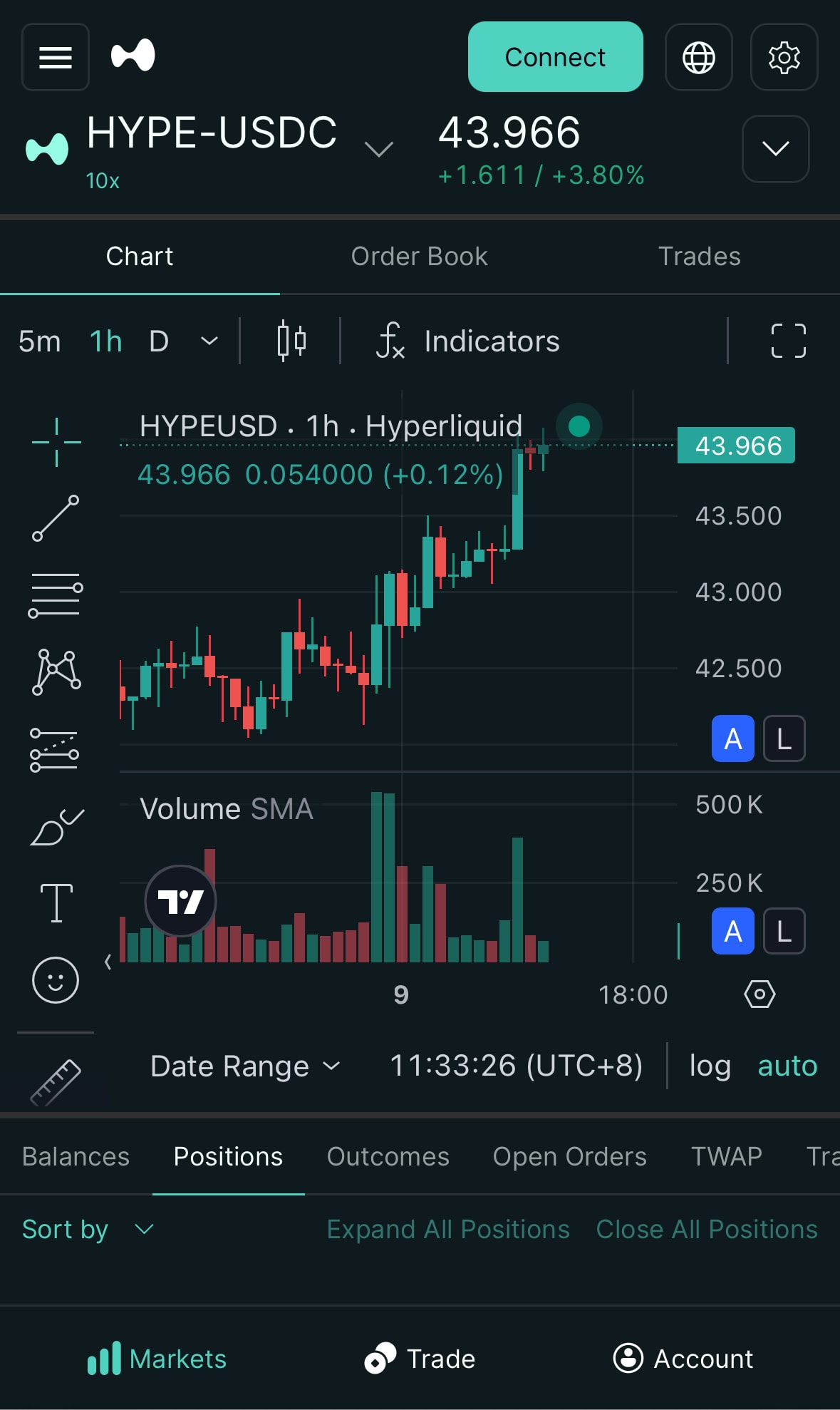
Hyperliquid is a perpetual-futures exchange built on its own blockchain. Trading runs through an on-chain order book and feels like a centralised exchange: market and limit orders, take-profit and stop-loss, leverage. The difference is custody. You do not hand funds to a company; you sign orders with your own wallet. Trading itself carries no gas fee, and only the deposit costs gas on the source chain.
According to the official getting-started page, you need an ordinary EVM wallet (Rabby, MetaMask or Coinbase Wallet, for example) or an email login, plus USDC on Arbitrum. There is nowhere to upload documents.
| Hyperliquid | Centralised exchange (Bybit, VIP 0) | |
|---|---|---|
| Where your funds sit | In your own wallet, orders signed by you | In the exchange account |
| Login | Wallet or email | Exchange account |
| Perps base fee | Taker 0.045% / maker 0.015% | Taker 0.055% / maker 0.020% |
| Gas while trading | None | Not applicable |
The Bybit figures come from the Bybit fee page and show the lowest derivatives tier. Hyperliquid is slightly cheaper at the start, but the real gap opens later through volume tiers and staking.
Who may use it, in three sentences
The official Terms of Use (section 1.6) exclude anyone who lives in, is located in or is incorporated in the United States or Ontario, anyone in a sanctioned jurisdiction, and citizens of such jurisdictions. Section 3.1.5 prohibits getting around these limits with a VPN or false statements about where you live. The UK, Canada outside Ontario and Australia are not named, but Hyperliquid also names no authorisation in those countries, so read this as a description of the Terms rather than legal advice. If you live in the United States, this guide is not meant for you.
If you prefer to start on a centralised exchange, read How to Use Bybit in 2026: Where It Works, Sign-Up, KYC, Fees and First Trade first. The fee comparison above shows how the two routes differ.
Depositing on Hyperliquid: from your currency to USDC on Arbitrum
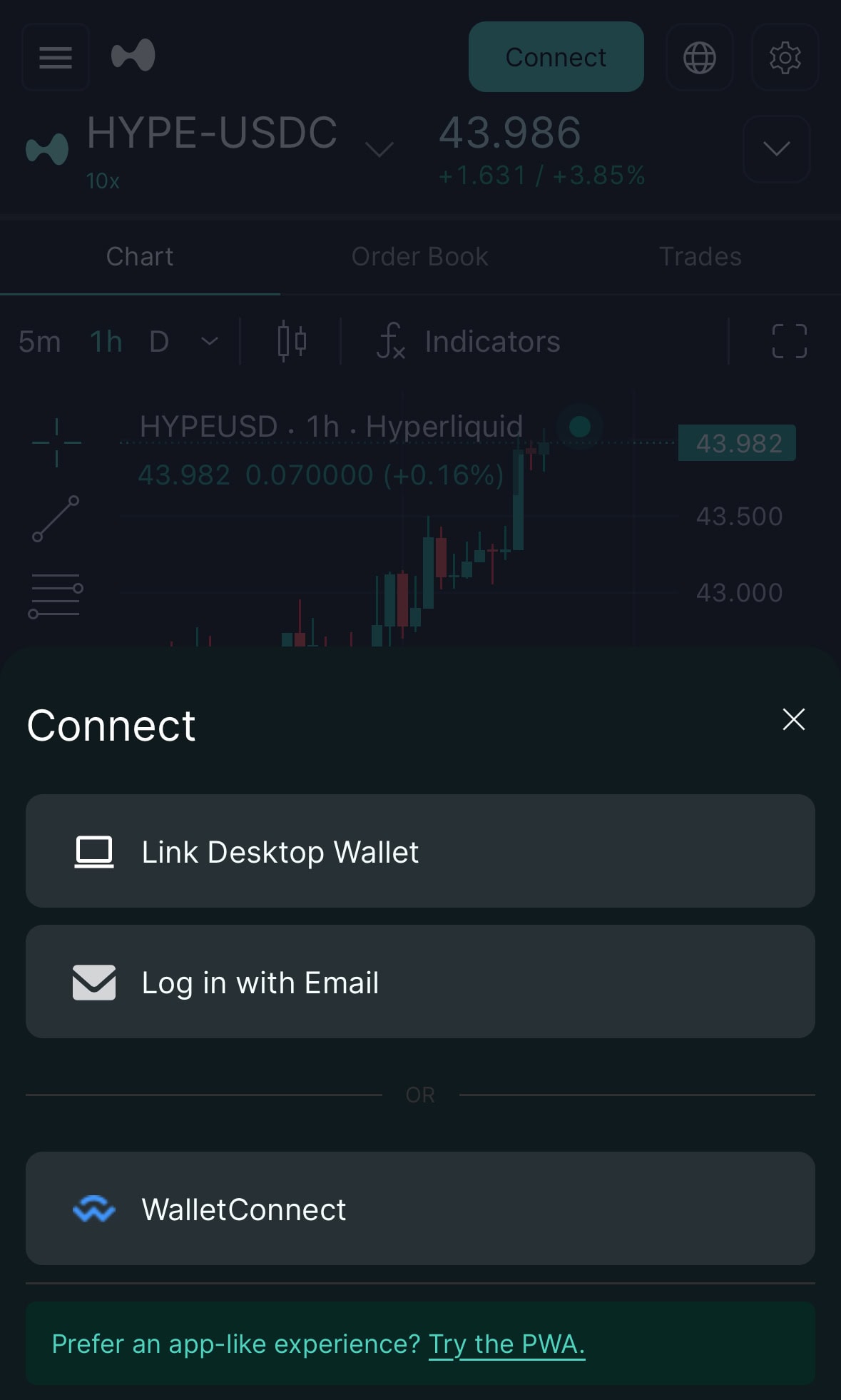
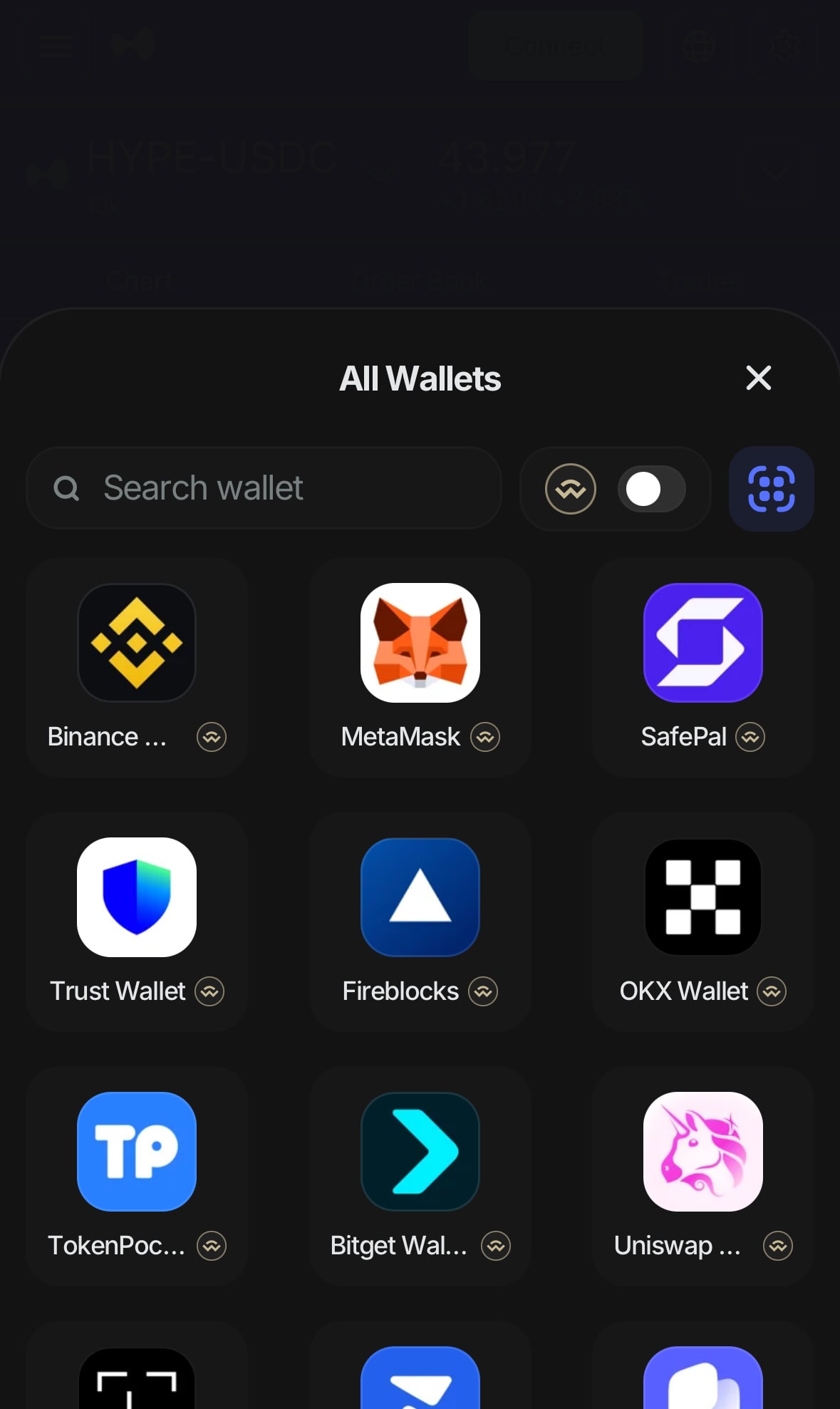
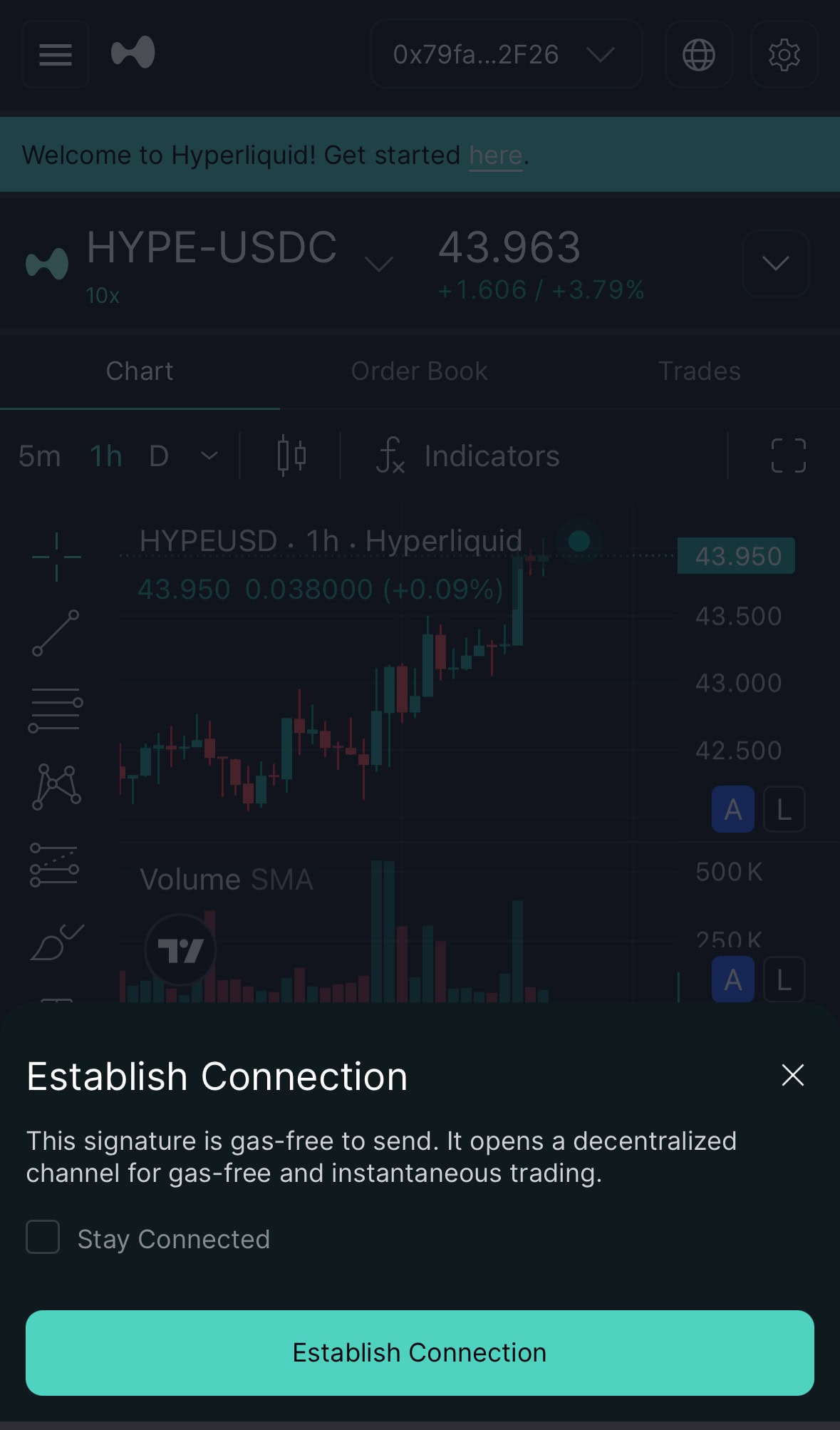
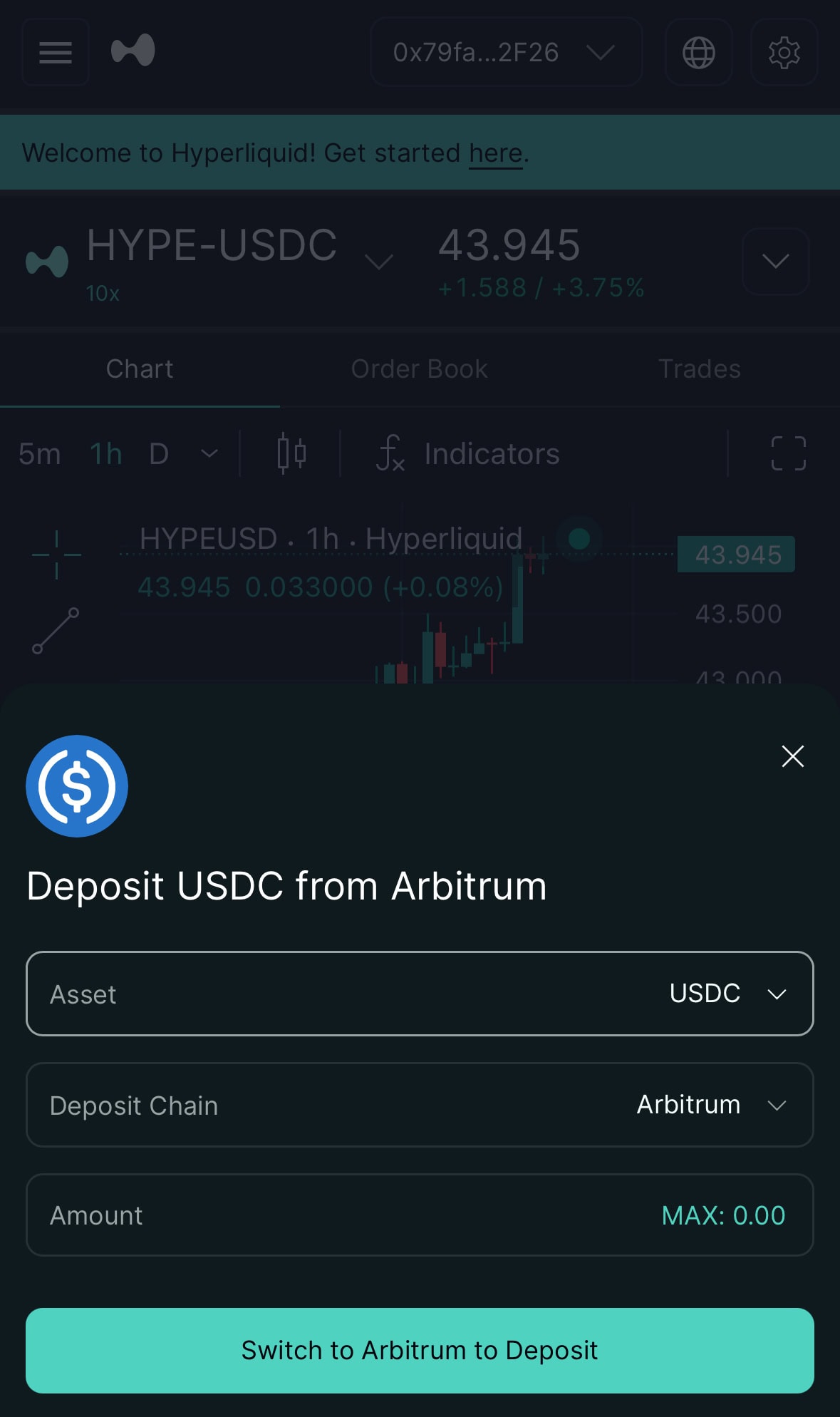
Beginners usually trip here, most often because the USDC sits on the wrong network. Hyperliquid takes no pounds, dollars or euros, so you first need USDC. The screenshots below were taken on a phone with a newly created, empty wallet and no real deposit, which is why balances show 0.
| Deposit route | How it works | What to watch |
|---|---|---|
| Wallet deposit | Hold USDC on Arbitrum in your wallet, then pick USDC and Arbitrum in the Deposit window | 5 USDC minimum; anything smaller is not credited and is lost |
| Email login, send to the address | Send USDC on Arbitrum, Ethereum, Base or Polygon to the address shown | Credited as USDC on HyperCore; the wrong chain means no credit |
| Other assets | Send BTC, ETH, SOL or other officially listed assets to the address | Sell them for USDC first; only then do they count as margin |
All three routes are in the getting-started docs. The wallet route is the most direct. The USDC documentation says Arbitrum deposits arrive in under a minute and the minimum is 5 USDC.
Before you start: three things
- An EVM wallet: Rabby, MetaMask, Coinbase Wallet or any WalletConnect-compatible wallet.
- USDC on Arbitrum One. If you buy it on an exchange, choose Arbitrum One as the withdrawal network, not Arbitrum Nova and not Ethereum mainnet. Bybit Deposit & Withdraw 2026: Minimum Amount, Methods & Network Fees shows what a deposit and a network choice look like on one exchange, and OKX Registration and Deposit Guide 2026 covers a second.
- A little ETH on Arbitrum, only for the gas of the deposit transaction. Your wallet shows the amount before you confirm.
Connect your wallet and make the first deposit
- Open Hyperliquid website in your browser and tap Connect at the top right.
- Pick your wallet from the list, or choose the email login (the docs describe a 6-digit code).
- Your wallet shows Establish Connection, a signature that costs no gas. Confirm it and tap Enable Trading.
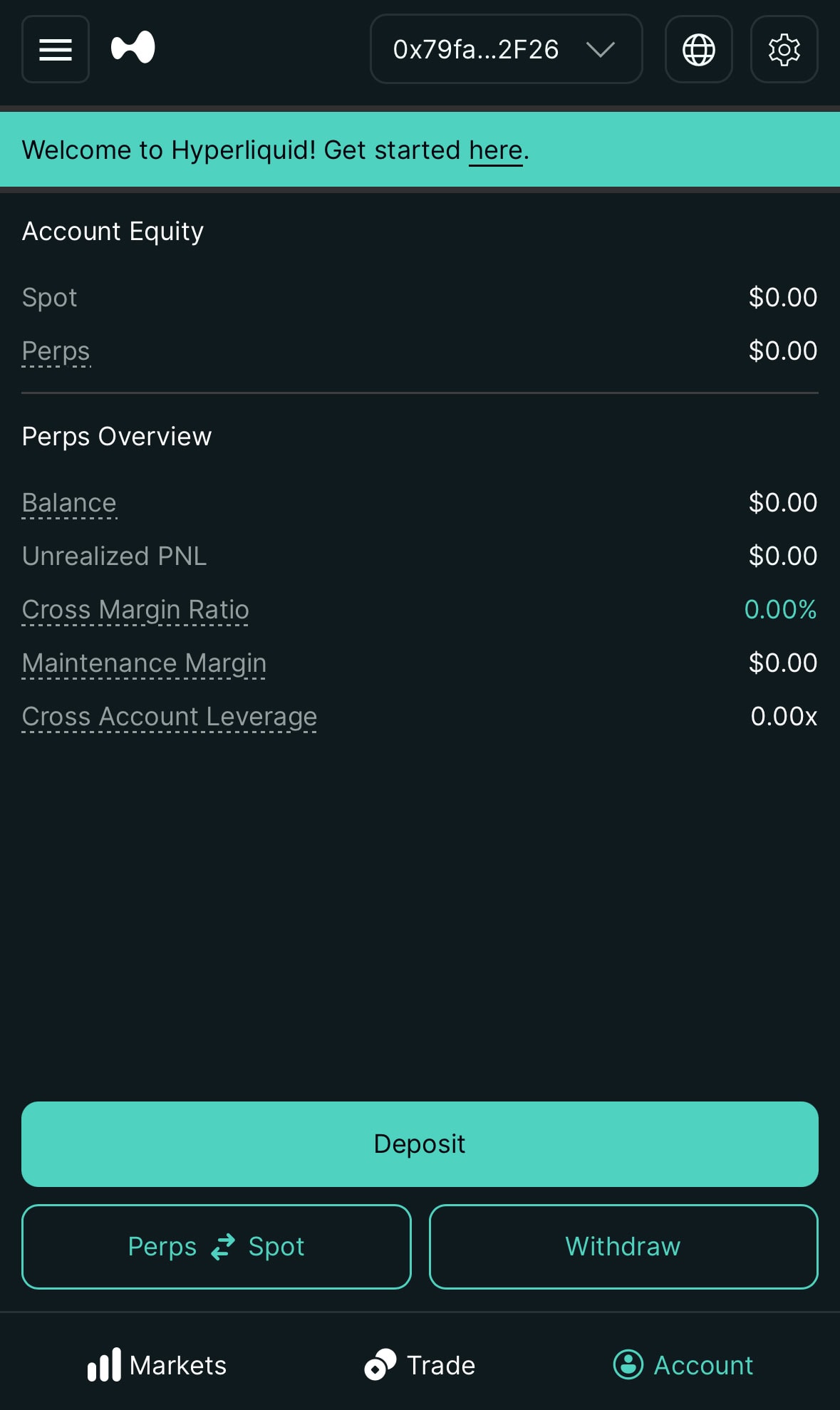
- Open the account page, tap Deposit, choose asset USDC and deposit chain Arbitrum, enter the amount and confirm in your wallet.
After the deposit: perps and spot are separate
The USDC lands on HyperCore. Perps trading uses the perps balance directly; for spot you move funds on the account page with Perps ⇄ Spot. Actions on Hyperliquid cost no gas, so that transfer needs no ETH.
The referral discount: 4% off fees
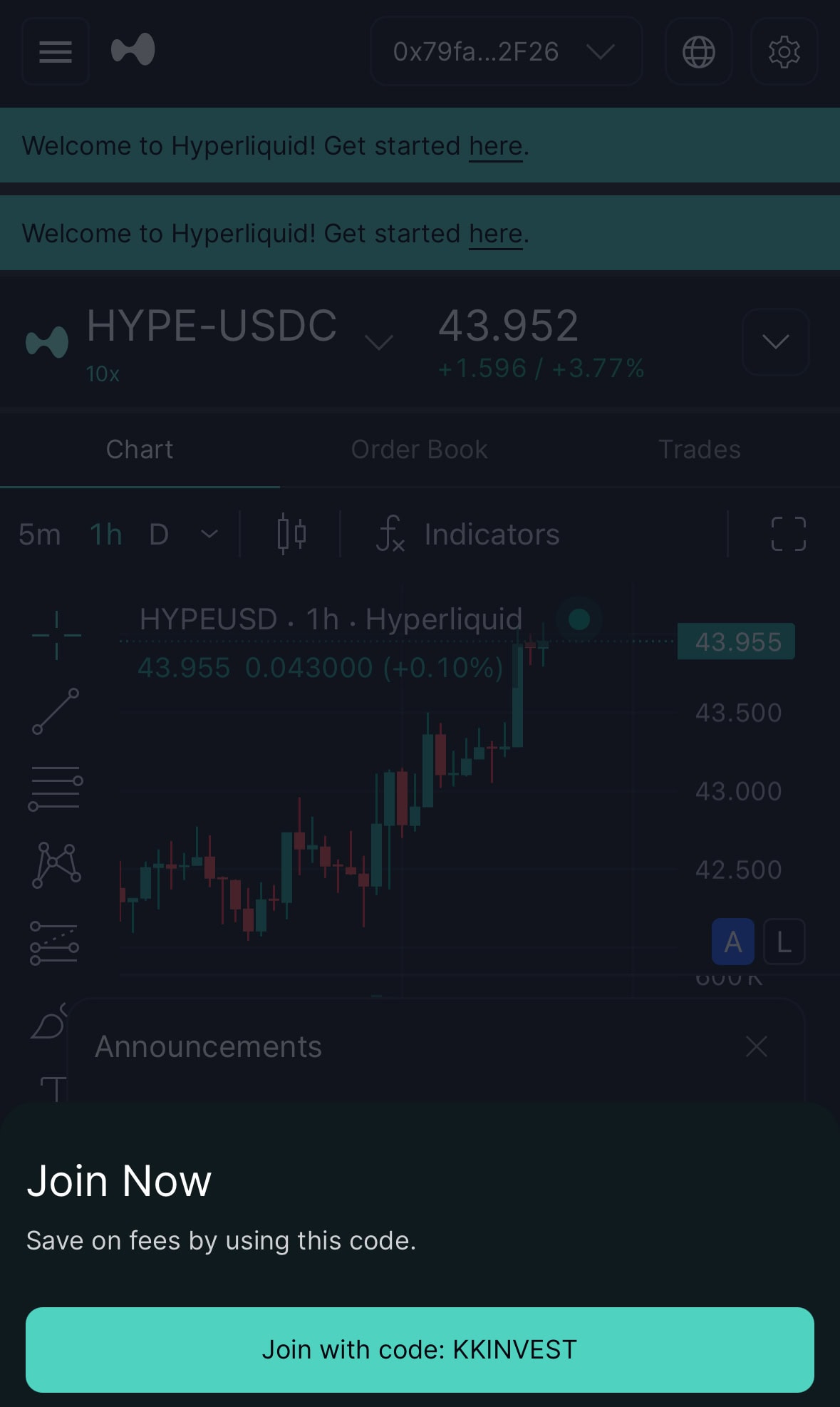
The official referral page says that using a code gets you 4% off fees on your first $25M of volume. The discount does not apply to vaults or sub-accounts. You can only create your own code after $10,000 in volume; that is a threshold for creating one, not a deadline for entering one.
How to apply it
- Open Hyperliquid website and connect your wallet. On a phone, a banner appears at the bottom with a Join with code button.
- Or go to app.hyperliquid.xyz/referrals, tap Enter Code and type the code from the note at the end of this article.
- The docs do not say whether an applied code can be changed, so check it before you submit.
What the discount is actually worth
Take $10,000 of volume a month, all as taker. That is $120,000 a year. At 0.045% you pay $54 in fees, and 4% off saves about $2.16 of that. The discount is a small edge that works from the first trade, and nothing more than that.
Hyperliquid fees in detail
A fee has three layers: the base rate, your tier from 14-day volume, and the HYPE staking discount. The referral discount comes off last. Perps and spot have separate tables, and for the tier calculation spot volume counts double.
Fees checked: 27 Oct 2026 (source: official fees page). Tiers use rolling 14-day volume, assessed daily at 00:00 UTC, and sub-account volume counts toward the main account.
Perpetuals
| Tier | 14-day weighted volume | Taker | Maker |
|---|---|---|---|
| 0 | from $0 | 0.045% | 0.015% |
| 1 | >$5M | 0.040% | 0.012% |
| 2 | >$25M | 0.035% | 0.008% |
| 3 | >$100M | 0.030% | 0.004% |
| 4 | >$500M | 0.028% | 0.000% |
| 5 | >$2B | 0.026% | 0.000% |
| 6 | >$7B | 0.024% | 0.000% |
Spot
| Tier | 14-day weighted volume | Taker | Maker |
|---|---|---|---|
| 0 | from $0 | 0.070% | 0.040% |
| 1 | >$5M | 0.060% | 0.030% |
| 2 | >$25M | 0.050% | 0.020% |
| 3 | >$100M | 0.040% | 0.010% |
| 4 | >$500M | 0.035% | 0.000% |
| 5 | >$2B | 0.030% | 0.000% |
| 6 | >$7B | 0.025% | 0.000% |
Weighted volume = 14-day perps volume + 2 × 14-day spot volume. There are also maker rebates: above 0.5%, 1.5% and 3.0% of weighted maker volume the exchange pays -0.001%, -0.002% and -0.003%.
HYPE staking discount
| Level | HYPE staked | Fee discount | Perps taker at tier 0 |
|---|---|---|---|
| Wood | >10 | 5% | 0.04275% |
| Bronze | >100 | 10% | 0.04050% |
| Silver | >1,000 | 15% | 0.03825% |
| Gold | >10,000 | 20% | 0.03600% |
| Platinum | >100,000 | 30% | 0.03150% |
| Diamond | >500,000 | 40% | 0.02700% |
All layers together
Tier 0, the referral discount (4%) and 100 HYPE staked (Bronze, 10%): by the docs’ formula the discounts multiply, so 0.045% × (1 − 4%) × (1 − 10%) comes to about 0.039%. A $10,000 perps order then costs roughly $3.89 instead of $4.50, about $0.61 less per order.
My view: the code is free, so enter it. Staking only pays off if you trade actively and would hold HYPE anyway. Do not buy the coin just for the discount, because one bad price day can cost more than a year of fee savings.
What else costs money
| Item | Cost | Note |
|---|---|---|
| Trading, cancelling orders, liquidation | No gas | The docs describe trading on Hyperliquid as gas-free |
| Deposit | Source-chain gas only | Wallet deposit from 5 USDC |
| Withdrawal | 1 USDC | The API docs give the fee ‘at the time of writing’; the Withdraw window is what counts |
| Funding (perps) | Paid between longs and shorts | Hourly, Hyperliquid takes nothing, capped at 4% per hour |
Funding is easy to overlook. The funding docs describe it as a payment between the long and short side, settled hourly, with a fixed interest component of 0.01% per 8 hours. If you hold positions overnight, price it in.
Your first order: interface, margin mode and leverage
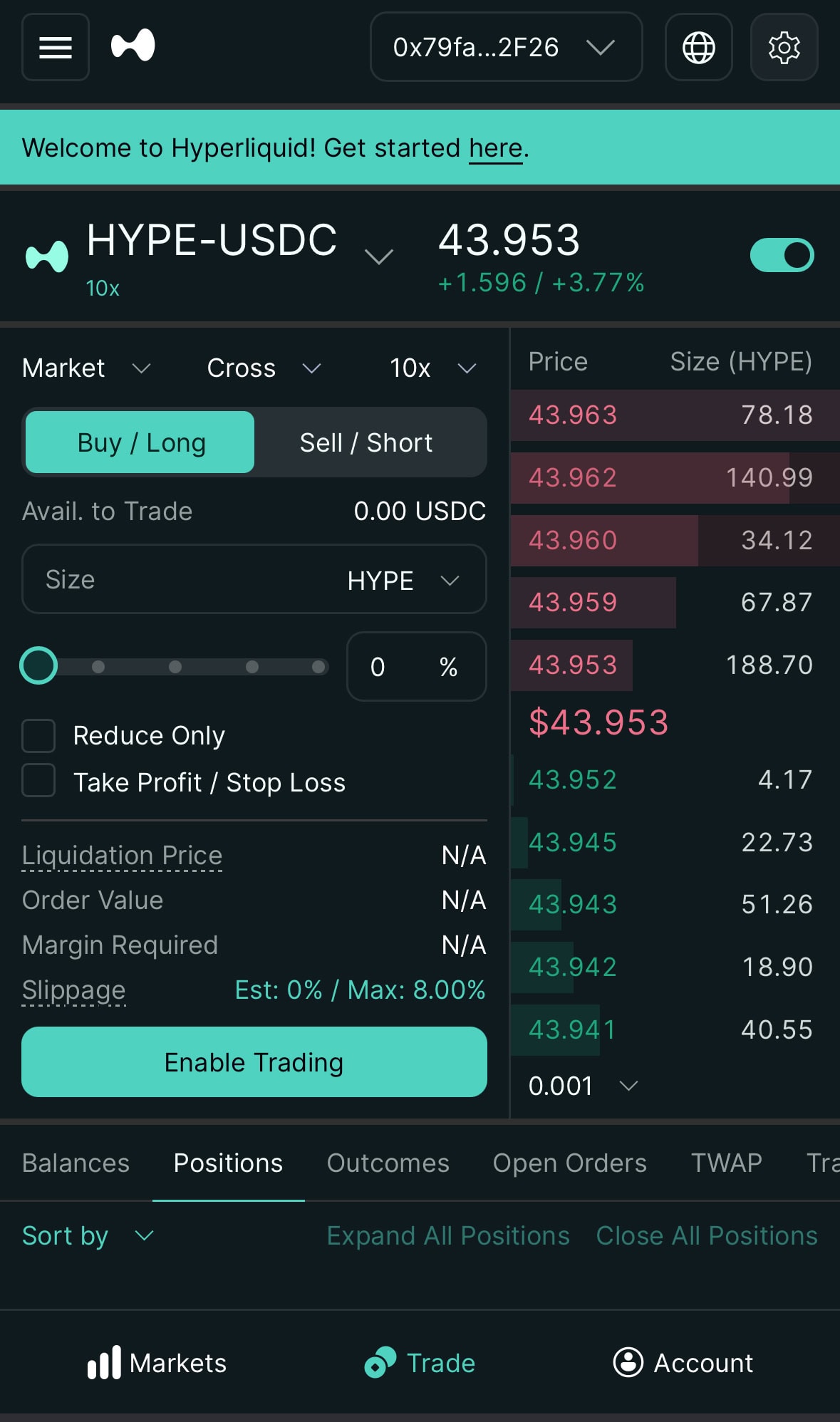
- Choose a market with the token selector (source: official docs).
- Decide on long (price rises) or short (price falls).
- Set the position size with the slider or by typing; it follows from leverage times stake.
- Click Place Order and confirm in the pop-up.
Three settings before the first order
- Cross or isolated: cross uses your whole balance as collateral, isolated only the amount you assign to the position. Beginners should pick isolated.
- Maximum leverage: the public API (27 Oct 2026) shows BTC 40x, ETH 25x, SOL 20x, HYPE 10x. Of 234 perps markets, 130 allow at most 3x and 63 at most 5x.
- Order types: market orders pay the taker fee, limit orders can earn the maker fee. The ticket also offers take profit and stop loss, plus a TWAP tab.
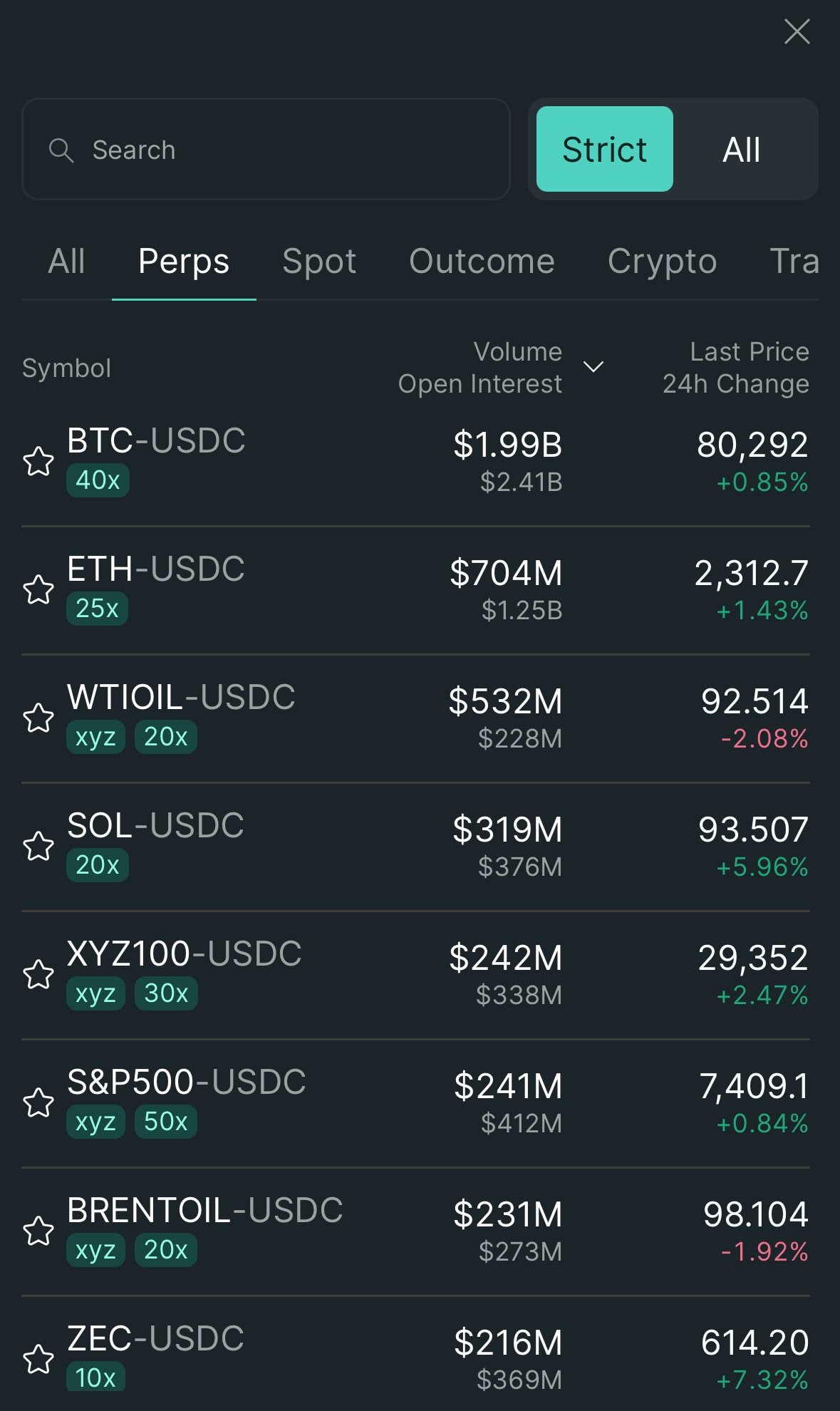
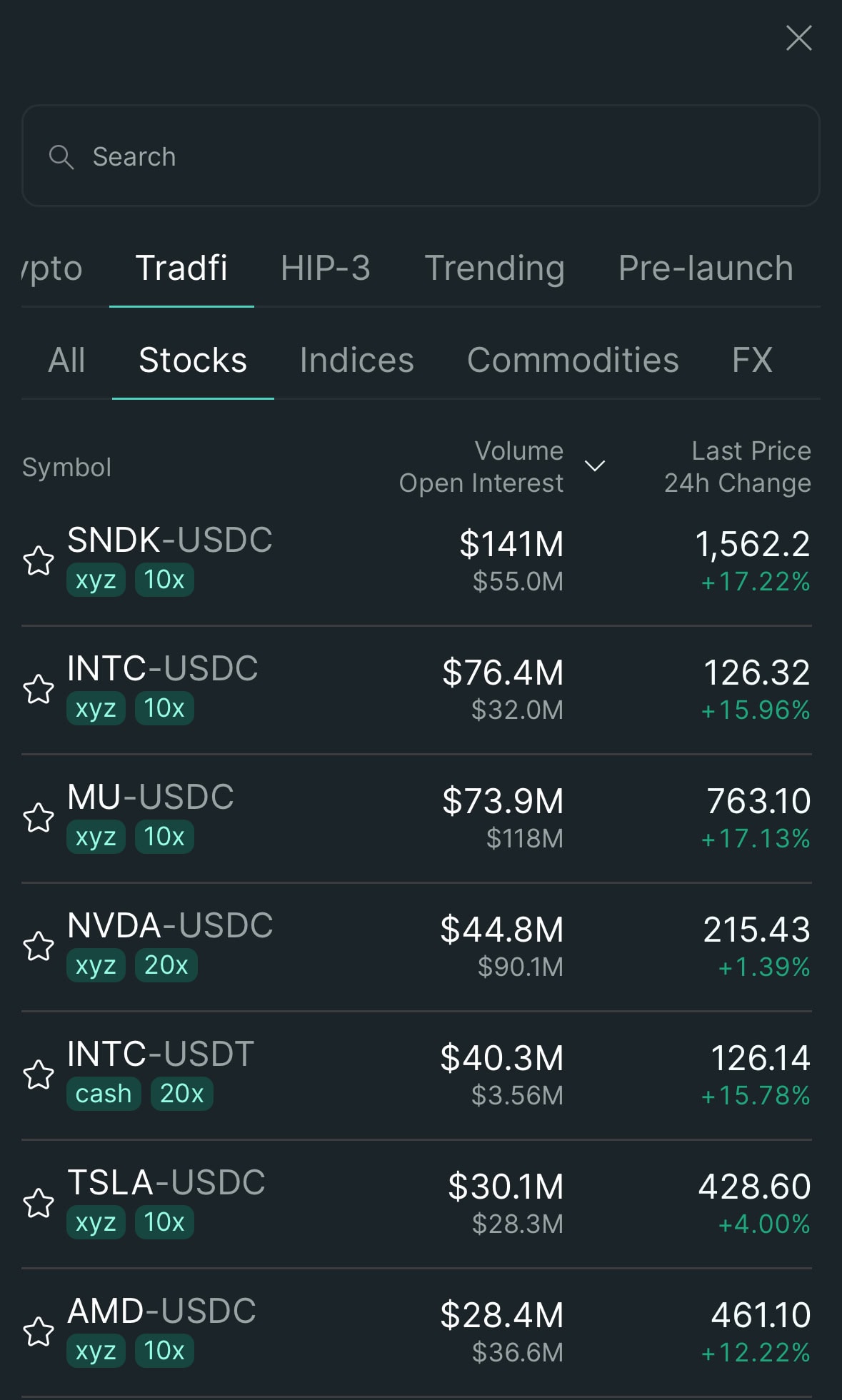
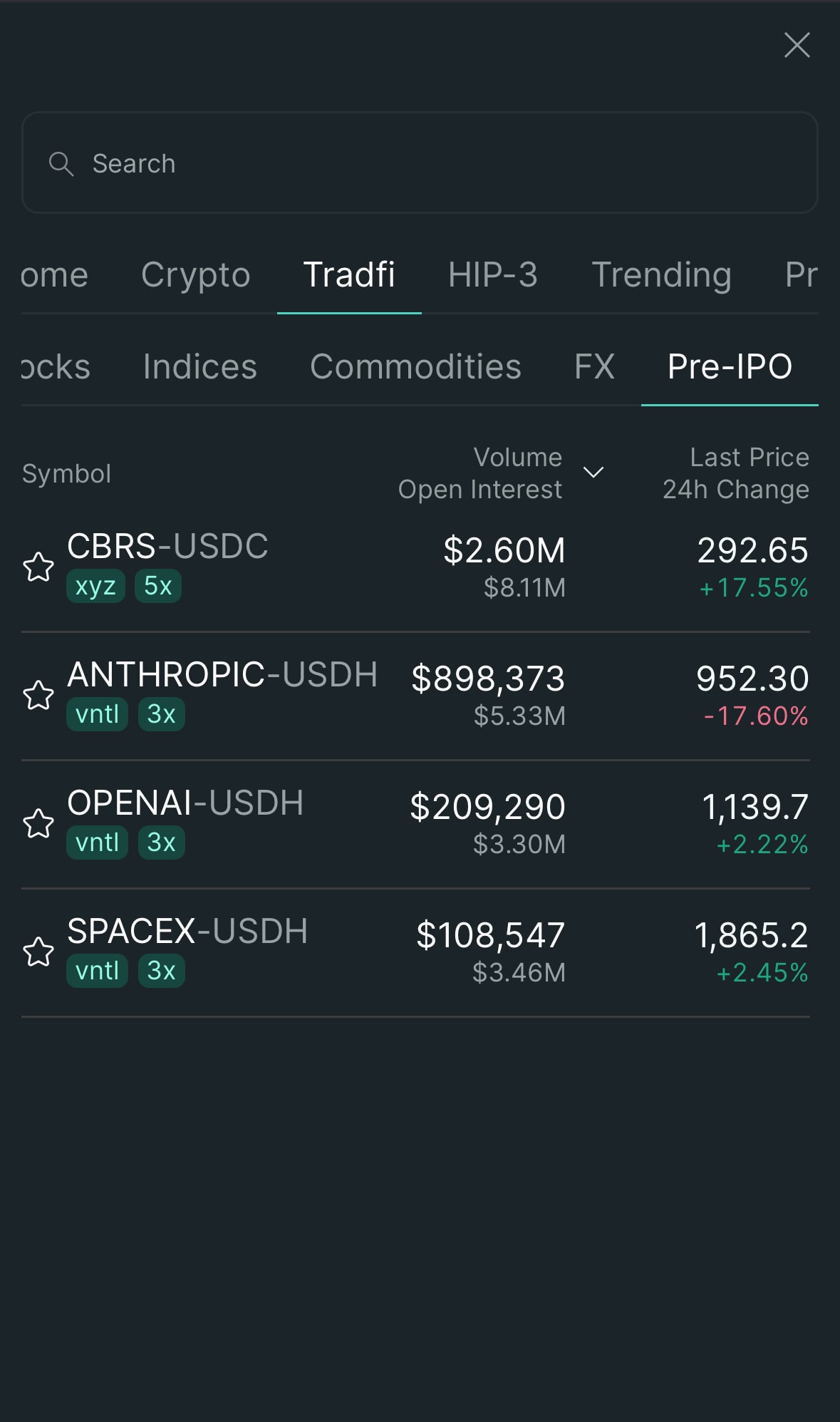
Besides crypto, Hyperliquid lists stocks, indices, commodities and pre-IPO markets through HIP-3. Deployers run them, and the fees page points to a validator vote for delistings. Liquidity and price behaviour are not comparable to BTC.
If you want a longer walkthrough of futures mechanics on a centralised venue, Binance Futures Trading Tutorial: Complete Beginner’s Guide [2026] covers order types and liquidation step by step.
My checklist
Before the first order: leverage at 2x to 5x, a stop-loss on every position, isolated margin, and a size where the loss at the stop is something you can live with, not based on how much you hope to win.
Withdrawing: Withdraw, Send and timing
| Button on the account page | What it does |
|---|---|
| Deposit | Pay in: USDC on Arbitrum from a wallet, or other assets to the address shown |
| Withdraw | Pay out to a wallet or on-chain address; status appears under Deposits and Withdrawals |
| Send | Only a transfer to another account on the Hyperliquid chain, not a withdrawal |
| Perps ⇄ Spot | Move balance between perps and spot |
Three steps to withdraw
- Make sure the USDC sits in the account you are withdrawing from (move spot balance back to perps first if needed).
- Tap Withdraw, enter the amount and destination address, and check the fee and estimated time in the window.
- A Withdrawal entry then appears under Deposits and Withdrawals.
The USDC API docs state a $1 fee, and on the Arbitrum route funds arrive after about 3 to 4 minutes. Validators handle the whole thing, so you need no ETH to withdraw.
Send is not a withdrawal
Do not use Send to move money to an exchange. The official help page on missing withdrawals explains that Send works only inside the Hyperliquid chain; funds sent to an exchange address can only be reached by whoever controls that address, and recovery depends on that exchange supporting the Hyperliquid chain. To get money out, always use Withdraw.
HYPE token and staking
HYPE is Hyperliquid’s token. Staked, it gives fee discounts (see the table above); it is also gas on HyperEVM and can be delegated to validators. Staking runs inside HyperCore and the rules are concrete:
| Step | According to the official docs |
|---|---|
| Spot → staking account | Instant |
| Delegating to a validator | 1-day lockup, then you can undelegate any time |
| Staking account → spot | 7-day unstaking queue, at most 5 pending withdrawals per address |
| Rewards | Accrue every minute, paid out daily and redelegated automatically |
Yield and the HLP vault
For yield, the staking docs give an example: with 400M HYPE staked the reward is about 2.37% a year, and it varies with the total amount staked. The figure on the staking page is the one that counts.
HLP, the market-making vault, comes up often. According to the vault docs, it provides liquidity through market-making, performs liquidations and receives a share of trading fees; no fixed return is given. Treat it as a position with gains and losses, not as a savings account.
Risks: when to stay away
- Leverage and liquidation: in fast moves the liquidation engine closes highly leveraged positions automatically on-chain, with no support hotline to call.
- Transfers are final: the wrong chain, less than 5 USDC or Send to an exchange address is something nobody can reverse.
- Smart contracts and the bridge: the legacy Arbitrum bridge was audited by Zellic and, per the bridge docs, holds less than 10% of the USDC on HyperCore. An audit is not a guarantee.
- HIP-3 markets: stock and pre-IPO markets run through deployers, and the fees page points to a validator vote for delistings.
- Eligibility: persons excluded by the Terms may not use Hyperliquid, and section 3.1.5 bans VPN workarounds. For other countries, check your own regulator’s rules; this article makes no legal claim.
What users keep reporting
The public review page is a small sample: when read on 27 Oct 2026 it showed 16 reviews and a 2.0 out of 5 average, with no history of inviting reviews. That is not representative, but three recurring themes concern daily use: newly listed coins that fall fast, wallets flagged as high risk without a clear reply to requests for help (one-sided accounts that cannot be verified), and scammers posing as support who ask for email codes. From that I take three rules: test the first withdrawal with 20 to 30 USDC, keep new listings small, and never hand a code to anyone who contacts you first.
Honest verdict: who Hyperliquid is suitable for
- Best for: people who already use their own wallet, can carry on-chain risk themselves and want to trade perps at low fees. The precondition is that you are not one of the persons excluded by the Terms.
- Probably not: anyone who needs a support desk, cannot stomach liquidations or only moves small amounts now and then, since every withdrawal costs a flat $1.
- Cheapest path: enter the code, run one small deposit and one small withdrawal, and only then decide about staking for the HYPE discount. Volume tiers and staking matter mostly at high monthly volume.
Frequently asked questions
What are the Hyperliquid fees?
Perps at tier 0: taker 0.045%, maker 0.015%. Spot: taker 0.070%, maker 0.040%. There are 7 tiers by weighted 14-day volume, HYPE staking adds up to 40% off, and a referral gives 4% off your first $25M of volume.
Do I need KYC?
The official getting-started docs contain no identity-verification step; a wallet or an email address is enough. The exchange where you buy USDC applies its own verification.
Is Hyperliquid available in the UK, Canada or Australia?
The Terms exclude the United States, Ontario and sanctioned jurisdictions and do not name the UK, the rest of Canada or Australia. That is not a legal clearance: Hyperliquid names no authorisation in those countries. If in doubt, ask your own regulator or a lawyer.
What is the minimum deposit and which chain?
For a wallet deposit it is USDC on Arbitrum with a 5 USDC minimum; below that nothing is credited. With an email login you can also send USDC on Ethereum, Base or Polygon to the address shown.
Where do I enter the referral code?
After connecting your wallet, go to Referrals and tap Enter Code, or use the invite link and the Join with code button appears on a phone. Per the docs, the discount is 4% on the first $25M of volume.
How long does a withdrawal take and what does it cost?
The API docs give a $1 fee and about 3 to 4 minutes on the Arbitrum route. The fee and time shown in the Withdraw window are the ones that count.
Is there a mobile app?
The docs list Dexari, MetaMask and Phantom as mobile ways in, plus the web app at app.hyperliquid.xyz; on a phone you can link a desktop wallet by QR code. Install apps only from official stores.
Is HYPE staking worth it?
Only with high trading volume and if you would hold HYPE anyway. 100 HYPE gives 10% off, which saves very little at low volume while the token price can swing a lot.
Affiliate disclosure and disclaimer: last updated 27 October 2026. This article is for information only and is not investment, legal or tax advice. Crypto assets and leveraged products are high risk and can lose more than you put in. The article contains referral links; using them costs you nothing extra and we may earn a small commission. Readers in regions excluded by Hyperliquid’s Terms should not use these links.