
Jupiter Global Card: Fees, 2% Cashback and How to Apply (2026)
Key Points
- What it is: the Jupiter Global card is a Visa card from jup.ag, the Solana DEX aggregator. It is not Jupiter Money, the Indian neobank. You deposit USDC or USDT into a Card balance and the card pays from that balance. There is no credit line.
- US readers get a Rain card: $0 annual fee, no fee on USD purchases, 1% on non-USD purchases. Cards issued by DCS (Australia, Japan, Malaysia, the Philippines, Singapore, South Korea, Taiwan, Thailand, Vietnam) charge 1.8% instead, with limits of $50,000 a day and $990,000 a year.
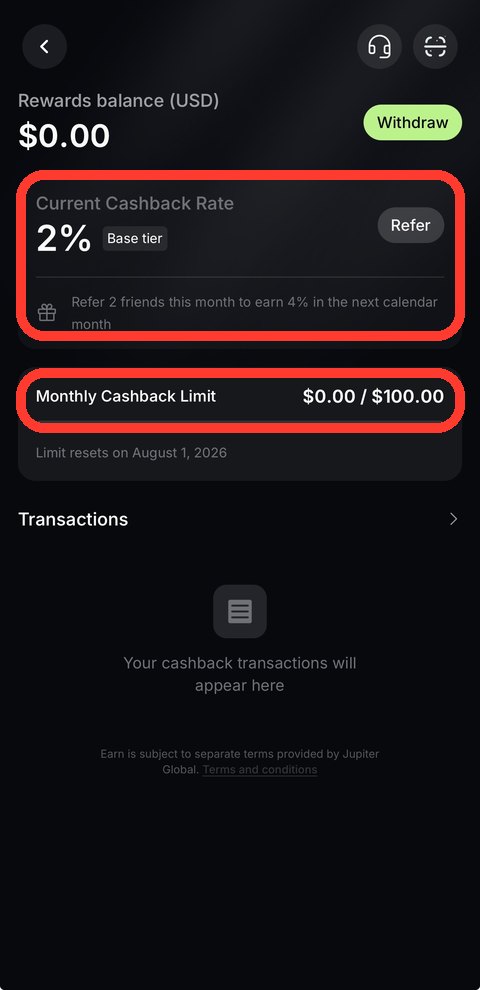
- Cashback: 2% base, capped at $100 a month, paid in USDC after the transaction settles. It rises to 4% (cap $200) only after you refer 2 qualified friends in the previous calendar month.
- US availability: 31 listed states, named in the next section. Check yours before you start KYC.
- Deposits: USDC or USDT sent on Solana has no processing fee. Other networks cost at least $0.30. Bank transfers add a fixed fee (ACH $2, SEPA €0.87).
- Physical card: phased rollout at $13.13 plus shipping, with full launch planned by the end of 2026. QR Pay works in 10 countries; paying from the Card balance is limited to DCS-issued cards.
What Is Jupiter Card? Rain vs DCS Issuers, and Why It Is Not Jupiter Money
The Jupiter Global card is the Visa card inside the Jupiter app from jup.ag. Searching “Jupiter Card” also returns Jupiter Money, an unrelated Indian neobank. Everything below, including fees, steps and the referral link, refers only to the jup.ag product. The flow is simple: sign in with a Global ID, pass KYC, deposit USDC or USDT into the Card balance, and the card draws from it. Jupiter’s docs state that it offers no credit line.
Two issuers sit behind the card, and your country decides which one you get. The official country list puts US residents on Rain and nine Asia-Pacific markets on DCS. One account can have only one issuer, so this choice sets your fees and whether you can take money back out.
| Item | Rain (US and other regions) | DCS (Taiwan, Japan, Korea and others) |
|---|---|---|
| Annual fee | $0 | $0 |
| Fee on USD purchases | None | None |
| Fee on non-USD purchases | 1% | 1.8% |
| Daily spend limit | No limit | $50,000 |
| Yearly spend limit | No limit | $990,000 |
| ATM withdrawal | Physical card: $1 + 0.65% per withdrawal | Not supported |
| Withdraw back to wallet or bank | Supported (Solana wallet, minimum 1 USDC or USDT, about 4 minutes) | Not supported |
| QR Pay from the Card balance | Not supported | Supported on DCS cards (all cards issued in Vietnam, the Philippines, South Korea and Taiwan; older cards only in Malaysia, Thailand and Singapore) |
Which US states are covered? Jupiter lists 31: Alabama, Alaska, Arkansas, California, Colorado, Connecticut, Florida, Hawaii, Illinois, Indiana, Iowa, Kansas, Kentucky, Maine, Massachusetts, Michigan, Minnesota, Montana, Nebraska, New Hampshire, New Jersey, New York, North Carolina, Oklahoma, Pennsylvania, South Carolina, Texas, Utah, Virginia, West Virginia and Wyoming. Eligibility follows your state of residence, not citizenship. Readers outside the US should look at the issuer column above. India is not on the country list, and Nigeria and Bangladesh are currently paused.
One more point on funds. Jupiter says it does not hold the money in your DeFi wallet, but the Card balance is managed by the issuing partner (Rain or DCS). Once you deposit, issuer terms apply. I would only load what I plan to spend in the next few weeks.
Fee Math: 1% or 1.8% FX Against 2% Cashback
USD purchases carry no fee: AWS, Netflix, ChatGPT and most US merchants. Only non-USD purchases pay the FX charge listed on the official fees page. Here is $500 of monthly spend on each issuer:
| $500 monthly spend | FX fee | 2% base cashback | Approx. net |
|---|---|---|---|
| All USD merchants (either issuer) | $0 | +$10 | +$10 |
| All non-USD merchants, Rain (1%) | −$5 | +$10 | about +$5 |
| All non-USD merchants, DCS (1.8%) | −$9 | +$10 | about +$1 |
The math assumes every purchase qualifies. ATM withdrawals, P2P, QR Pay, refunds, fees, gambling and government payments earn no cashback. The $100 monthly cap is reached at roughly $5,000 of spend. For a US cardholder on Rain, the practical rule is simple: USD merchants net the full 2%, and foreign purchases still net a few dollars. On DCS, a foreign purchase mostly cancels the cashback.
Cashback: 2% Base, 4% Only After 2 Referrals
| Item | Base | Referral boost |
|---|---|---|
| Rate | 2% | 4% |
| Monthly cap | $100 | $200 |
| Condition | Eligible card purchases | At least 2 qualified referrals in the previous calendar month (each friend completes KYC and spends $50 on the card). Takes effect the next month. One referral does not unlock it. |
| Paid when | After the transaction settles, into the Rewards balance | Same |
| Paid in | USDC (USD-denominated) | USDC |
You can move the Rewards balance to the card balance at any time without a fee (Withdraw on the Rewards page). It cannot go straight to an outside wallet. The docs also call cashback discretionary, and Jupiter can change, pause or revoke it. For that reason I plan around 2% and treat 4% as a bonus. Older posts that quote a flat 4% describe a rule that has since been replaced.
Registration and KYC: Five Steps With Your Global ID
You need a Global ID before you can use Spend. Download the Jupiter app (iOS or Android) and sign in with Email, Google or Apple. Discord and X sign-in are not supported. If you want to try it, this is my referral link. It adds no cost for you.
- Open the Card tab at the bottom of the app and tap Card, then Apply for Card on the Jupiter Global Visa Card page.
- When Verification Required appears, choose your country of residence and confirm your phone number with the one-time code.
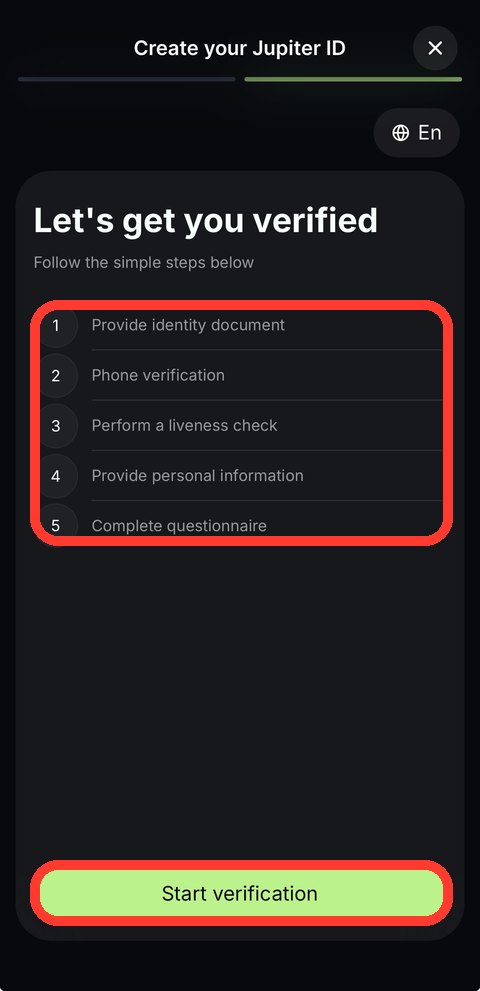
- Work through the five KYC steps: ID document, phone verification, liveness check, personal information, and a short questionnaire.
- Wait for the result. The docs say verification usually takes a few minutes. A flagged application goes to manual review, which usually takes 3 to 5 working days.
- Once approved, create the virtual card. DCS cardholders must also file a Travel Rule declaration before adding funds, and the money has to come from an account in their own name.
Asia-Pacific applicants must also provide proof of address. Jupiter’s docs do not state the address-proof rule for Rain accounts, so follow the prompts in the app if you are in the US.
What the referral program pays
Under the current official rules, the invited friend earns $20 after spending $1,000 within 30 days of card activation. The referrer earns $10 when that friend spends $50 within 30 days of finishing KYC. There is no cap on the number of referrals, and referral rewards do not count toward the monthly cashback limit. The “spend $1,000, get $100” offer you may see elsewhere is not the current official term. Confirm amounts in the app.
Deposit and Withdrawal: Three Routes and What Each Costs
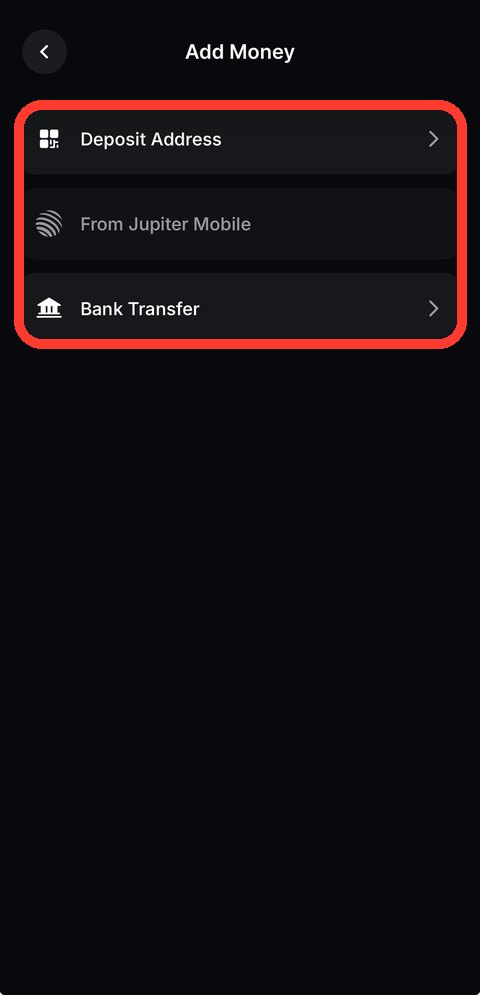
The Add Money screen offers three entry points: a deposit address, a transfer from Jupiter Mobile, and a bank transfer. The deposit address accepts only USDC and USDT. Other assets, including SOL, do not credit and cannot be recovered. From a Jupiter Mobile wallet, I would use Send to Spend, which swaps other tokens into USDC for you.
| Route | Cost | Notes |
|---|---|---|
| USDC or USDT on Solana | No processing fee | A one-time account-opening cost of up to about 0.002 SOL applies if the receiving address has no USDC account yet |
| Ethereum, Base, Arbitrum, Sui, BNB Chain, Robinhood Chain | At least $0.30; 0.02% for stablecoins, 0.1% for other tokens, plus source-network gas | Minimum deposit $10 on Ethereum, $3 elsewhere; up to 200,000 USDC per deposit |
| Send to Spend (Jupiter Mobile wallet) | Jupiter Mobile swap fee (0.1% or 0.2%) plus a small SOL network fee | Any token works and converts to USDC |
| ACH (USD) | $2 + 0.05% | A transfer too small to cover the fee is not credited and not refunded |
| SEPA (EUR) | €0.87 (about $1.00) + 0.10% | Same small-amount rule |
| Fedwire / SWIFT | $20 / $30 + 0.05% | Poor value for small amounts |
Example: depositing $500 USDC from Base costs the $0.30 floor, while $10,000 costs 0.02%, or $2. Solana is the cheapest route. A US reader can fund ACH from a bank account, but the fixed $2 fee makes it a poor fit for small top-ups. If you buy USDC on an exchange first, withdraw it to your Solana deposit address and send a small test amount before moving the full balance.
Spending, Apple Pay and QR Pay
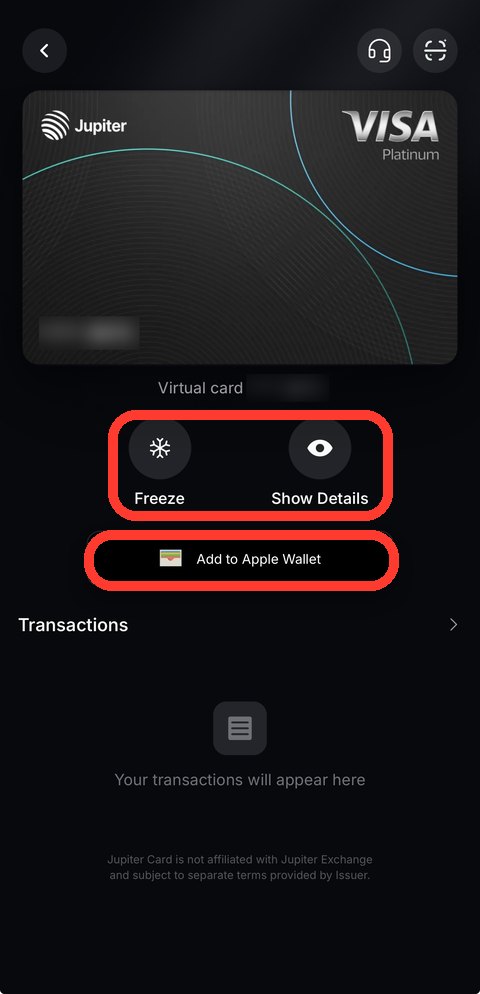
The card works at any merchant that accepts Visa. You can add it to Apple Pay or Google Pay by hand, and Jupiter charges nothing for that. Whether you can add it depends on Apple’s and Google’s support in your country. Refunds take up to 7 working days to reach the card balance, and the original FX fee is not returned. On a Rain card the refunded amount stays in the card balance for spending and cannot be withdrawn. If a merchant authorizes a payment but never settles it, the hold can last up to 30 days.
QR Pay: ten countries, Singapore and Thailand paused
| Country | QR network | Status |
|---|---|---|
| Bolivia (added Oct 2026) | QR Bolivia | Available |
| Brazil (added Oct 2026) | Pix | Available |
| Cambodia | KHQR | Available |
| Colombia (added Oct 2026) | Bre-B | Available |
| Indonesia | QRIS | Available |
| Malaysia | DuitNow | Available |
| Mongolia | QPay | Available |
| Philippines | QR Ph | Available |
| South Korea (added Oct 2026) | Seoul Pay, Jeju Pay | Available |
| Vietnam | VietQR | Available |
| Singapore | SG QR | Temporarily unavailable |
| Thailand | PromptPay | Temporarily unavailable |
There are two ways to pay. From a wallet, anyone signed in with a Global ID who passes the lighter identity check can pay in USDC on Solana, with no card needed. From the Card balance, only DCS-issued cards qualify and Rain cards do not support it: every card issued in Vietnam, the Philippines, South Korea and Taiwan works, while in Malaysia, Thailand and Singapore only cards activated before the dates Jupiter lists (May 13, May 28 and mid-May 2026) do. Payer and payee pay no fee, including no FX, and the limits are $500 per payment and $5,000 per day. QR Pay purchases earn no cashback. What counts is the country of the merchant’s QR code, not where you live. Country guides: Cambodia KHQR and Mongolia QPay.
Physical Card and Other Limits
- Physical card: phased rollout. The order option appears in the app only when your account is included, and the docs give no US-specific date. The price is $13.13 plus shipping, deducted from the Card balance. You need a balance of $1,500 when you order to get $30 off tracked shipping. Until then, plan around the virtual card and Apple Pay or Google Pay.
- Card orders are final: a virtual or physical card cannot be refunded once ordered.
- Cash: ATM withdrawals work on Rain physical cards ($1 + 0.65% each) and are not supported on DCS cards.
- Blocked merchant types: money transfers, securities brokers, gambling, government payments and some high-risk digital services are declined automatically.
- Co-branded card: the Claynosaurz card is closed to residents of Taiwan, South Korea, the Philippines and Vietnam.
How Jupiter Card Compares With Other Crypto Cards
I compare crypto cards on one fixed checklist: FX fee on non-USD spend, cashback conditions and cap, whether you can withdraw, and whether a physical card and ATM access exist. On that list Jupiter stands out for the $0 fee on USD purchases and 2% base cashback, and it is weakest where DCS applies: 1.8% FX and no withdrawals. Run any US alternative through the same four checks, including which states it serves, before choosing. These guides cover the same checks card by card:
- RedotPay card: sign-up and fee breakdown (its India guide covers UPI and tax)
- Bybit Card: application, cashback and fees
- Bitget Wallet Card application guide
- Kast Card application guide
FAQ
Is Jupiter Card available in my country or US state?
US residents of 31 listed states get a Rain-issued virtual card. Australia, Japan, Malaysia, the Philippines, Singapore, South Korea, Taiwan, Thailand and Vietnam get a DCS-issued card. India is not on the official country list, and Nigeria and Bangladesh are paused. Check the list on the Jupiter docs before starting KYC.
Is the cashback 4%?
Not by default. Base cashback is 2%, capped at $100 a month. It rises to 4% (cap $200) only after you refer at least 2 qualified friends in the previous calendar month. Cashback is paid in USDC after settlement and Jupiter can change it.
Can I withdraw money I deposited?
It depends on the issuer. Rain cardholders can withdraw to a Solana wallet (minimum 1 USDC or USDT, about 4 minutes) or to a bank. DCS cards, including Taiwan, do not support withdrawals, so deposit only what you plan to spend.
Is there a physical card?
Yes, but it is rolling out in phases. The order option appears in the app only when your account is included. The price is $13.13 plus shipping, and Jupiter plans a full launch by the end of 2026. No US-specific date is published.
How much does the referral program pay?
The invited friend earns $20 after spending $1,000 within 30 days of card activation. The referrer earns $10 when that friend spends $50 within 30 days of finishing KYC. There is no limit on referrals.
Is this Jupiter Money?
No. Jupiter Money is an Indian neobank. This guide covers the Jupiter Global Visa card from jup.ag, the Solana DEX aggregator.
Fees, cashback and limits follow Jupiter’s official docs (Jupiter Card, Fees & Limits, Rewards & Referrals), checked November 3, 2026. They can change at any time. This article is for informational purposes only and does not constitute financial advice. Cryptocurrency carries significant risk. Always do your own research.
Disclosure: This article contains affiliate links. We may earn a commission at no extra cost to you if you sign up through our links. This does not influence our editorial recommendations. If the app asks “Have a referral code?” during signup, you can enter EN8EREGZ manually.