RedotPay Card 2026: Supported Countries, Real Fees & Who Can Use It
Key Takeaways
- Virtual card: 10 USD one-time fee. Physical card: 100 USD. No annual fee.
- Swipe fee: 2.2% on non-USD purchases, 1% on USD merchants like Amazon. ATM: 4.2%, or 5.2% once monthly ATM withdrawals pass 10,000 USD.
- Funding: USDT, USDC, BTC, ETH on TRC20, ERC20, BEP20, Polygon, Arbitrum, Solana, and Bitcoin. Minimum 1 USDT on TRC20, landed in about 5 minutes.
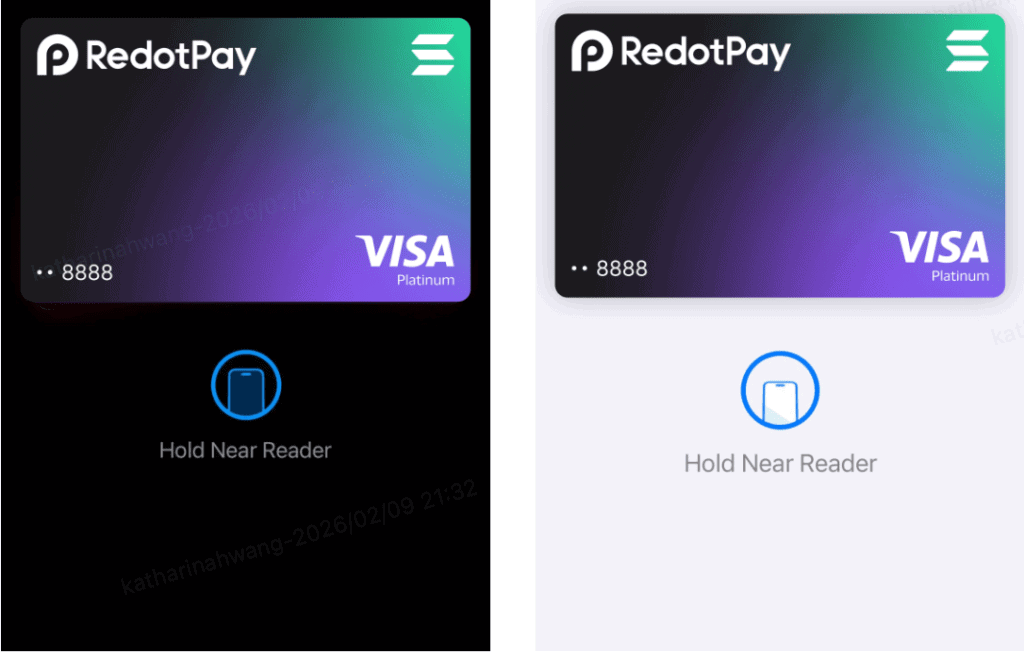
- Apple Pay: some cards need a free card upgrade first (app 3.0.1 or higher; Card → Upgrade). RedotPay is rolling the prompt out gradually.
- Availability: cards are not issued to residents of 47 regions on RedotPay’s official restriction list (updated August 28, 2026), including the United States, India, Singapore, Russia, and Mainland China.
- Trust signals: Hong Kong-based company, KYC through Sumsub. Check RedotPay’s own Help Center for the entity that serves your country.
- New in 2026: Credit, P2P marketplace, multi-currency wallet, Loan, Earn, Scan to Pay, mobile top-up.
What Is the RedotPay Card? A 30-Second Overview
The RedotPay card is a stablecoin-based card that turns USDT, USDC, BTC, and ETH into real spending power at any merchant that accepts major card networks. No forced off-ramp to your bank and no multi-day bank-transfer hold just because you bought groceries.
RedotPay is a Hong Kong-based crypto payments company founded in 2023. The core product is a stablecoin card linked to a crypto wallet you fund with stablecoins or major coins. When you swipe, RedotPay instantly converts the crypto to fiat at the point of sale, so the merchant sees a normal card transaction. You see a standard debit on your app ledger.
Say you hold $500 in USDT and want to buy a pair of running shoes on Amazon for $120. The old way: withdraw USDT to an exchange, sell, wait 3-5 business days for the bank transfer to land in your account, then order. The RedotPay way: you top up the card in the app, check out at Amazon with the card number, done in under a minute. No bank delay and no separate sell order on an exchange; how a swipe is taxed depends on where you live.
Two card types exist. The virtual card costs 10 USD one time and is issued instantly to the app for online checkout and mobile wallets. The physical card costs 100 USD and ships by mail, with ATM access and chip-and-PIN or contactless use at terminals. Most new users start virtual, test it for a month, then add the physical card if the economics work out. The virtual card is enough if you only spend online, and you can cancel it anytime without paying a fee.
Who Should Actually Use RedotPay?
Not everyone benefits from a crypto card. Three user profiles get the most out of RedotPay, and one group should probably skip it.
Profile 1: Stablecoin holders who want to spend without selling. If you park six months of expenses in USDT or USDC as dollar-cost-averaged dry powder, RedotPay lets you spend that balance at a supermarket checkout without the two-step dance of selling on an exchange and waiting for a bank transfer. How each swipe is taxed depends on your country, but at least the UX matches a normal debit card.
Profile 2: Frequent international travelers. The 2.2% swipe fee runs higher than a premium travel card, but RedotPay beats the combined cost of a Wise transfer plus the bank’s 3% foreign transaction fee when you pay by card at USD-priced merchants abroad; for cash, the 4.2% ATM fee makes it expensive. The fee structure actually rewards you for spending at USD-denominated merchants while abroad, and the next section breaks down why.
Profile 3: First-time crypto card users. A 10 USD virtual card is the lowest entry fee in the market. Crypto.com’s entry-tier Ruby Steel card requires a CRO lock-up, and the amount varies by region. Coinbase Card requires a funded Coinbase account. RedotPay lets you test the flow with the equivalent of a $10 bill.
Who should skip it: heavy ATM users. At 4.2% per withdrawal, pulling $200 out costs $8.40, worse than most airport ATMs. Also skip RedotPay if your monthly spend tops $5,000 and you already carry a card with no foreign-exchange fee. The 2.2% fee adds up fast.
Fast transactions and easy to use app. The plastic card works everywhere.
Sarvesh Emrith, Trustpilot, April 2026
RedotPay Fees: The Full Breakdown
Most reviews list the headline 2.2% number and stop there. That is incomplete. Here is every fee RedotPay charges, including the small ones buried in the help center.
| Fee Type | Amount | Detail |
|---|---|---|
| Virtual card issuance | 10 USD (one-time) | No annual fee, no monthly fee |
| Physical card issuance | 100 USD (one-time) | Standard mail free; DHL Express fee varies by country; no annual fee |
| USD merchant swipe | 1% | Amazon, Netflix, Uber, any USD-priced merchant |
| Non-USD swipe | 2.2% | 1% crypto-to-fiat plus 1.2% FX spread |
| ATM withdrawal | 4.2% (5.2% above 10,000 USD a month) | 2% ATM fee (3% once monthly ATM withdrawals exceed 10,000 USD) plus 1% conversion plus 1.2% FX, physical card only |
| Small transaction fee | $0.20 | Only on swipes of $1.00 or less, from the 6th such swipe of the month onward |
| Declined transaction | $0.50 | Each decline from the 4th declined transaction of the month onward |
The 1% vs 2.2% distinction matters more than people realize. If you shop at Amazon, pay Netflix, or ride an Uber billed in dollars, you are hitting USD merchants, so RedotPay only takes 1%. That is a low swipe fee for a crypto card; check each issuer’s own fee page for your region before comparing.
The small transaction fee trips up light users who do not read the fine print. It only applies to swipes under $1, from the sixth such swipe of the month, at $0.20 per transaction. A normal $4 coffee never triggers it; the fee shows up only if you make many sub-$1 purchases. Plan around it by consolidating tiny buys into larger transactions.
The decline fee is less scary than it looks. It only triggers from the fourth declined transaction of the month, so a few insufficient-funds declines at the pump do not cost you. Keep a 10-20% buffer in the card balance and you will never see it.
How to Sign Up for RedotPay in Under 10 Minutes
The full onboarding runs about 8-10 minutes if your documents are ready. Here are the five steps, with the gotchas that trip up most first-time users.
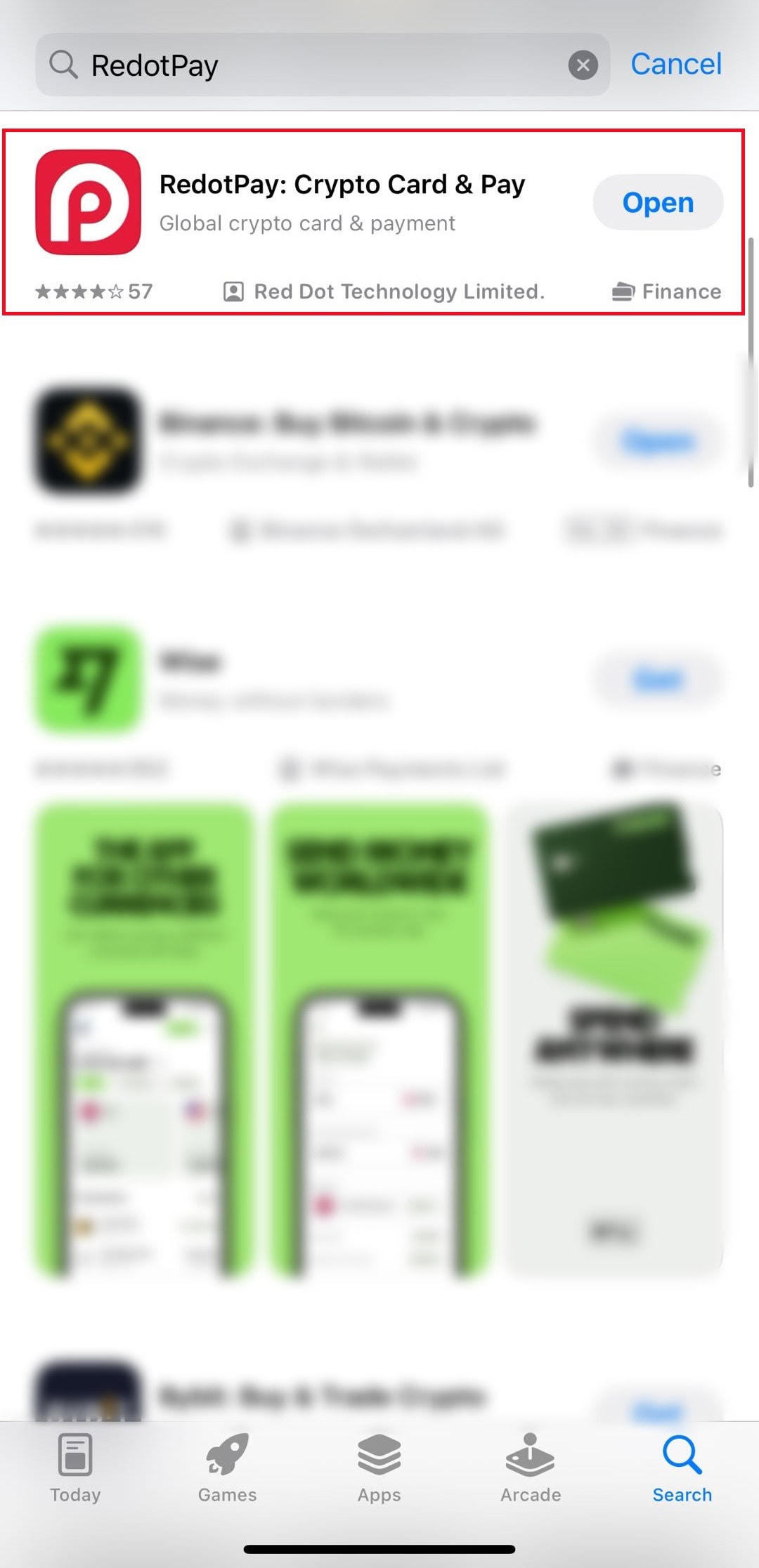
Step 1: Download the app and create an account
RedotPay is on both the App Store and Google Play. Download, then register with an email or phone number. Any mainstream email provider works. Signing up through the link in this guide gives new users a 5 USDs welcome reward. It is valid for 30 days after you receive it and cannot pay the virtual or physical card application fee.
Step 2: Check eligibility, then complete KYC
First, confirm your country of residence is not on RedotPay’s card issuance restriction list (last updated August 28, 2026). Residents of the United States, Mainland China, Singapore, and several dozen other regions are currently ineligible for both virtual and physical cards, and addresses in those regions cannot be registered as billing addresses — check the official list before you invest time in the process.
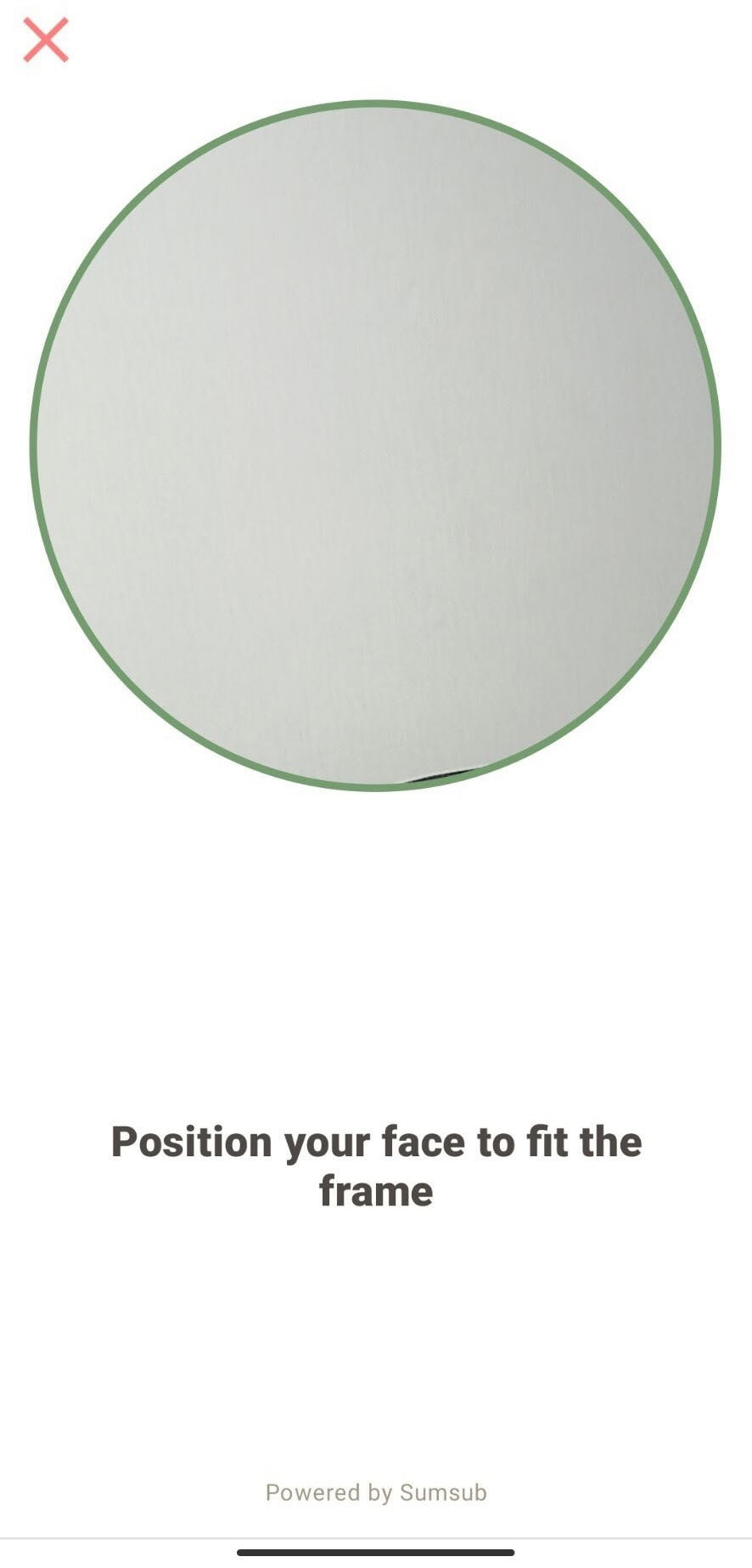
If you are in a supported country, KYC runs through Sumsub in the background. Two things to prepare: a well-lit photo of your government-issued ID, front and back, and a selfie video where you turn your head left and right. You also enter your current residential address and answer a short 4–5 question form, and RedotPay may ask for extra documents. The review usually takes a few minutes; if extra documents are requested, allow 1–3 business days.
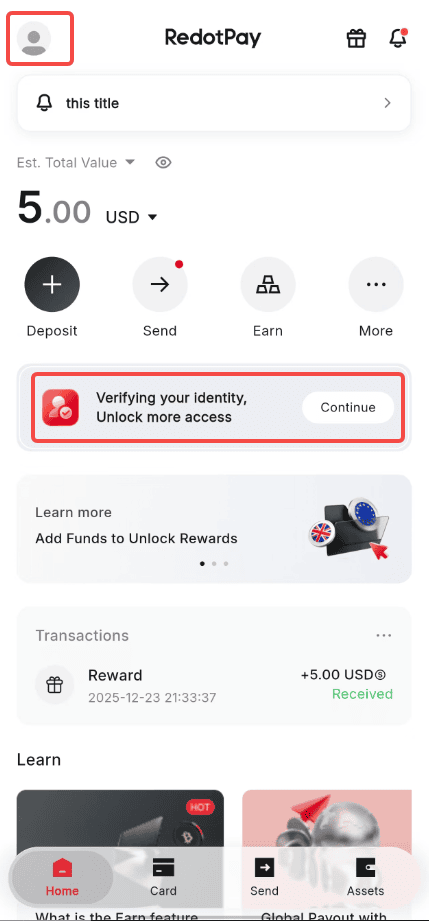
Action: on the home screen tap the "Verifying your identity" banner and press Continue (the profile icon at the top left opens the same flow). Result: after the profile details, a checklist shows Profile details, Identity document and Selfie as the three stages.
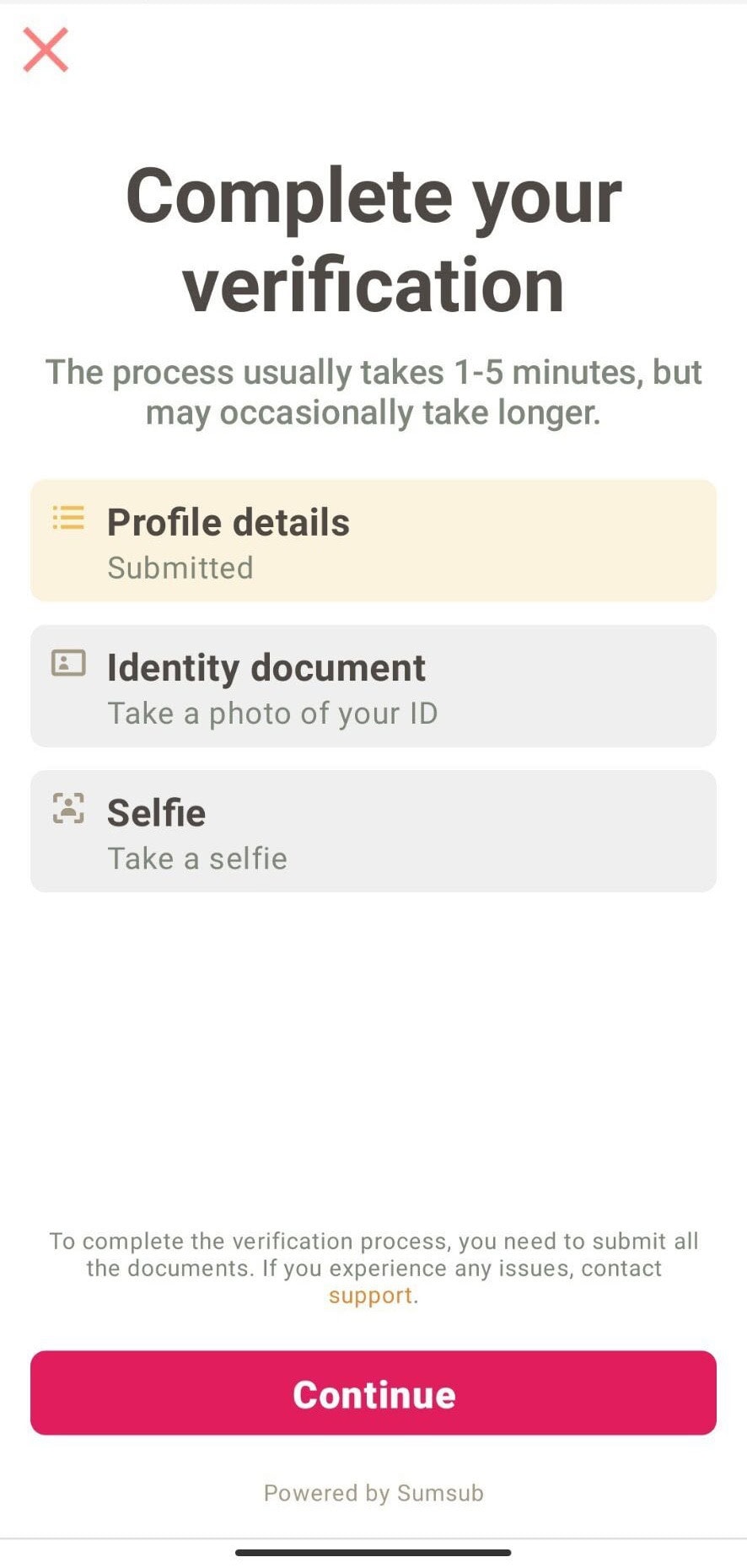
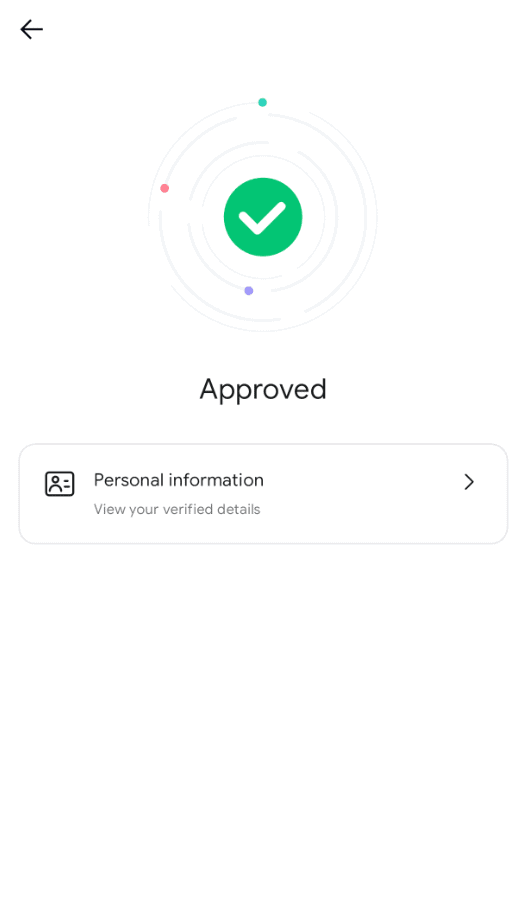
Action: photograph the ID under Identity document, then fit your face inside the circular frame for the Selfie. Result: once the review finishes, the app shows Approved and your verified personal information. The on-screen estimate is 1-5 minutes, and it can take longer.
Step 3: Choose virtual or physical card
Go to the Card tab. The virtual card activates within seconds of paying the 10 USD fee. The physical card requires a mailing address in a supported country (see the eligibility note in Step 2), and is delivered by standard mail (shipping waived) or DHL Express (fee varies by country, shown at checkout). Delivery time depends on your destination. A few regions where cards can be issued are still excluded from physical delivery, so check the official Card Delivery Restrictions list. Enter your billing and shipping address in English; the name on the billing address is printed on the card and cannot be changed afterwards.
Step 4: Set a spending PIN and security options
Turn on biometric login, set a 6-digit transaction PIN, and enable push notifications for every swipe. The virtual card does not use PIN at checkout, but the physical card needs one for in-store chip-and-PIN terminals. Save the PIN somewhere you can find it later. There is no “forgot PIN” quick reset, just a full support ticket.
Step 5: Top up with crypto to activate
A new card sits inactive until you fund it. Transfer USDT, USDC, BTC, or ETH from an exchange or any self-custody wallet that supports the network you choose. TRC20 USDT is the cheapest, about $1 in network fees and 5 minutes to land. Once the balance shows in the app, the card is live.
How to Fund and Spend with Your RedotPay Card
Funding and spending are the two flows you will run every week. Here is how each one works, with the network choices and merchant behavior that actually move the needle on cost.
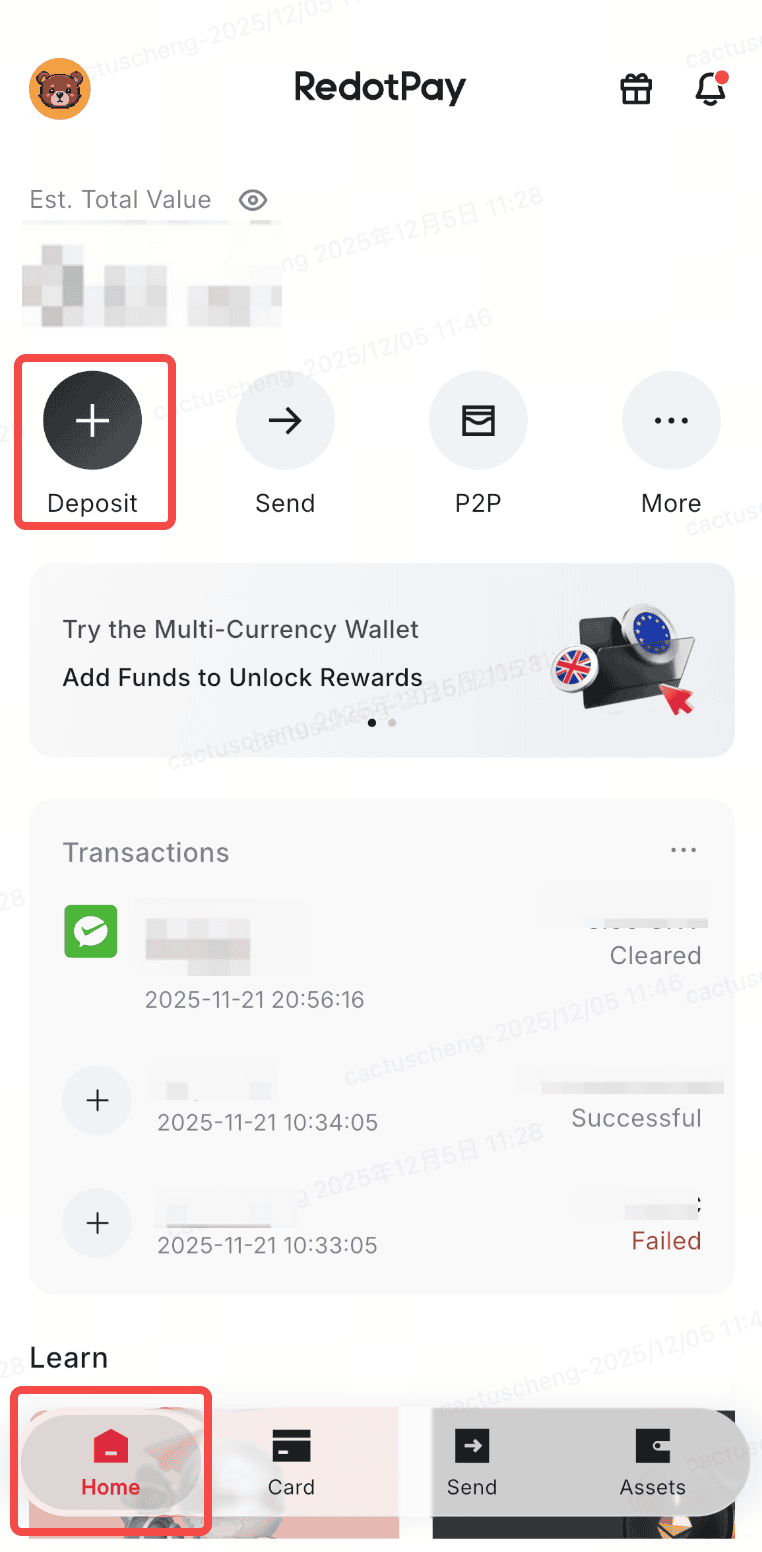
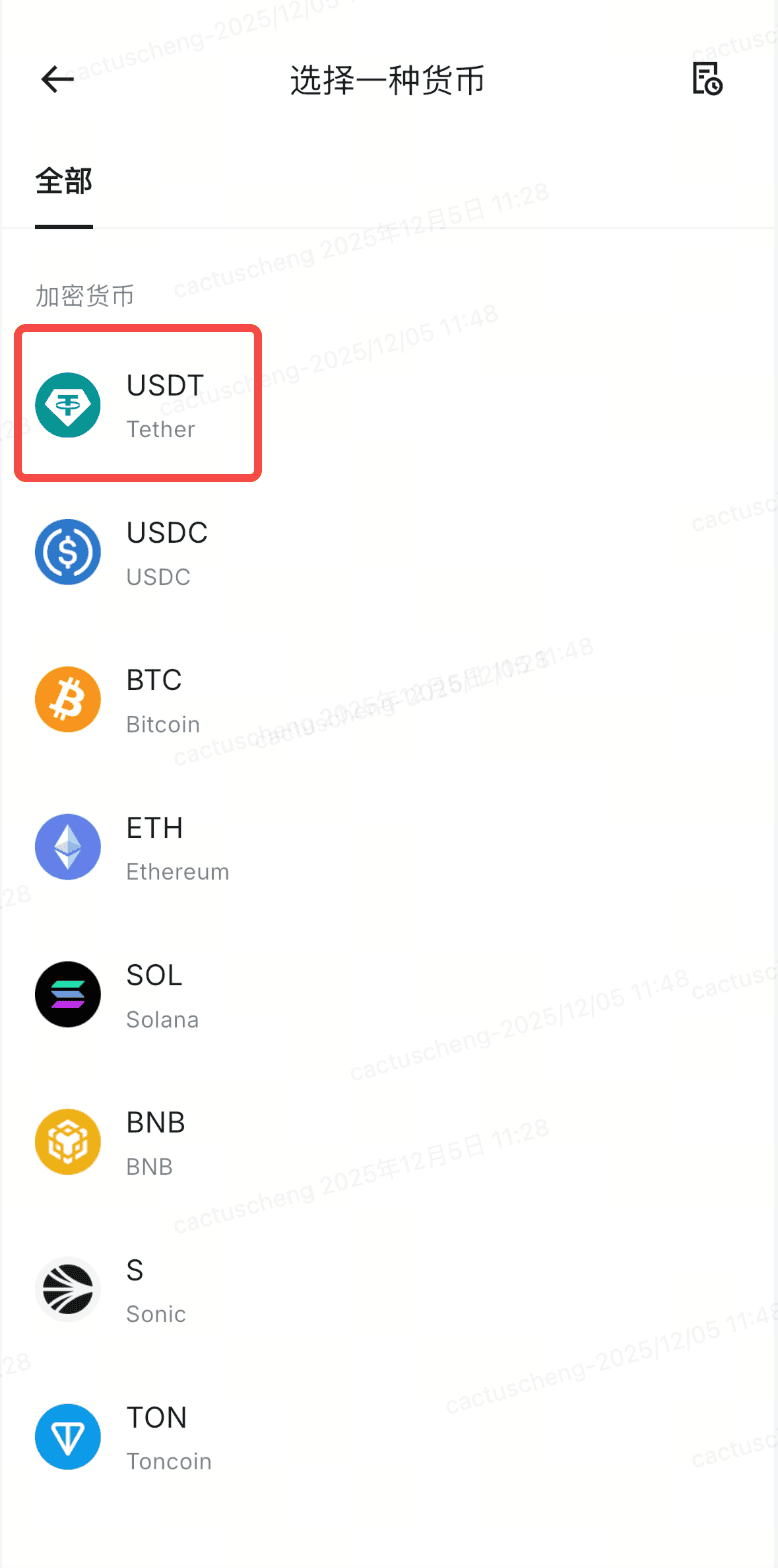
Action: on the home screen tap Deposit, then choose the coin to receive (USDT in the example). Result: the next screen asks how you want to deposit. The second capture was taken with the app language set to Chinese; it is the same currency list.
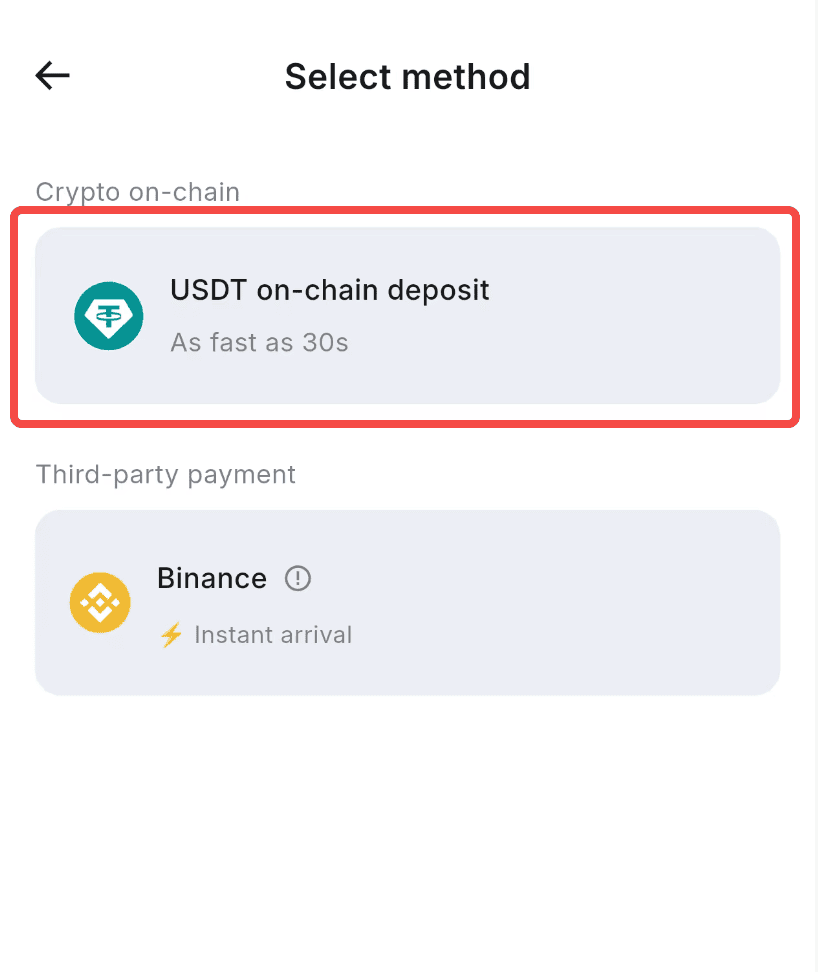
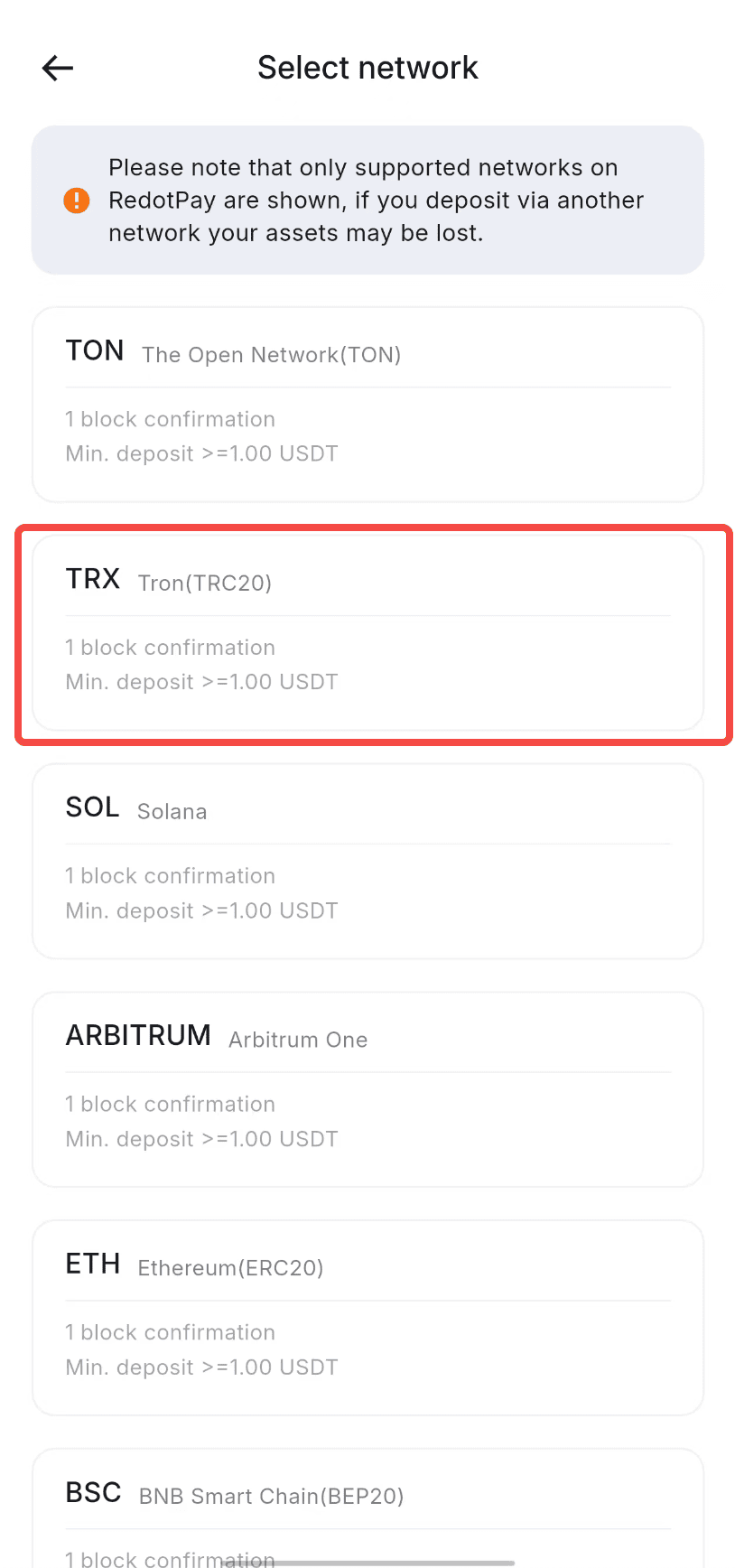
Action: pick USDT on-chain deposit as the method, then choose the network. TRC20 is highlighted because it is the cheapest route described below. Result: the app only accepts the networks it lists, and a warning says assets sent over any other network may be lost.
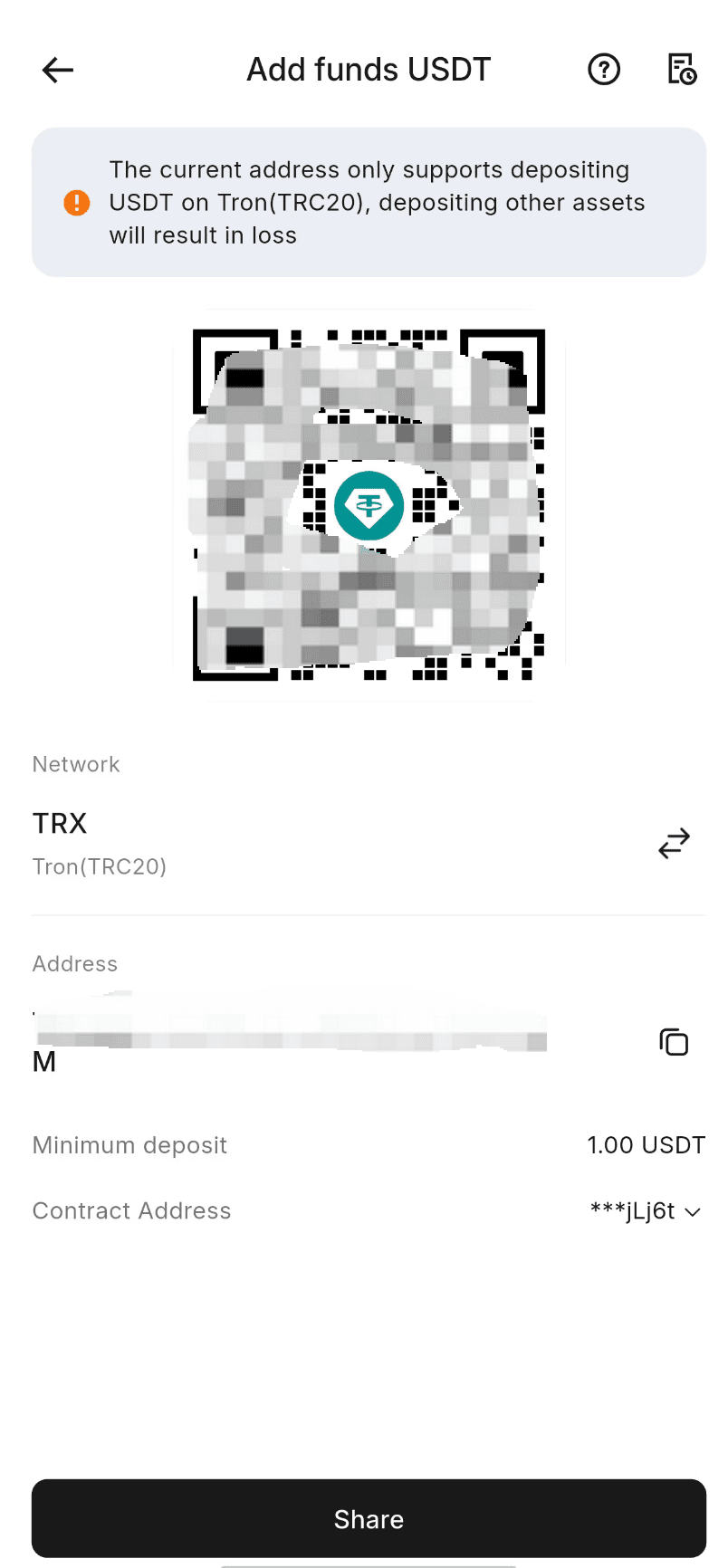
Action: copy the address under the QR code, or tap Share, and paste it into the exchange or wallet withdrawal form. Result: the screen shows the network (TRX, Tron TRC20), the address, and the 1.00 USDT minimum deposit.
Funding Path 1: From an exchange. Buy USDC or USDT on an exchange that serves your country, then withdraw to your RedotPay deposit address. Choose the network before you buy and confirm the exchange supports it. Solana withdrawals cost a few cents. ERC20 costs more but is the safest option if you are used to MetaMask and Ledger workflows. TRC20 USDT is often the cheapest of all.
Funding Path 2: From self-custody. If you already hold stablecoins in a Ledger, Trezor, or MetaMask wallet, send directly to the RedotPay deposit address. Minimum deposit is 1 USDT on TRC20, or network-dependent on other chains. Always do a small test transfer first. Crypto sent to the wrong network does not come back, and the support ticket to recover it can take weeks.
Funding Path 3: Buy coins with a bank card. In the app, tap Buy Coins, pick the coin, choose Credit/Debit Card and confirm. RedotPay says the crypto usually arrives within 0.5–2 hours, your bank may ask you to approve the payment, and some assets are not offered in every country. A RedotPay card cannot be used to buy crypto. The price and any fee are shown on the confirmation screen, so check them before you pay; some users also report card and PayPal funding being declined (see the community notes below).
RedotPay says most crypto deposits arrive within 1–15 minutes, depending on the network. ERC20 depends on gas and can take longer during mainnet congestion. Anything below the minimum is not credited until you send a second deposit of the same coin on the same network that brings the total above it. After funding lands, your card balance updates instantly and you can spend right away.
Spending Channel 1: Online checkout. Enter the card number, expiry, and CVV from the app at any merchant that accepts card payments. Works on Amazon, Netflix, Uber, and most SaaS subscriptions. Some merchants reject prepaid cards for recurring billing. Spotify and certain streaming services do this occasionally. Fix: if your card has been upgraded for Apple Pay or Google Pay, use the wallet; otherwise use another payment method for that subscription. Digital goods platforms like Steam and the App Store accept the card without issues.
Spending Channel 2: In-store payments. With the physical card, tap it on a contactless terminal or insert it and enter your PIN when the terminal asks. The virtual card has no chip or PIN; it taps through Apple Pay or Google Pay once it is added to your phone wallet (some cards need the free in-app upgrade first). The swipe fee is the standard 1% for USD merchants. A $4 coffee is well above the $1 line, so it never counts toward the $0.20 small transaction fee, which applies only to swipes under $1 from the sixth such swipe of the month.
Spending Channel 3: ATM withdrawal. Physical card only. Per the RedotPay Help Center, USD cards are capped at 3,750 USD in ATM withdrawals per day and 50,000 USD per month, with a maximum of 3 ATM transactions per day (some countries and regions apply lower caps of 3,000 USD per day and 10,000 USD per month) — the official caps are the binding constraint, well below what a machine might dispense in one session. The 4.2% fee (5.2% once your monthly ATM withdrawals pass 10,000 USD) plus whatever the ATM operator charges makes this the most expensive path. Use it when you genuinely need cash, not as a routine. If you can wait 24 hours, a Wise transfer to your bank and a fee-free ATM withdrawal from your debit card usually costs half as much.
RedotPay publishes its full fee and limit table in the Help Center; the ATM caps above are the ones that matter for cash. The other real-world cap is your wallet balance and the merchant’s own risk screens. Large purchases, say a $5,000 laptop from an electronics retailer, sometimes trigger card-network fraud holds. Call the merchant or pre-authorize a small test charge first. Freeze the card in the app anytime you want to cut off spending, and unfreeze it in one tap when you are ready to swipe again.
What’s New in RedotPay 2026
RedotPay expanded from a single card product into a broader crypto financial app this year. Seven new features launched, and three of them change the math on whether it is worth keeping crypto on the platform.
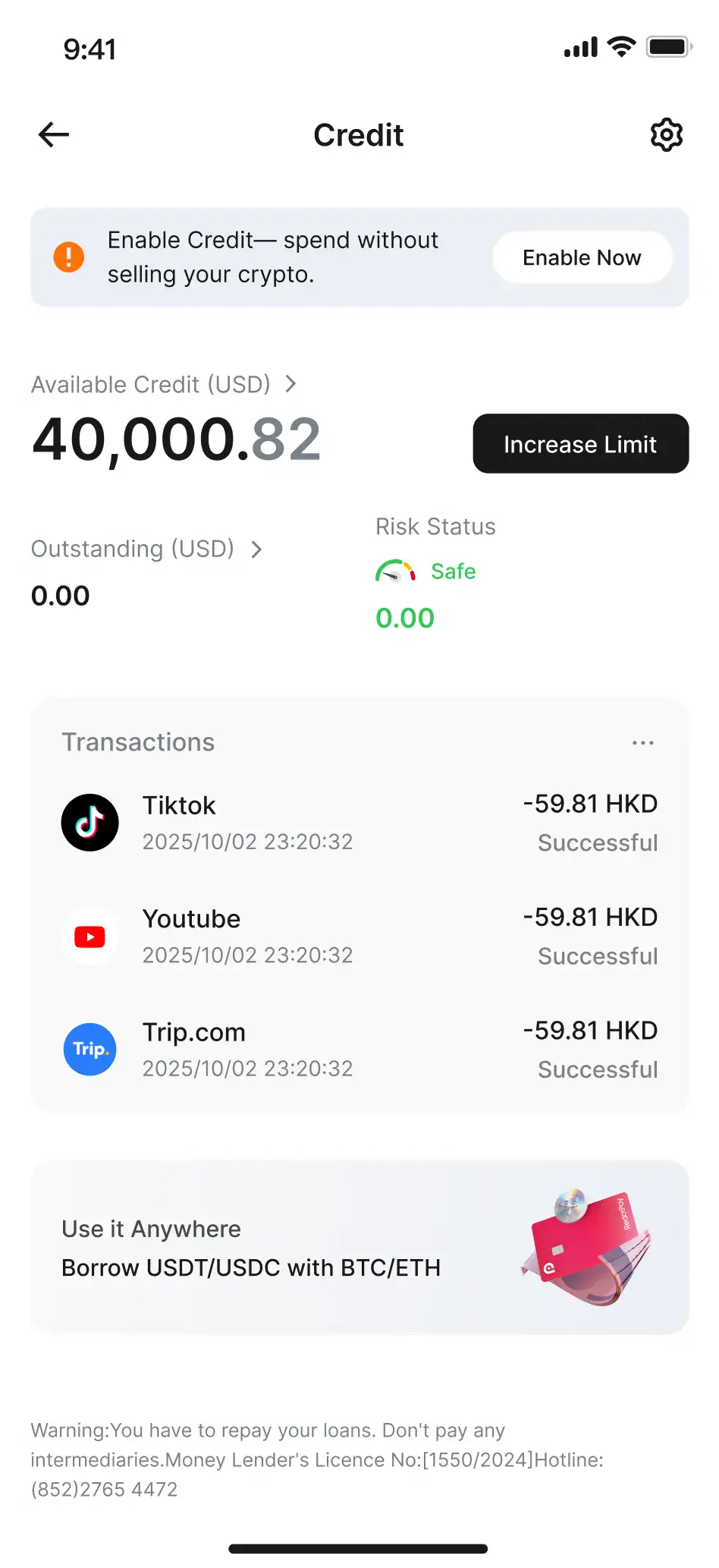
Credit. Spend against your crypto balance without selling. You pledge BTC or ETH as collateral and borrow against it to fund card spending. Useful when you do not want to sell your crypto, but pledged assets are locked until you repay, and RedotPay charges a fixed 0.05% simple interest per day on the outstanding balance. Unpaid credit can bring extra fees and limit your account.
The Credit tab shows available credit, the outstanding balance and recent card transactions in one place.
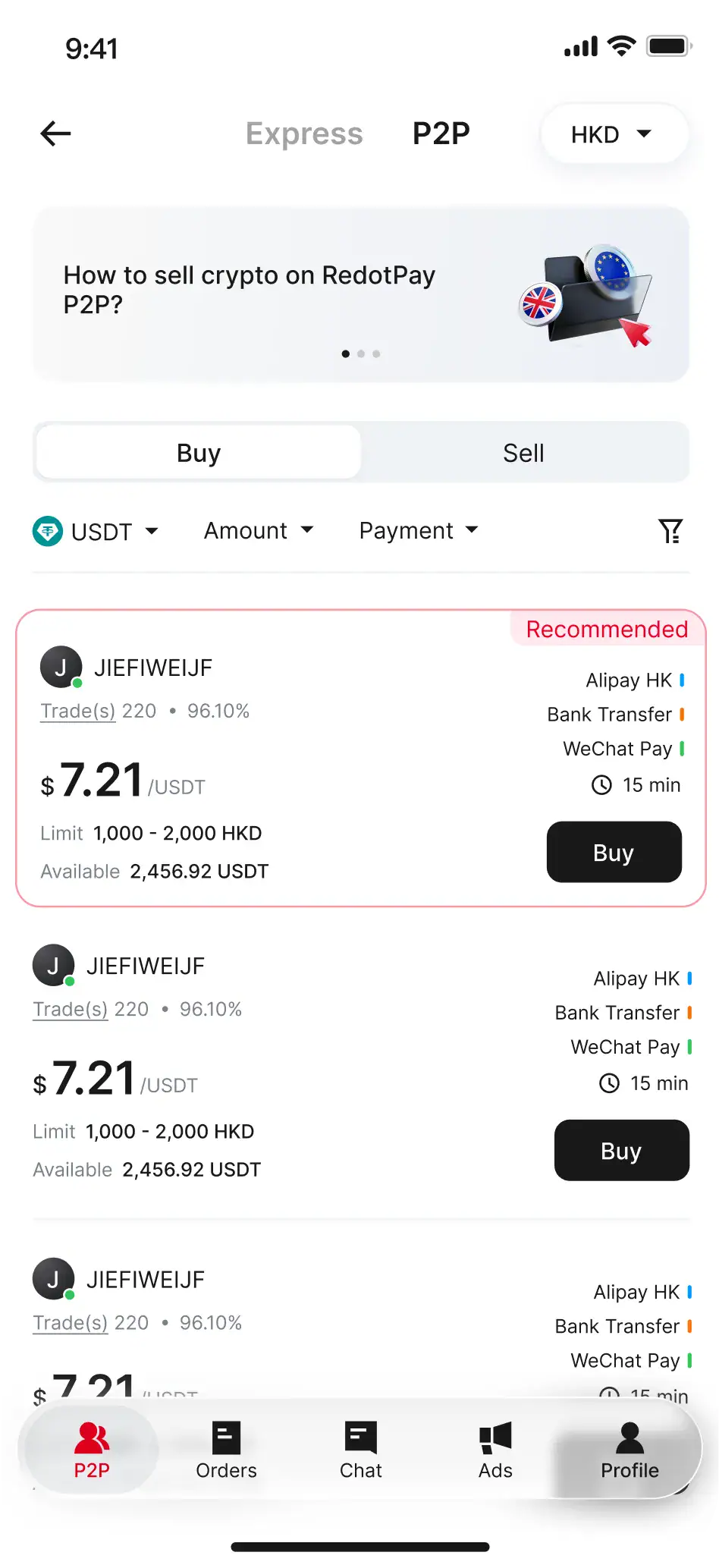
P2P marketplace. Buy and sell crypto directly with other RedotPay users at rates the community sets. It works like the old LocalBitcoins model, useful for getting better rates than centralized exchanges, but counterparty risk is on you. Check the order terms and any fee shown in the app before you trade, and confirm availability for your country first.
Multi-currency wallet. You can open a personal funding account in US dollars, pounds or euros, depending on your country or region. Open the app and go to Deposit – Fiat to see which ones you can get, then check the fee and deposit limits shown there before you rely on it for card top-ups.
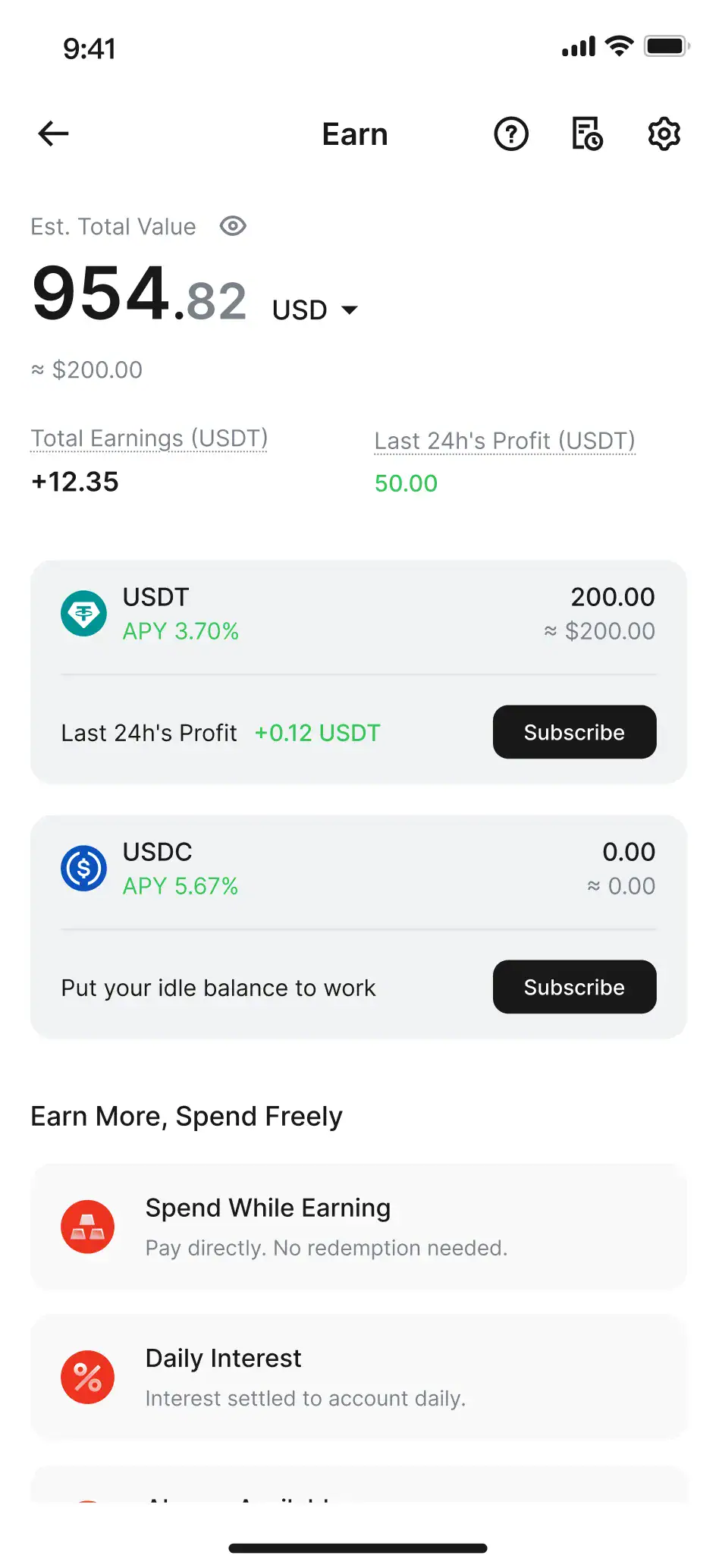
Loan, Earn, Scan to Pay, Mobile Top-Up. Loan is crypto-backed lending. Earn pays yield on stablecoin balances. Compare with other yield options, including tokenized T-bills, before committing. Scan to Pay reads merchant QR codes, mostly relevant in Asia. Mobile Top-Up recharges prepaid SIMs in over 100 countries, handy for travel. None of these are required to use the card, but they each cut a specific trip to a third-party service.
Is RedotPay Safe? Regulation and Trust Signals
RedotPay is a Hong Kong-based company that issues cards through a card program partner. This guide does not treat that as a guarantee: the protections that apply to you depend on the entity serving your country.
Which rules apply to you depends on where you live, not where RedotPay is based. RedotPay does not issue cards to residents of the regions on its Card Issuance Restrictions list, which includes the United States, and it runs KYC checks through Sumsub. That does not mean zero risk. Regulatory requirements continue to evolve; verify your local compliance obligations before use. This article does not constitute legal advice.
Custody remains the main risk. Your crypto sits in RedotPay’s custody once deposited, not in a wallet you control. The platform is not covered by deposit insurance. It is a payment service, not a bank. If RedotPay suffers a hack or insolvency, your balance is not protected by a bank deposit-insurance scheme. Keep only as much on the card as you plan to spend within a month or two. Long-term stablecoin positions belong on a self-custody wallet.
Trustpilot reviews are mixed. The positive reviews praise fast activation and broad merchant acceptance. The negative reviews cluster around two issues: slow support response on complex tickets (1-3 business days) and occasional KYC re-verification requests that feel intrusive. One user reported two unauthorized transactions totaling $20.72 with slow dispute resolution. Small-dollar fraud happens on every card network. The real question is how RedotPay handles chargebacks, and that process is still rougher than a Chase or Amex dispute.
Disclaimer: This article is for informational purposes only and does not constitute financial or tax advice. Cryptocurrency carries significant risk, and each card swipe may be a taxable event depending on your country’s rules. Consult a licensed tax professional in your country before relying on any of this.
RedotPay vs Coinbase, Crypto.com, and Binance Cards
These are the cards readers most often compare with RedotPay: Coinbase Card (US only) and Crypto.com Visa, where each is available in your country. Here is the direct comparison on the metrics that actually affect your wallet.
| Criteria | RedotPay | Coinbase Card (US only) | Crypto.com Visa (Ruby) |
|---|---|---|---|
| Issuance fee | 10 or 100 USD | Free | Free (requires a CRO lock-up; amount varies by region) |
| Annual fee | $0 | $0 | $0 |
| USD swipe fee | 1% | 2.49% | 1% |
| Non-USD swipe fee | 2.2% | See Coinbase’s fee page (US only) | See Crypto.com’s fee page for your region |
| ATM fee | 4.2% (5.2% above 10,000 USD a month) | Network fees only | See Crypto.com’s fee page for your region |
| Rewards | None (plus occasional promos) | Up to 4% in crypto | See Crypto.com’s fee page for your region |
| Crypto accepted | USDT, USDC, BTC, ETH | Coinbase account balances | CRO and major coins |
| Apple Pay | Free card upgrade required for some cards | Yes | Yes |
| Exchange independence | Standalone platform | Tied to Coinbase | Tied to Crypto.com |
Coinbase Card wins on rewards if you already use Coinbase and qualify for the 4% crypto-back promotions. It loses on the swipe fee. A 2.49% charge is high for a card that is effectively free. Crypto.com Visa offers better cashback but requires locking up CRO.
RedotPay’s edge is platform independence. You do not need an account at any particular exchange. USDT bought anywhere works. For users who already moved off centralized exchanges post-FTX and prefer self-custody wallets, RedotPay is the cleanest bridge from a MetaMask or Ledger balance to everyday spending.
The 2026 features (Credit, P2P, Multi-Currency Wallet, Loan, Earn) are unique to RedotPay among the cards listed. If any of those matter to you, the comparison changes.
Related: Best Crypto Credit Cards 2026: Bybit vs RedotPay · Kast Card vs RedotPay · Compare Crypto Cards by Where You Live
RedotPay Pro: Is the Paid Membership Worth It? (New for 2026)
In June 2026 RedotPay launched a paid membership called RedotPay Pro, built on a simple idea: the more you spend on your card, the more it gives back. It doesn’t change how you pay — it trades a monthly or annual fee for cashback, waived card fees and fee-free ATM withdrawals. Here’s the breakdown using RedotPay’s own terms, and when it actually pays off.
| Plan | Monthly | Annual |
|---|---|---|
| Price | $12.90 / mo | $129 / yr (~$10.75/mo) |
| Free card | Free virtual card (waives $10 fee) | Free physical card (waives $100 fee) |
| Apple / Google Pay cashback | 3% | 3% |
| Fee-free ATM | — | Up to $1,000/mo (global, RedotPay-side fees only) |
| RedotPay Earn boost | — | +1% APY (first $1,000,000, supported regions) |
How the cashback works — the limits to know
- The 3% cashback applies only to Apple Pay / Google Pay transactions — physical-card swipes or manually typed online payments don’t count.
- It’s paid in USDs (RedotPay’s US-dollar credit) and capped at 18 USDs per month — roughly $600 of Apple/Google Pay spend before it maxes out.
- Issued USDs expire after 30 days and can only be applied to future card spending — they can’t be withdrawn, transferred, or used to buy a card.
- Refunded or disputed purchases claw back the matching cashback; the membership fee is non-refundable and non-transferable, and auto-renews 48 hours before expiry (cancel anytime, keep benefits until it ends).
When is RedotPay Pro actually worth it?
Working back from the 3% rate, the $12.90 monthly fee breaks even at about $430/month of Apple/Google Pay spend, and the reward maxes out past $600/month. So the sweet spot is someone who already taps Apple/Google Pay for roughly $430–$600 a month. The annual plan adds a free physical card (saves $100), $1,000/month of fee-free ATM withdrawals and the Earn boost — better suited to frequent travelers who pull cash abroad, or anyone already holding funds in RedotPay Earn.
If you use the card lightly, rarely tap-to-pay, or mostly pay online by typing your card number, the fee is hard to earn back and a standard free account is probably the smarter choice. Membership is tied to your account (not your card or phone), so it follows you across new cards and devices. You can activate Pro inside the app — check your typical monthly mobile-pay spend before picking a plan.
What recent RedotPay users are saying — my takeaways
I went through recent Reddit threads about RedotPay to get a clearer picture of what real users are experiencing. Much of the recent feedback comes from users in the Middle East and North Africa, so it tends to be candid. That said, it’s not all positive, and the pain points cluster around one area: funding channels.
The issue that comes up most is PayPal. Multiple people report that PayPal transfers to RedotPay are getting declined — some say automatic top-ups have failed consistently for the past couple of months, and manual attempts haven’t worked either. A few users compared it to cards like Bleap and came away underwhelmed. Others are simply asking whether anyone has had a reliable long-term experience with it. The picture that emerges: the card works, but funding success rates and stability vary by region and method. These are publicly posted Reddit comments I’ve compiled to help flag the rough spots — not my own transaction-by-transaction testing.
- Verify your funding channel first: Especially PayPal — confirm it actually works in your region before loading any balance.
- Start with a small deposit: Make sure the funds arrive before committing a larger amount.
- Treat it as one card among several: Don’t rely on it as your sole payment method.
- Watch long-term stability and support: One smooth onboarding doesn’t tell you much about day-to-day reliability.
- Cross-reference three sources: Official terms, your own transaction history, and community feedback together give you the clearest picture.
Overall, RedotPay’s reach in developing markets is a genuine strength, but community sentiment on funding reliability — particularly PayPal — is mixed. It works for many people, just not consistently enough to count on every time. Treat official support pages as the authority on what’s currently available; the community feedback here is meant to help you calibrate expectations, nothing more.
Frequently Asked Questions
Can you pay for Spotify, Netflix, and other subscriptions with RedotPay?
Mostly yes. RedotPay works on USD-priced merchants such as Netflix, Amazon, and Uber at a 1% fee, and on most SaaS subscriptions. Some services like Spotify can reject prepaid cards for recurring billing; if a subscription declines, use the physical RedotPay card or another payment method for that service. One-time charges and most recurring USD billing go through normally.
Do I pay tax when I spend crypto through RedotPay?
It depends on where you live. Many countries treat a crypto-to-fiat conversion as a taxable event, including when it happens at the point of sale. If you swipe $50 of BTC that you bought at a lower cost basis, that can be a realized gain. Stablecoin swipes often produce little or no gain because USDT and USDC track the dollar, but they may still need reporting. The app’s transaction history is your paper trail. Export it and check your local rules or ask a licensed tax professional.
Can I use RedotPay if I live in the United States?
No. RedotPay’s official Card Issuance Restrictions list (updated August 28, 2026) includes the United States, so residents are ineligible for both the virtual and physical cards, and US addresses cannot be registered as billing addresses. Check the list for your own country before you start.
Can the virtual card be used at ATMs?
No. The virtual card does not support ATM withdrawals or any PIN-based in-store transaction. For ATM access, apply for the physical card at 100 USD. The 4.2% withdrawal fee (5.2% once monthly ATM withdrawals pass 10,000 USD) applies on top of whatever the ATM operator charges.
Is Apple Pay working for new RedotPay cards in 2026?
Yes, after a free card upgrade where the app asks for it. The upgrade gives you a new card number, CVV and a 3-year expiry. Update the RedotPay app to 3.0.1 or higher, tap Card → Upgrade, then add the new card to Apple Wallet. RedotPay sends the upgrade prompt to eligible users gradually, so if you do not see it yet, keep the app updated and notifications on. If linking still fails, check that the card is Active, Face ID, Touch ID or a passcode is on, and your Apple ID has two-factor authentication.
How do I contact RedotPay customer support?
In-app chat is the primary channel, with email backup. Response times run same-day for simple questions and 1-3 business days for complex ones like KYC disputes or unauthorized transactions. Attach screenshots and transaction IDs in your first message to skip back-and-forth. For urgent card-lost scenarios, freeze the card in the app immediately before opening a ticket.
What countries does RedotPay serve?
RedotPay issues cards everywhere except the regions on its official Card Issuance Restrictions list (updated August 28, 2026; 47 regions, including the United States, Singapore, India, Indonesia, Russia, and Mainland China). Residents of those regions cannot get a virtual or physical card. The UK, Canada, most of the EU, Hong Kong, and Australia are not on the list. Japan is not on it either, but RedotPay stopped new sign-ups in Japan in November 2026 (official notice), so Japanese residents cannot open a new account.
Disclosure: This article contains affiliate links. If you sign up through a link here, we may earn a commission at no extra cost to you. This does not influence our editorial view. Every RedotPay fee and limit in this guide was checked against RedotPay’s Help Center.