Bitget Wallet Card: Fees, Assetback & How to Apply (2026 Guide)
Key Takeaways
- Availability is country-specific. The official Bitget Wallet Card region list (checked 2026-10-20) does not include the United States, so US residents cannot sign up through the normal Bitget Wallet app flow today.
- Two different Bitget cards exist. This article covers the Bitget Wallet Card (inside the self-custody Bitget Wallet app). The unrelated Bitget Exchange Card commonly shows up in the same search results — it is a different product with separate cashback tiers and terms.
- 0-Fee ended August 1, 2026. The old fee-free monthly quotas were replaced by “Assetback”: a straight cashback-style reward instead of a fee waiver. Guides still quoting those old quota figures are describing the old program.
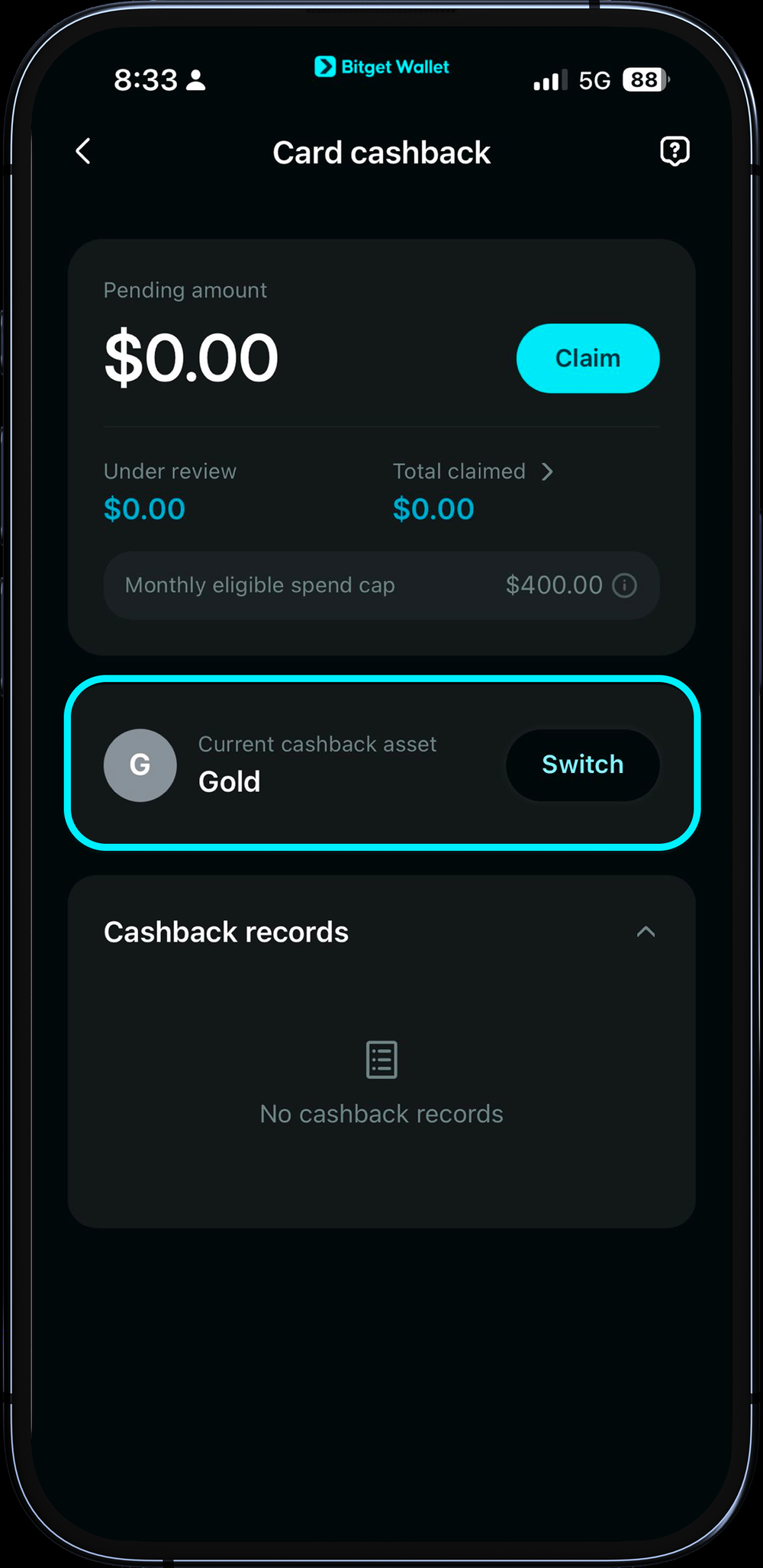
- Assetback math: every cardholder earns a base 2% back; new cardholders, or anyone who reaches an in-app monthly spend threshold (Help Center: $200 in mainland China, South Korea, Japan, Malaysia, Taiwan, Australia and the EEA + UK; $100 in Vietnam, Thailand, the Philippines, South Africa, Pakistan and the listed Latin American countries), get 3% for that month and the next. Rewards pay out in BTC, gold (XAUt), tokenized stocks (NVDA, TSLA, GOOGL, S&P 500) or USDC, claimable about 8 days after settlement.
- Fees: no monthly or annual fee, free top-up; crypto-to-fiat conversion costs 0.05%-0.2%; USD-priced spending has no FX fee, but any other currency costs 1.7% at the live Visa rate.
- Who can actually apply: officially supported English-language markets include the Philippines (account and physical card), and South Africa, Pakistan and Bangladesh (account/virtual card only, no physical card yet). India, UAE and Egypt are also not on the current region list; Nigeria is missing from the card page’s list too, but the official fee article (Help Center 431) mentions a one-time $2 opening fee for Nigeria-issued new cards, so check the in-app application screen.
- Three limits to know before applying: Apple Pay is not supported on APAC-issued cards (Google Pay works); unspent card balance currently cannot be withdrawn back to your wallet; some cards have been closed after an address-proof re-review by the issuing partner.
- Physical card: $49 including international shipping; ATM withdrawals cost 1% per transaction (minimum $5) plus FX, and never earn Assetback.
If your country is on the official list below, here is where to check your application screen before you start:
What Is the Bitget Wallet Card? (Not the Bitget Exchange Card)
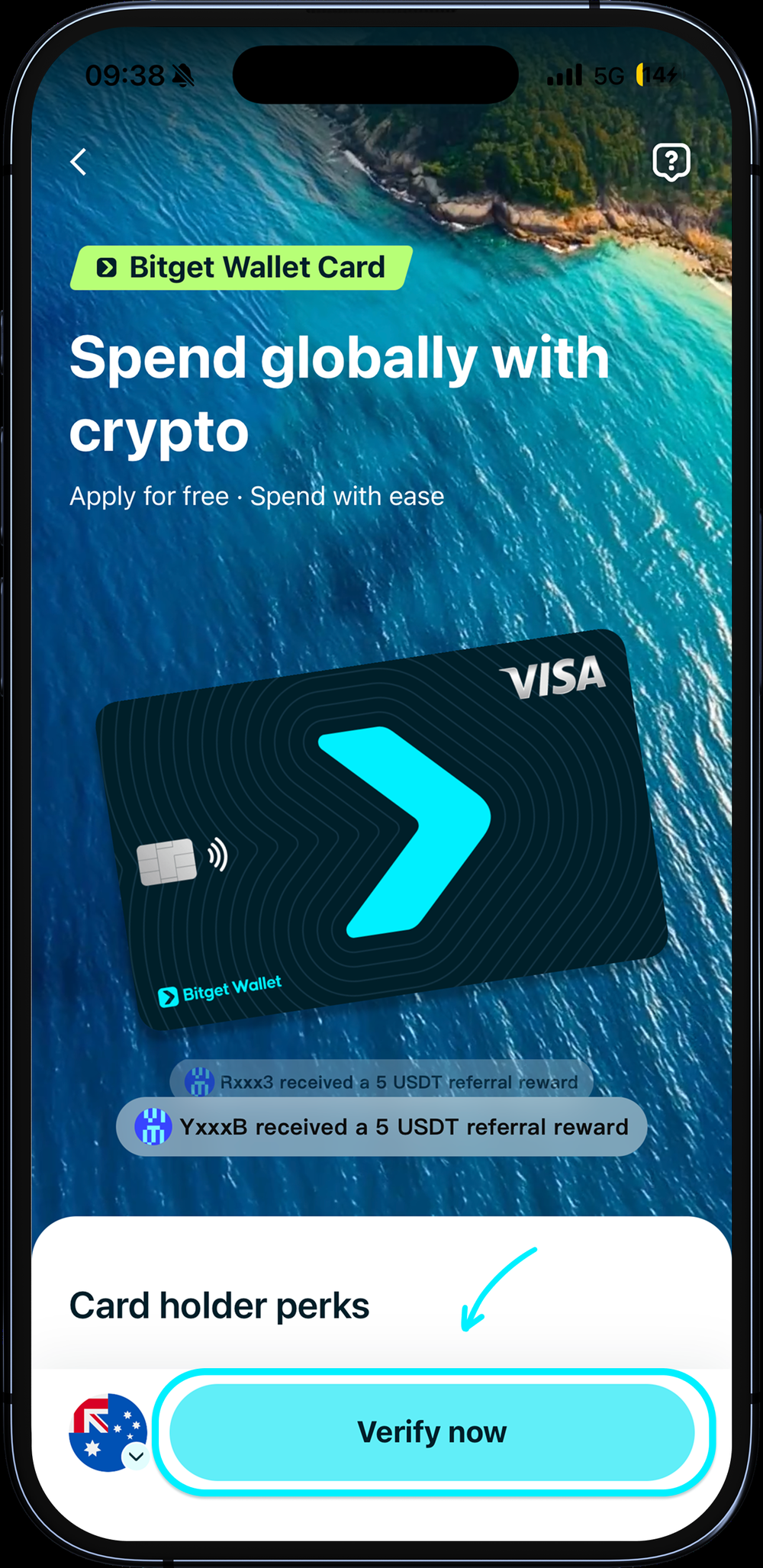
The Bitget Wallet Card is a spending feature inside Bitget Wallet, a self-custody Web3 wallet. You do not need a Bitget exchange account; you apply from the Bitget Wallet app under Wallet > Card. You top up USDT, USDC or other supported assets into the card balance, and when you pay, the system converts to local fiat in real time — the merchant just sees a normal Visa transaction.
- Wallet type is restricted. Only seed-phrase wallets or MPC wallets can apply; a wallet imported by private key alone cannot.
- Card network: the card currently issued is a Visa; some older cards have been notified to upgrade to the new Visa card, which changes the card number and requires re-binding any saved payment methods.
- Lost seed phrase: an already-active card can still be charged, but it can no longer be topped up or withdrawn, and the card account cannot be recovered.
If you want to understand the wallet itself first, see our Bitget Wallet review; the card is one feature inside that wallet, separate from the Bitget exchange’s own card program covered in our Bitget exchange tutorial.
Bitget Wallet Card Fees and Assetback: How the Math Changed After August 2026
The numbers below come from the official Assetback announcement and the Help Center’s fees and Assetback articles.
| Item | Current rule (APAC-issued card) |
|---|---|
| Monthly / annual fee | None |
| Top-up fee | Free; you still pay the blockchain network fee to send the top-up |
| Crypto-to-fiat conversion fee | 0.05%-0.2% per transaction |
| FX fee | None on USD-priced spend; 1.7% on other currencies, settled at the live Visa rate |
| ATM withdrawal (physical card) | 1% per transaction (minimum $5) plus 1.7% FX plus 0.05% conversion; never earns Assetback |
| Refunds | No fee; usually settles within 7 business days; settled at the live rate, which can create a small FX difference |
| Assetback | Rule |
|---|---|
| Base tier | 2% back for every cardholder |
| Boosted tier | New cardholders, or anyone whose qualifying monthly spend reaches the in-app threshold: 3%. The Help Center lists $200 in mainland China, South Korea, Japan, Malaysia, Taiwan, Australia and the EEA + UK; $100 in Vietnam, Thailand, the Philippines, Brazil, Mexico, Panama, Guatemala, Bolivia, Peru, Colombia, Argentina, Chile, Ecuador, Uruguay, Paraguay, South Africa and Pakistan; the card landing page FAQ still says $200–$400, so treat the Help Center figure as the one to check in the app. Once reached, all qualifying spend that month (including before the threshold) counts at 3%, and it carries into the next calendar month. |
| Reward assets | BTC (paid as WBTC), gold (XAUt), NVDA/TSLA/GOOGL/S&P 500 (as xStocks tokenized assets), or USDC; you can change the reward asset once per calendar month |
| Claiming | Claimable on day 8 after settlement; USDC goes straight to your card balance, other assets go to a rewards account and become withdrawable once they reach 1 USDC in value |
| Monthly cap | Your old 0-Fee quota amount became your Assetback-eligible spend cap your actual cap shows on the in-app Assetback page |
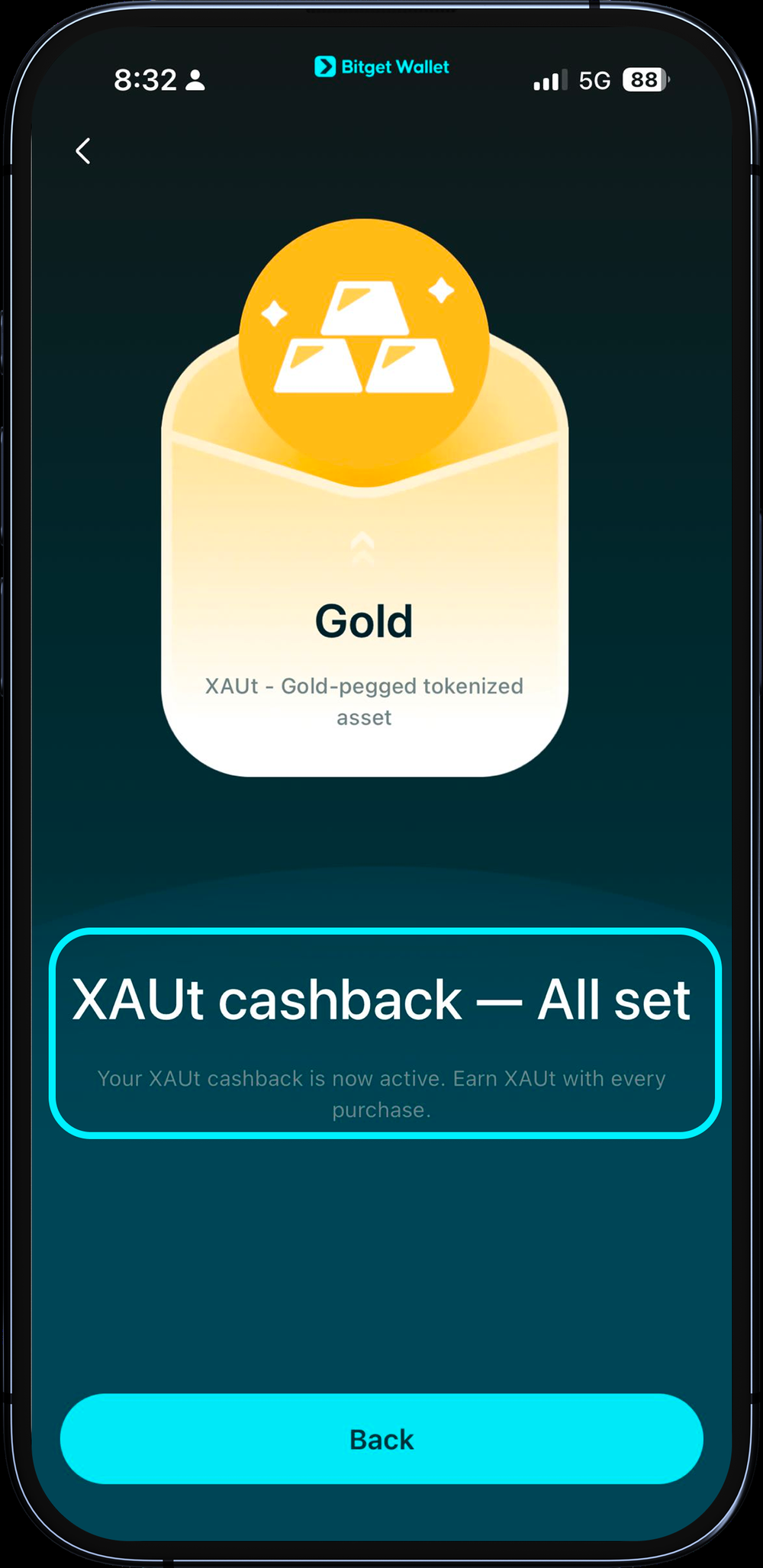
Editorial note: Assetback pays out in a tokenized asset, not cash. What lands in your account will move with the price of BTC, gold or the underlying stock. If you want a stable reward rather than price exposure, pick USDC.
How to Apply for a Bitget Wallet Card: Steps and KYC
The official region list (checked 2026-10-20) covers the EEA and UK; Argentina, Brazil, Chile, Colombia, Ecuador, El Salvador, Guatemala, Mexico, Panama and Peru; Singapore, South Korea, Japan, Vietnam, Malaysia, mainland China, Taiwan, Australia, Thailand and the Philippines; South Africa; and Pakistan and Bangladesh. For English-language readers in supported markets, the Philippines has full account-and-physical-card support, while South Africa, Pakistan and Bangladesh currently have account/virtual-card access only. The United States, India, UAE and Egypt are not on this list, so residents of those countries cannot register through the normal app flow today. Nigeria is also absent from the card page’s region list, but the official fee article (Help Center 431) mentions a one-time $2 opening fee for Nigeria-issued new cards, so Nigerian readers should check the application screen in the app rather than assume it is closed. More regions are stated to be “opening soon,” but there is no published date.
For the supported markets covered here, the Help Center lists citizens and residents as eligible; its resident requirement is a work permit plus proof of address. Have three things ready before you start:
- Valid ID: national ID, passport or driver’s license, valid for at least 3 more months — anything shorter gets rejected by the system.
- Proof of address: this needs to be your own real address document; it is the most common place applications get stuck (see the Risks section below).
- A seed-phrase or MPC wallet: update the app to the latest version first; a private-key-only wallet cannot apply.
- Download the Bitget Wallet app (not the Bitget exchange app), then create or log into a seed-phrase/MPC wallet.
- Go to the Wallet tab, tap Card, tap Apply Now, then tap Verify now on the landing screen.
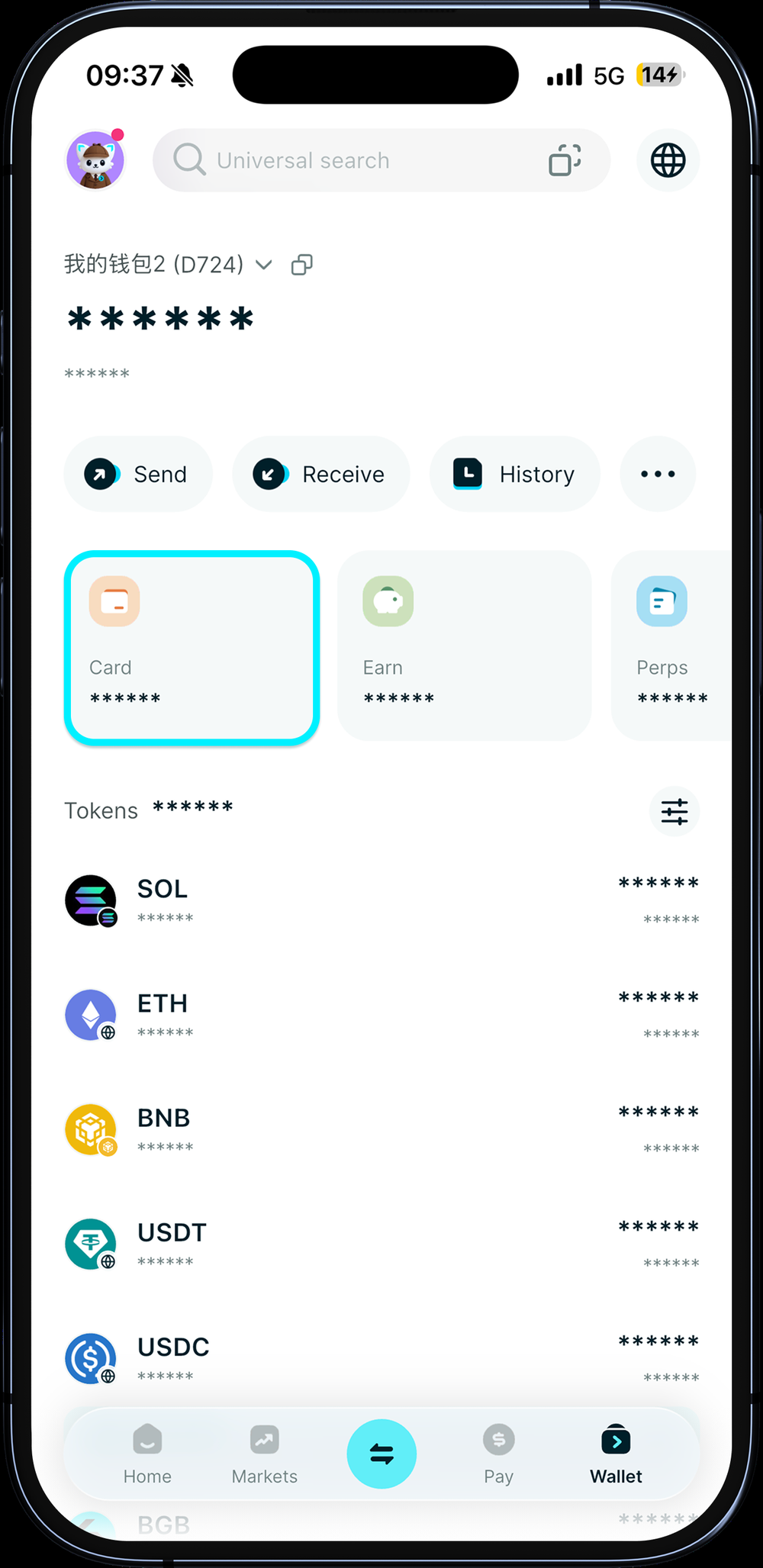
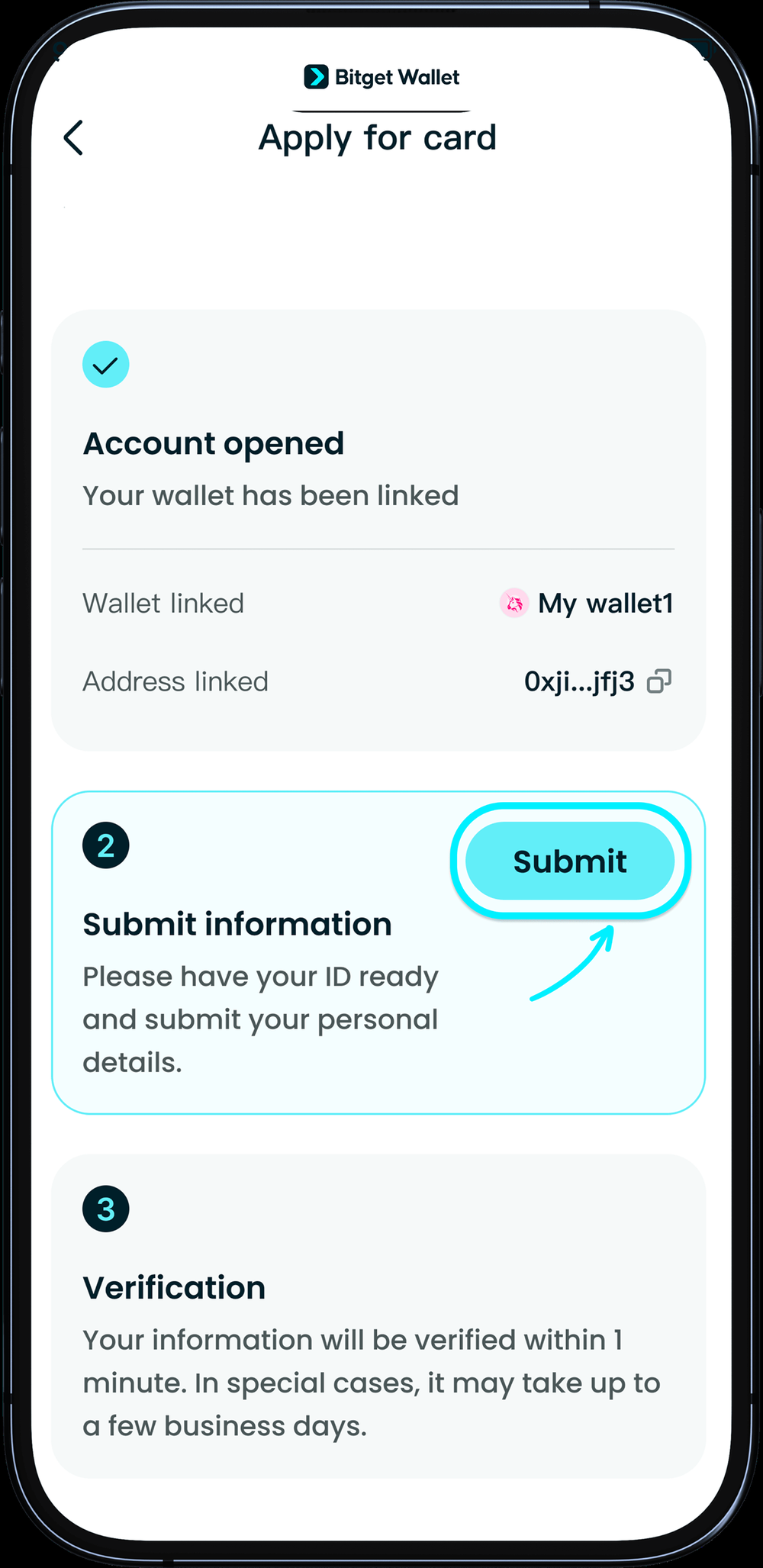
- Register your account on screen, then submit your ID and proof of address.
- If your documents pass automatically, approval takes about 1-2 minutes; if it goes to manual review, the official estimate is 1-3 business days. The notification email comes from issuing partner DCS’s corporate mailbox, so check your spam folder.
- Once approved, go to the card page to top up, then pick your reward asset. A referral code can still be added within 7 days of activation if you have not bound one yet.
Deposit and Top Up: USDT and USDC Into Your Card Balance
Tap Top Up on the card page and choose an asset and network. The official card page lists USDT, USDC, ETH and SOL among supported top-up assets; the exact chains available show on the in-app top-up screen. You will also need the native token of that chain to pay the network fee.
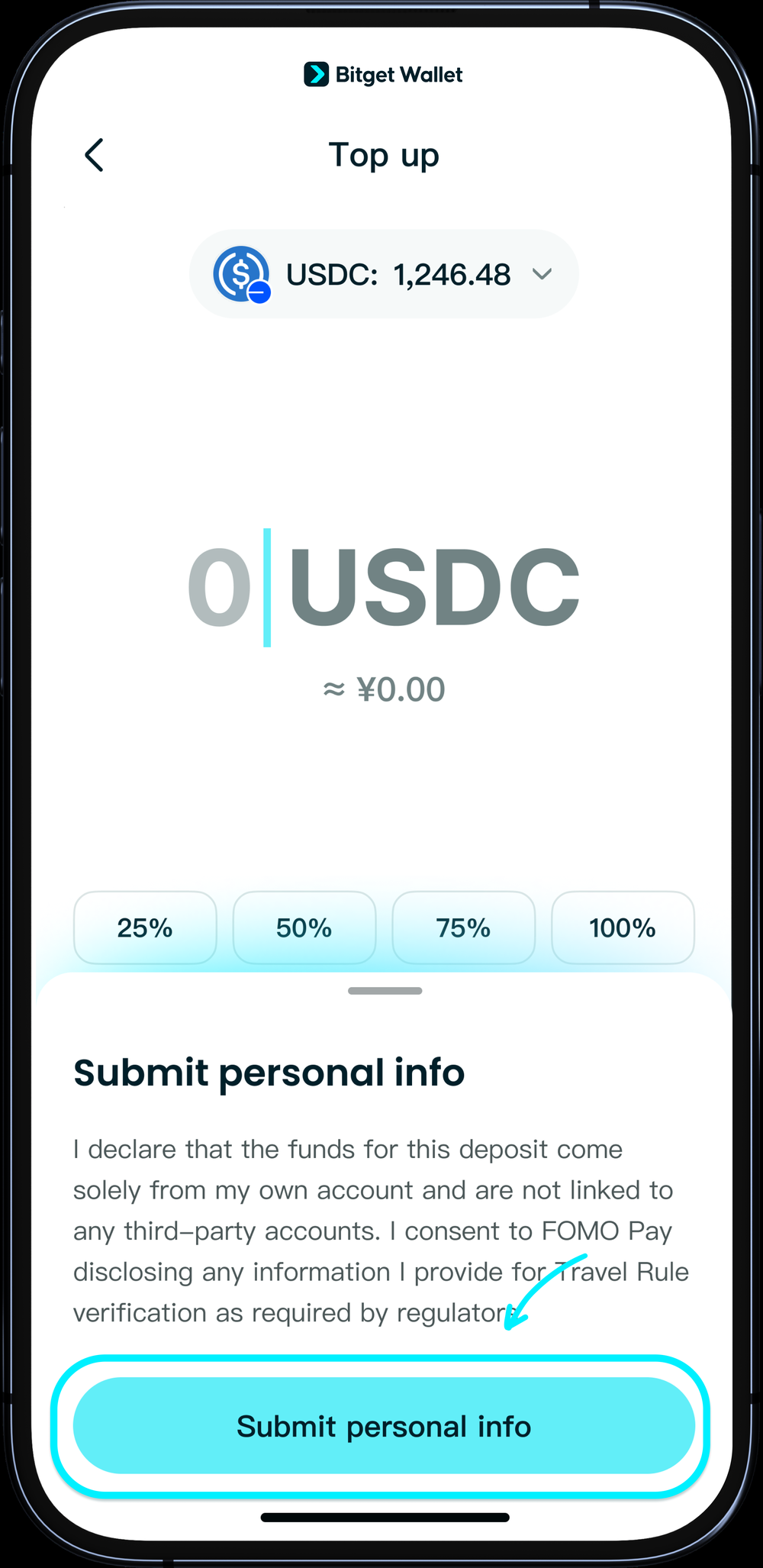
- First top-up requires submitting international Travel Rule information (required by payment processor FOMO Pay); tap “Submit personal info,” complete the fields, and you are returned to the top-up screen automatically.
- Settlement: usually 3-7 minutes once the issuer confirms funds; if you see “on-chain transaction broadcast failed,” wait 5 minutes and try again.
- Limits: single top-up maximum $200,000; daily spend cap $50,000; annual spend cap $990,000.
- No withdrawal to your wallet: unspent card balance currently cannot be withdrawn back to your wallet, so top up in smaller amounts rather than one large deposit.
Spending With the Card: Google Pay, Apple Pay, Online and Physical Card
| Use case | Current status | Notes |
|---|---|---|
| Google Pay | Supported | Your phone needs NFC; rooted or custom-ROM devices may fail to bind |
| Apple Pay | Not supported on APAC-issued cards | Help Center updated May 2026; support will be announced if it changes — do not expect this to work based on older guides |
| Samsung Pay | Not supported | Use Google Pay instead |
| Online shopping and subscriptions | Enter the card number directly | Card number, expiry and CVV show after you tap Card > View and authenticate in the app; the official examples given are Amazon, ChatGPT, TikTok and Grab |
| Physical card | $49 including shipping, where offered | Visa; currently ships only within the official Asia-Pacific list (Singapore, South Korea, Japan, Vietnam, Malaysia, Taiwan, Australia, Thailand, Philippines) — South Africa, Pakistan and Bangladesh are account/virtual-card only for now; activate and set a PIN in the app after it arrives; usable at any Visa-supporting ATM |
On the Apple Pay point specifically: the official Help Center exclusion above means APAC-issued Bitget Wallet Visa cards cannot currently be added to Apple Pay, while Google Pay is supported. Treat this as the current product limitation when deciding whether the card fits your payment setup.
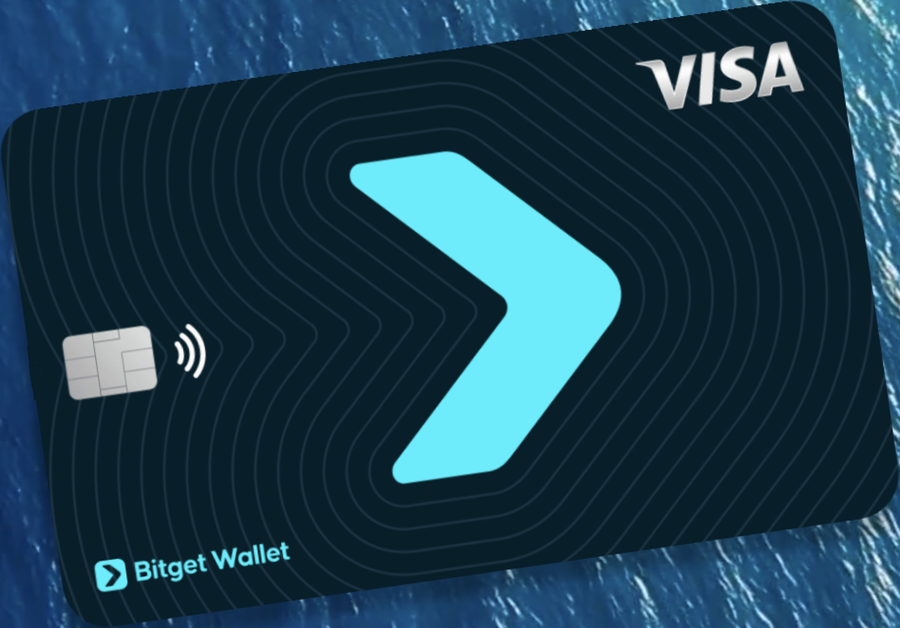
- Physical card limits: daily spend $50,000, annual $990,000; ATM withdrawals cap at $3,000 per transaction, $10,000/day (20 withdrawals), $100,000/month (30 withdrawals) — ATM and card spending share the same limit pool.
- Card-fee rebate campaign: after activating the physical card, inviting 3 friends (friend binds your referral code, activates a virtual card, completes a first purchase) pays back $10, $10 and $29 in sequence — $49 total. This entry was last updated in March 2026; verify current status in the app’s invite center.
- Card not arrived: if it has been more than 2 weeks, contact support to check; shipping is tracked via a FedEx tracking number.
Cost Math: Is the Assetback Worth It for Your Spending?
Running the official fee rates against real scenarios, assuming you stay under your monthly cap. Reward is calculated both at the 3% boosted tier and the 2% base tier; this ignores reward-asset price movement.
| Scenario (monthly) | Cost | Reward at 3% | Net at 3% | Net if only 2% |
|---|---|---|---|---|
| Non-USD-priced spending, about $500 equivalent | $8.75 to $9.50 | $15 | +$5.50 to +$6.25 | +$0.50 to +$1.25 |
| Non-USD-priced spending, about $1,000 equivalent | $17.50 to $19 | $30 | +$11 to +$12.50 | +$1 to +$2.50 |
| USD-priced subscription, $500 | $0.25 to $1 | $15 | +$14 to +$14.75 | +$9 to +$9.75 |
| Non-USD-priced spending, $1,500, cap $600 (official example) | $26.25 to $28.50 | $18 (only the capped portion counts) | -$8.25 to -$10.50 | -$14.25 to -$16.50 |
| ATM withdrawal of $100 | About $6.75 (6.75%) | $0 | -$6.75 | -$6.75 |
What this means: the 1.7% FX fee on non-USD-priced spending is the biggest cost, cutting the 3% reward down to a net of roughly 1.1%-1.25%; if your account is sitting at the 2% base tier instead, non-USD spending is close to break-even. A USD-priced online subscription has no FX fee, which makes it the most profitable way to use this card. Spend past your monthly cap and the extra amount earns nothing while still costing fees — that is where this turns into a loss.
Your actual cap is whatever the app’s Assetback page shows as your “monthly qualifying spend cap.”
Risks and Lock-In Points to Check Before You Apply
| Risk | What actually happens | How to handle it |
|---|---|---|
| Address-proof re-review | The issuing partner updated its proof-of-address standard; some DCS-issued cards that don’t meet it get closed, with a notice email giving the cutoff date beforehand | Use your own genuine address document; if you get a closure notice, switch any bound subscriptions first, then request a balance refund |
| Balance refund | After a card closes, you can file a support ticket for a refund; review takes about 14 business days, minus a network fee (2 USDT on BSC/Arbitrum/Polygon/Base/Solana, 5 USDT on TRON) | Double-check the receiving wallet address — a wrong address cannot be recovered |
| Same wallet can’t reapply | A closed card cannot reapply with the same wallet; you need a new wallet and compliant proof of address | Don’t use a third-party’s or someone else’s documents |
| Card balance can’t be withdrawn | Once funds are in the card balance, they can only be spent | Top up in smaller, more frequent amounts |
| Reward-asset price swings | BTC, gold and tokenized stock rewards all move with market price | Choose USDC if you want a stable reward |
| Rules and regions can change | Both supported regions and reward rules have changed before — the 0-Fee-to-Assetback switch is the recent example | Check the in-app screen and the official card page before relying on any figure |
The official notice and refund process for address-proof closures is documented in this Help Center article. Bitget Wallet is an overseas Web3 service; it is not a locally licensed bank card, so there is no deposit insurance or local complaint mechanism if something goes wrong. Treat this as a small, disposable spending account rather than a place to park your main savings.
Honest Verdict: Who It Fits, Who It Doesn’t, and How It Compares
| Your situation | Recommendation |
|---|---|
| You live in the US, India, UAE or Egypt | Not an option right now: not on the official region list; see alternatives below |
| You regularly pay for USD-priced subscriptions (AI tools, streaming, overseas online shopping) and your country is officially supported | Good fit: no FX fee, so the 3% reward is close to pure net gain |
| Your spending is mostly in a non-USD local currency | Average fit: the 1.7% FX fee eats most of the reward; break-even if you’re on the 2% base tier |
| You specifically need Apple Pay | Not a fit: APAC-issued cards don’t support it today |
| Your address-proof documents aren’t genuinely your own, or you’re unsure | Hold off: your application may be rejected or your card may be closed later |
| You want to store crypto in the card balance | Not a fit: balance cannot be withdrawn back to your wallet |
If you’re in the United States and this card is not an option, RedotPay Card is an alternative to compare separately — check its current eligibility, fees and regulatory disclosures directly — and Wise is a non-crypto multi-currency card worth comparing on fees if you mainly need to spend in foreign currencies without holding crypto. If you’re comparing against other crypto cards in a supported region, check each issuer’s own current fee page directly rather than relying on older reviews, since terms like this one’s 0-Fee-to-Assetback switch change without much notice.
Living in Malaysia? The Bitget Wallet Card page names Malaysia, while OKX lists it as restricted; see OKX Card Malaysia: what to check instead.
FAQ
Can I use Bitget Wallet Card in the US?
No. The official Bitget Wallet Card region list, checked 2026-10-20, does not include the United States, so US residents cannot register for a card through the normal Bitget Wallet app flow today. The same applies to India, UAE and Egypt. Nigeria is not on the card page’s region list either, but the official fee article (Help Center 431) mentions Nigeria-issued new cards, so check the application screen in the app.
Is the Bitget Wallet Card the same as the Bitget Exchange Card?
No. The Bitget Wallet Card is a feature inside the self-custody Bitget Wallet app, applied for under Wallet > Card. The Bitget Exchange Card is a separate product from Bitget’s exchange platform, with its own cashback tiers and terms — it commonly shows up in the same search results, which causes confusion.
What happened to the 0-Fee quota on the Bitget Wallet Card?
It ended on August 1, 2026. The old fee-free monthly quotas were replaced by Assetback: a 2% base reward, or 3% once you hit an in-app monthly spend threshold. The Help Center lists $200 in mainland China, South Korea, Japan, Malaysia, Taiwan, Australia and the EEA + UK; $100 in Vietnam, Thailand, the Philippines, Brazil, Mexico, Panama, Guatemala, Bolivia, Peru, Colombia, Argentina, Chile, Ecuador, Uruguay, Paraguay, South Africa and Pakistan (the card landing page FAQ still says $200–$400). Your old quota amount became your Assetback-eligible spend cap.
Does the Bitget Wallet Card support Apple Pay?
Not currently. The official Help Center states that APAC-issued cards do not support adding to Apple Pay; Google Pay is supported. Bitget will announce it if this changes, so treat any guide claiming Apple Pay works as outdated.
How much does the physical Bitget Wallet Card cost?
$49, including international shipping, deducted from your card balance. You can recover that cost through the card-fee rebate campaign by inviting 3 friends who bind your referral code, activate a virtual card and complete a first purchase, which pays back $10, $10 and $29 in sequence. Verify the campaign is still active in the app’s invite center before relying on it.
What documents do I need for Bitget Wallet Card KYC?
A national ID, passport or driver’s license valid for at least 3 more months, plus a genuine proof-of-address document in your own name. Approval is usually 1-2 minutes if documents pass automatically, or 1-3 business days under manual review.
Can I withdraw the unspent balance from my Bitget Wallet Card?
No. Funds in your card balance currently cannot be withdrawn back to your wallet; they can only be spent. A refund to your wallet is only possible if the card itself is closed, via a support ticket, after a network fee is deducted.
Which countries officially support the Bitget Wallet Card?
As of 2026-10-20: the EEA and UK; Argentina, Brazil, Chile, Colombia, Ecuador, El Salvador, Guatemala, Mexico, Panama and Peru; Singapore, South Korea, Japan, Vietnam, Malaysia, mainland China, Taiwan, Australia, Thailand and the Philippines; South Africa; and Pakistan and Bangladesh (account-level only, no physical card yet). The United States, India, UAE and Egypt are not on this list; Nigeria is missing from it too, but the fee article (Help Center 431) mentions Nigeria-issued new cards, so check the in-app application screen for the current status.
This article contains an affiliate referral link to Bitget Wallet. If you sign up through it, we may earn a commission at no extra cost to you.